JeffB418
HYDROS Expert
This tutorial explains how to use your Control 4 0-10V output port to control any Kessil light that has a 3.5MM photo control input that accepts 0-10V control. Any Kessil lights that use K-Link ports for control, can not be controlled by Hydros using this method.
What you will need:
- Control 4 with free 0-10V output port
- Kessil Control Cable - Type 1 (PN: KSACB01) (Kessil Control Cable Type 1 for Neptune Systems Apex - 6 ft - Marine Depot)
- Hydros WaveEngine APX Link Cable (Hydros WaveEngine APX Link Third Party Controller Cable - CoralVue - Marine Depot)
- RJ45 non-active 1-to-1 coupler (https://www.amazon.com/dp/B08JZ1FJC4/ref=cm_sw_em_r_mt_dp_T666WJAXY31PCTHD38TA?_encoding=UTF8&psc=1)
Note: This method of using an RJ45 coupler works with Kessil since the interface on the light has only 1 ground pin. On the WE APX cable, only pins 3 (GND), 4(Port1/3), and 8 (Port2/4) are used. Pin 7 is not connected to ground like a typical Apex VDM port. So devices, like the Reefbrite APEX interface requires 2 grounds, so this interface method will not work.
Connection:
Connect the GX12 connector on the WaveEngine APX cable to the 0-10V OUTPUT port on your Control 4.
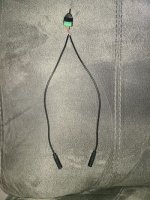
Then use either the RJ45 (ethernet) connector and plug it into a RJ45 coupler. The cable marked with a white tag is channels 1/2, black or no tag is channels 3/4.
Then connect the Kessil Control Cable into the other side of the coupler.
Then plug the 3.5mm phono plug into the 0-10V port on your Kessil light.
You can daisy chain multiple kessil lights by using their 3.5mm cables from INs to OUT, or buy a second Kessil Control Cable to connect to the unused RJ45 on the WE APX cable and run them direct on different schedules.
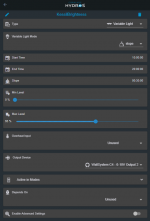
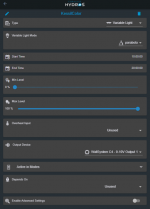
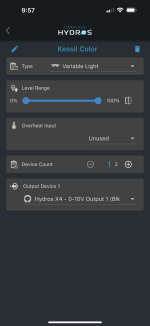
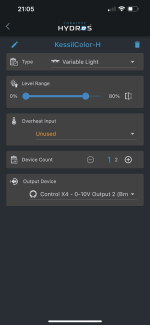
Once you have those connected then you need to configure the outputs. This configuration requires you to make 2 Outputs. One to control the intensity, and one to control the color.
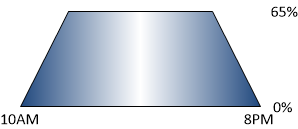
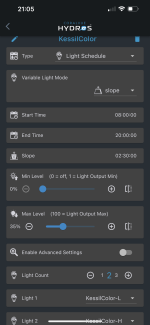
Make a new Output and select the Variable Light profile. Color is controlled by Output 1 or 3 (based on which RJ45 used above). A percentage towards 0% sets the light to full blue, and 100% sets it to full white. Any value in the middle will set it to a mix of blue/white. You can use a schedule to ramp the color as the day progresses to start and end with blue and peak to white. Play with schedules and timing to see what works best for you.
Second you need to make another Output for the intensity. Again select the Variable Light profile. Intensity is controlled by Output 2 or 4 (based on which RJ45 used above). This follows the standard 0-100% intensity curve with anything under 10% turning the light off. Match the schedule of this output to your color channel to best use the spectrum/intensity.
What you will need:
- Control 4 with free 0-10V output port
- Kessil Control Cable - Type 1 (PN: KSACB01) (Kessil Control Cable Type 1 for Neptune Systems Apex - 6 ft - Marine Depot)
- Hydros WaveEngine APX Link Cable (Hydros WaveEngine APX Link Third Party Controller Cable - CoralVue - Marine Depot)
- RJ45 non-active 1-to-1 coupler (https://www.amazon.com/dp/B08JZ1FJC4/ref=cm_sw_em_r_mt_dp_T666WJAXY31PCTHD38TA?_encoding=UTF8&psc=1)
Note: This method of using an RJ45 coupler works with Kessil since the interface on the light has only 1 ground pin. On the WE APX cable, only pins 3 (GND), 4(Port1/3), and 8 (Port2/4) are used. Pin 7 is not connected to ground like a typical Apex VDM port. So devices, like the Reefbrite APEX interface requires 2 grounds, so this interface method will not work.
Connection:
Connect the GX12 connector on the WaveEngine APX cable to the 0-10V OUTPUT port on your Control 4.
Then use either the RJ45 (ethernet) connector and plug it into a RJ45 coupler. The cable marked with a white tag is channels 1/2, black or no tag is channels 3/4.
Then connect the Kessil Control Cable into the other side of the coupler.
Then plug the 3.5mm phono plug into the 0-10V port on your Kessil light.
You can daisy chain multiple kessil lights by using their 3.5mm cables from INs to OUT, or buy a second Kessil Control Cable to connect to the unused RJ45 on the WE APX cable and run them direct on different schedules.
Once you have those connected then you need to configure the outputs. This configuration requires you to make 2 Outputs. One to control the intensity, and one to control the color.
Make a new Output and select the Variable Light profile. Color is controlled by Output 1 or 3 (based on which RJ45 used above). A percentage towards 0% sets the light to full blue, and 100% sets it to full white. Any value in the middle will set it to a mix of blue/white. You can use a schedule to ramp the color as the day progresses to start and end with blue and peak to white. Play with schedules and timing to see what works best for you.
Second you need to make another Output for the intensity. Again select the Variable Light profile. Intensity is controlled by Output 2 or 4 (based on which RJ45 used above). This follows the standard 0-100% intensity curve with anything under 10% turning the light off. Match the schedule of this output to your color channel to best use the spectrum/intensity.
Last edited: