Kessil 0-10V Control Interface

Users Who Are Viewing This Thread (Total: 0, Members: 0, Guests: 0)

JeffB418

HYDROS Expert
Joined
Jun 25, 2020
Messages
1,316
Reaction score
405
Location
Syracuse NY
This tutorial explains how to use your Control 4 0-10V output port to control any Kessil light that has a 3.5MM photo control input that accepts 0-10V control. Any Kessil lights that use K-Link ports for control, can not be controlled by Hydros using this method.

What you will need:
- Control 4 with free 0-10V output port
- Kessil Control Cable - Type 1 (PN: KSACB01) (Kessil Control Cable Type 1 for Neptune Systems Apex - 6 ft - Marine Depot)
- Hydros WaveEngine APX Link Cable (Hydros WaveEngine APX Link Third Party Controller Cable - CoralVue - Marine Depot)
- RJ45 non-active 1-to-1 coupler (https://www.amazon.com/dp/B08JZ1FJC4/ref=cm_sw_em_r_mt_dp_T666WJAXY31PCTHD38TA?_encoding=UTF8&psc=1)

Note: This method of using an RJ45 coupler works with Kessil since the interface on the light has only 1 ground pin. On the WE APX cable, only pins 3 (GND), 4(Port1/3), and 8 (Port2/4) are used. Pin 7 is not connected to ground like a typical Apex VDM port. So devices, like the Reefbrite APEX interface requires 2 grounds, so this interface method will not work.

Connection:

Connect the GX12 connector on the WaveEngine APX cable to the 0-10V OUTPUT port on your Control 4.
Then use either the RJ45 (ethernet) connector and plug it into a RJ45 coupler. The cable marked with a white tag is channels 1/2, black or no tag is channels 3/4.
Then connect the Kessil Control Cable into the other side of the coupler.
Then plug the 3.5mm phono plug into the 0-10V port on your Kessil light.
You can daisy chain multiple kessil lights by using their 3.5mm cables from INs to OUT, or buy a second Kessil Control Cable to connect to the unused RJ45 on the WE APX cable and run them direct on different schedules.

Once you have those connected then you need to configure the outputs. This configuration requires you to make 2 Outputs. One to control the intensity, and one to control the color.

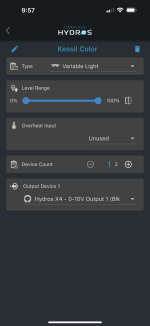
Make a new Output and select the Variable Light profile. Color is controlled by Output 1 or 3 (based on which RJ45 used above). A percentage towards 0% sets the light to full blue, and 100% sets it to full white. Any value in the middle will set it to a mix of blue/white. You can use a schedule to ramp the color as the day progresses to start and end with blue and peak to white. Play with schedules and timing to see what works best for you.

Second you need to make another Output for the intensity. Again select the Variable Light profile. Intensity is controlled by Output 2 or 4 (based on which RJ45 used above). This follows the standard 0-100% intensity curve with anything under 10% turning the light off. Match the schedule of this output to your color channel to best use the spectrum/intensity.
 
Last edited:
This tutorial explains how to use your Control 4 0-10V output port to control any Kessil light that has a 3.5MM photo control input that accepts 0-10V control.

What you will need:
- Control 4 with free 0-10V output port
- Kessil Control Cable - Type 1 (PN: KSACB01) (Kessil Control Cable Type 1 for Neptune Systems Apex - 6 ft - Marine Depot)
- Hydros WaveEngine APX Link Cable (Hydros WaveEngine APX Link Third Party Controller Cable - CoralVue - Marine Depot)
- RJ45 non-active 1-to-1 coupler (https://www.amazon.com/dp/B08JZ1FJC4/ref=cm_sw_em_r_mt_dp_T666WJAXY31PCTHD38TA?_encoding=UTF8&psc=1)

Note: This method of using an RJ45 coupler works with Kessil since the interface on the light has only 1 ground pin. On the WE APX cable, only pins 3 (GND), 4(Port1/3), and 8 (Port2/4) are used. Pin 7 is not connected to ground like a typical Apex VDM port. So devices, like the Reefbrite APEX interface requires 2 grounds, so this interface method will not work.

Connection:

Connect the GX12 connector on the WaveEngine APX cable to the 0-10V OUTPUT port on your Control 4.
Then use either the RJ45 (ethernet) connector and plug it into a RJ45 coupler. The cable marked with a white tag is channels 1/2, black or no tag is channels 3/4.
Then connect the Kessil Control Cable into the other side of the coupler.
Then plug the 3.5mm phono plug into the 0-10V port on your Kessil light.
You can daisy chain multiple kessil lights by using their 3.5mm cables from INs to OUT, or buy a second Kessil Control Cable to connect to the unused RJ45 on the WE APX cable and run them direct on different schedules.

Once you have those connected then you need to configure the outputs. This configuration requires you to make 2 Outputs. One to control the intensity, and one to control the color.

Make a new Output and select the Variable Light profile. Color is controlled by Output 1 or 3 (based on which RJ45 used above). A percentage towards 0% sets the light to full blue, and 100% sets it to full white. Any value in the middle will set it to a mix of blue/white. You can use a schedule to ramp the color as the day progresses to start and end with blue and peak to white. Play with schedules and timing to see what works best for you.

Second you need to make another Output for the intensity. Again select the Variable Light profile. Intensity is controlled by Output 2 or 4 (based on which RJ45 used above). This follows the standard 0-100% intensity curve with anything under 10% turning the light off. Match the schedule of this output to your color channel to best use the spectrum/intensity.


Thanks Jeff for doing this. I have two Kessil light fixture so I might try this.
I have been thinking of switching them out soon for something else.
I really want a Phillips Coral Care fixtures with Reefbrights but might be out of my price range.
Work has been really slow and I have not been working as much.
 
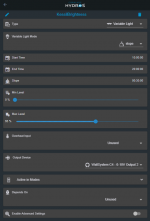
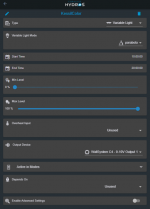
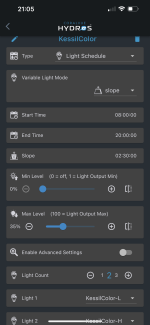
Here is a quick example of how to set up 2 outputs to control brightness throughout the day and have color shift with your brightness schedule:

The brightness output would look like the following, where it starts at 10AM and turns off at 8PM with 30 min ramps on each side. With a max brightness of 65% during the day.

1617131505371.png

Then using a second variable output for the color channel you can have the color of your fixture shift as the brightness changes. Here the mode is set to parabola to create a ever changing color shift to the peak time from blue to white and back to blue for sunset. The start and end times are matched to the above schedule to set the sunrise and sunset periods to blue.

1617131737441.png

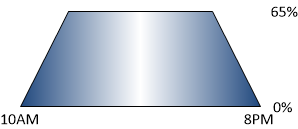
And this is what the resulting 2 schedules should produce in both color mix and intensity (not to scale):

1617131665868.png
 
JeffB418....thank you so much for posting this! I bought the parts to do this a few months ago, but I could only get the blue portion of the lights to come on and ramp up and down. This solved my problem. Now I can toss the Kessil controller that is on its last leg.
 
FYI, this also works for the Nicrew LEDs that you can purchase on Amazon. I have my lights working perfectly.
 
I simply plugged in the hydros 0-10 volt cable 3.5 jack into the kessil, let me control intensity only. The one with the 4 colors. FYI. Might try this for fun, as I am experimenting with a fuge light.
 
Just set up a Kessil H80 fuge light. With the 3.5mm jacks of the Hydros quad cable only using the tip for single channel control, wouldn't setting up a simple combiner/splitter to plug two of the quad cable outputs into a single male jack wired to use both the tip and first ring (combine the ground) allow to use both the intensity and color channels?
 
You can probably get a couple of 3.5 mm stereo jack extension cables and make a cable like that out of them.
 
Ordered a pair of female jacks with bare wires and male jacks with screw terminals. Hopefully the male end isn't too bulky for how close the mount and one of the knobs are to the input on the Kessil. Worst case scenario, I have a barrel jack laying around and will have to break out the soldering iron. Best case, it fits and I have this done in a couple of minutes Monday night.
 
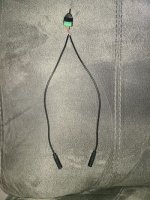
The red wires on the female ends feed from the tip, which is also the feed from the Hydros Quad cable 0-10v cable ends. The black wire is ground, and the white is for the middle (the ring) which is unused in the Quad cable ends and therefore unused in this application. The male jack to 3 screw adapter is nicely labled as to which terminal is ground and which is tip and ring, or left channel and right channel if this was a stereo hook up. In this case, the red from one female goes to the tip and the red from the other one goes to the ring, with both grounds twisted together into the ground terminal. Keep track of which female conector goes to the tip and which the ring on the terminal adapter, and which Quad cable input goes to which. The input for the tip will be intensity, and ring controls color.

20211213_204624.jpg

3.5mm 3 pole (TRS) stereo female jack to bare wire
3.5mm 3 pole (TRS) stereo male jack to 3 screw terminal adapter
 
Here are more detailed instructions on the DIY cable that @billsreef created...

 
Hi guys so I was trying to do this with a Kessil A80 tuna blue. When creating the variable light output one for intensity and one for color the app no longer shows the variable light mode in order to set it up or am I doing something wrong thanks. @JeffB418 8B94ADFA-C6FB-4C4C-BDF0-D942E369391E.png
 
I am not sure what you mean by variable light mode. You are using the variable light output type in the screenshot. That is like the output for my lighting. Do you have your schedule created for it?
 
Last edited:
You need to set up two schedules. One for the intensity and one for the color. One of the cool things is that within the schedule you can cut power to the power brick when the lights aren't being used. I have two Kessil 360we. The lights don't come on when they are receiving less than 8% (I think) from the 0-10v input. I scheduled the power to be off during this time within the schedule for intensity. No sense of them receiving power.
 
I created 2 output one is named color the other intensity but I don’t have the option to create the schedule or to select slope or parabola. You can see on my screenshot compared to yours unless I need to select something else?
 
I’m just adding this in case it is useful for anyone. I am running two Kessil A80s on nano. I use 1 color schedule, and a schedule for each A80 for both the fixture outlet and its intensity. As someone posted, the light really doesn’t turn on until intensity is 11%. You can run separate schedules for power, intensity and color. But it really isn’t necessary. You would want the outlet to power on when intensity is above a level. So tying this to intensity makes sense. I assume most people that use this light will want to start/end on the deep blue (0% color) go up to some mix that they light (probably 40-60%) and back down.

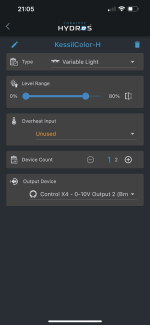
I wanted to point out that an outputs level range is a factor of the schedule. For example, when the color schedule is set (as shown) to a max of 35%. You can have an output only use 80% of that max range. (0-100% is using the full schedule of 0-35%).

8AEED282-02A1-4AEF-AA74-9DFDF5FF9CF8.png
A2D2EC4F-B8A1-4ED9-A0F8-014260E09745.png

You can definitely get away with running multiple of these lights with just two of the 0-10v channels and daisy chain the lights. Until I need the channels, I’m just using all 4 0-10v to control them for some independent capabilities.
 
Back
Top