911 ATO Backup Sensor on Display Full

Users Who Are Viewing This Thread (Total: 0, Members: 0, Guests: 0)

robert404

New member
Joined
Mar 31, 2021
Messages
15
Reaction score
1
Location
Chicago
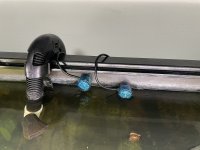
I have a stand alone sensor that is higher than the ATO fill sensor I want to use as a failsafe to disable the ATO Pump.

I’m able to accomplish part of this now with alerts and a MODE that allows me to kill the ATO. However if the control thinks the sensor is good but is actually inop for some unknown reason OR i’m away from the tank for an extended period I want to use the higher sensor for 911 redundancy.

If the higher sensor goes wet I either A) Want to disable the ATO Pump or B) Accomplish the same thing by having it automatically change the mode to my ATO Off mode.

Could this be accomplished?

530927D8-E1E5-4B63-BCFF-E26B7C4CC723.jpeg

C639C769-A2BF-42D4-BA24-37E0A6497277.jpeg

Thank you
 
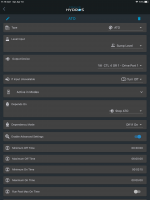
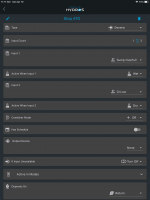
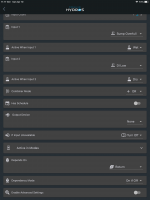
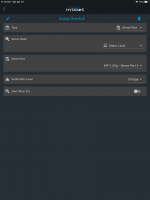
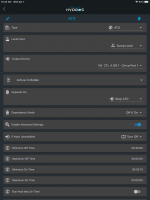
I use another output to do this. It is called ATO off. And the depends on is set on the ATO output using this output. It is set to off if on since that ATO off output is only on if I want the ATO off. sorry I was adding text to it and it went ahead and posted before I finished the post.

7DC06DAE-7ED6-4FAD-BB99-498579C731F6.png

320340C1-6110-49E0-875C-93373C3140F5.png

ED914511-815B-4498-9A8F-D2711B66DFF6.png
EA0AA3EA-0321-4FF5-9CB3-68A1678E73DA.png
 
I'm starting to figure this out - very good. Is it possible to have 2 "depends on" statements with the ATO?

1. Depends on Sensor 1 / Off if On (Display is MAX Full)
2. Depends on Sensor 2 / Off if On (Resivoir is empty)
 
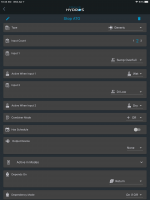
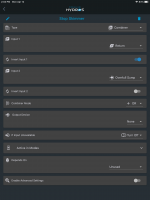
Yes, make a new output using the Combiner mode if it is outputs or Generic mode if you have inputs. Set the two inputs to the outputs you want to use as depends on. Then use that output in your depends on statement. I do that with my ATO. I called the second output Stop ATO. Below are the setup for my ATO and Stop ATO. I also set a depends on for stop ATO so if the return pump is off the ATO will not run.

C70ED1C9-D1F3-4C5A-8243-BAA8B088A909.png

CB4C85A3-9588-42B4-9420-AED654C1F3F2.png
 
Last edited:
I use the combiner type with my skimmer. Here s a screenshot of the Stop Skimmer output. The actual skimmer output uses this output as tye depends on just like the ATO uses Stop ATO.

8EBD41CE-F75B-427C-A9F0-159A0AE4ACB1.png
 
Still trying to get a handle on using the Hydros. I'd like to have my ATO pump not operate if the return pump is off and/or if the skimmer is off. Right now I have the ATO pump set up with "depends on return pump." How do I add the element that it will turn off if the skimmer is off and then be on auto again if the skimmer is on? Thanks for anyone who can help.
 
Use the combiner type output and set the skimmer and the retuen as inputs to the combiner. Use the AND combiner mode. Then the combiner output will be on if both the return and skimmer are on. If one or the other is off then it will be off. You don't have to assign an actual output to it for it to work as logic. Now set ATO depends on to that output. I also have a generic output as the depends on and the depends on of that output is set for return. My ATO will not run for a good while if the skimmer is off since the water level will raise in the return section with it off so I don't worry about the ATO with the skimmer off.
 
Back
Top