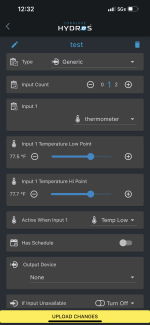
active when input . . . "temp low" "temp hi"

Users Who Are Viewing This Thread (Total: 0, Members: 0, Guests: 0)

burningedge

New member
Joined
Jun 17, 2021
Messages
11
Reaction score
1
Location
Burbank, CA
I'm trying to create a generic output and have a question about using a temperature range with the thermometer as an input. I can select a temperature low point and a temperature hi point. I'm confused about the function beneath those settings called "active when input 1" that I can toggle to select "temp low" or "temp hi." What do these mean? The language is confusing to me. Does active when "temp low" mean that the device will be on when the temperature is anything below the upper end of the range, i.e. essentially anything below the temperature HI point? Or does it mean that the device will be on when the temperature is anything below the lowest end of the range, i.e. essentially anything below the the temperature LOW point?

P.S. SUGGESTION: The toggle would be a lot clearer if it were "active when input 1" and you could select between: "above hi point," "below hi point," "below low point," or "between low and hi point"
 
Ok, A heater or chiller output will probably do what you want, but you can also use the generic to accomplish the same thing. I use the chiller output type to run my cooling fans. Active when is the same as on when. The low point and high point set points will depend on active when but the range between them could be either on or off. Now above high set point depends on the active when settings. if set to active when temp high then it would be on and stay on until it goes below the low set point then it will go off. if Active when is set to temp low it would go off if it goes above the high set point and would not come on again until it goes below the low set point. Hope this helps.
 
OK, here's my dilemma. Maybe someone can help me.

I have a chiller that is physically set to 78 degrees and plugged into a Hydros wi-fi power strip. On the Hydros controller, I've had my chiller setup under the chiller setting with the "turn on at" temperature at 81.5 and the "turn off at" temperature at 72.5, and I've had the power mode on "auto" so it's always getting power from the power strip; I always just have my chiller on.

I want to use Hydros as a failsafe. I figured if the chiller cools too much the power strip will turn off at 72.5. Then, if the chiller was off for any reason and the temperature got too hot, the power strip would turn on again at 81.5. The problem is recently sometimes the hydros wi-fi power strip the chiller's plugged into momentarily loses power for a bit. When that happens the chiller loses power and when the strip regains power, the chiller stays off. So, sometimes I go into the room and find my chiller is off, and I have to toggle the Hydros power mode to "on" and then I put it back to "auto." This is a problem because this could lead to long periods of the chiller being off without me even knowing it.

I thought I could do the following:

Set the chiller up under "constant." Have the "default to off" not enabled (so it’s always on). This way if the power strip turns off for a bit and then turns back on, the chiller will still get power. For output device select the outlet the chiller is plugged into. Create a "depends on" called “Chiller On Range” (see below). And select "Off if off."

Then, I create a “Chiller On Range” as a "generic." Input is thermometer. Low point = 72.5, high point = 81.5 . Then, have "active when input 1" toggled to "temp hi" (Unsure if that is correct). Then, for Output device would I select the same outlet the chiller is plugged into? Or would I select "none"? And I'm not sure what to select for "if input unavailable." If my thermometer is not working, I'm not sure if this chiller range rule should "turn off" or "turn on." I'm guessing turn on because in theory my chiller's actual internal thermometer would still be working.

Any advice on this? Maybe there's a simpler or better solution. Forgive my ignorance. Not an expert in this stuff.
 
The low and high set points are not for range. Set the turn off setting and then set the turn on just above that setting. I would use .5 degrees with the chiller. Low point 72.5 and high point 73.0 in you example. The difference between the set points is the hysteresis for the output to keep the output from cycling too often. They just allow you to set your own. There are some controllers that do not allow you to set that and it is fixed like the thermostat on your air conditioner.
 
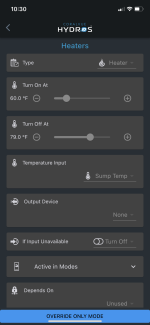
"Set the turn off setting and then set the turn on just above that setting." I don't see those options under constant (see pic). Am I missing something? Or are you saying to just do that under "Chiller"? If I just have the chiller installed as chiller, it doesn't really solve my initial problem of the wi-fi strip sometimes losing power and then when it comes back on it defaults the outlet to off so my chiller has no power.
 

Attachments

  • IMG_3041.PNG
    IMG_3041.PNG
    390 KB · Views: 3
Yes, The constant output will do the same thing on the wifi strips if they loose power. The outlet come on then go off until it gains communication with the controller. The wifi strip does nothing until commanded by the controller. It is not used as a smart strip. Even the XP8 would have the outlets off until it completes bootup and they turn on and off during boot up. The constant outputs aren not meant to change from what you set them too as far as the controller is concerned. It will allow manual turn on and off from the app.
 
"Set the turn off setting and then set the turn on just above that setting." I don't see those options under constant (see pic). Am I missing something? Or are you saying to just do that under "Chiller"? If I just have the chiller installed as chiller, it doesn't really solve my initial problem of the wi-fi strip sometimes losing power and then when it comes back on it defaults the outlet to off so my chiller has no power.
The reason it has no power is because you are setting the turn on set point to 81.5 degrees. The output will not turn back on if off for any reason until the temp get back above 81.5 degrees. If you want it to turn on at a lower value you have to set it to that value. in between the two set points the output can be either off or on and that is normal. that is called the hysteresis. It is used to keep the output from cycling on and off too often in a given amount of time. Also 72.5 seem awful low for a reef tank. Don't you want a shut off a little higher than that. My heaters turn on at 76 degrees. I would think you would want the shutoff above your heater settings so the heater and chiller would not be fighting each other.
 
Last edited:
Ok, I think I am asking a similar question I just don’t have a chiller in the mix, only heaters. But having reread this thread 3 times I still cannot understand this.

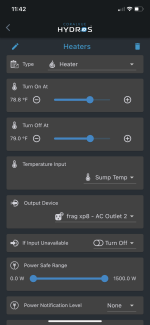
Below is the heater output set up on a xp8 outlet. So this isn’t a range setting, but I can’t wrap my head around the hysteresis!!! The device plugged into the xp8 outlet is an inkbird which I want as the primary temp controller turning on/off the heaters which needs the xp8 outlet to be on at all times. Then I want the xp8 to use the hydros temperature sensor input set to 1deg F above the inkbird setting to turn off the xp8 outlet if the inkbird were to fail on.
Do I have this programmed correctly?


C4CA208D-BB30-461E-839A-BABF44C45FE4.png
 

Attachments

  • F40C11D9-27B3-4061-B5F3-C9BD37F0194D.png
    F40C11D9-27B3-4061-B5F3-C9BD37F0194D.png
    197.9 KB · Views: 1
Ok, I think I am asking a similar question I just don’t have a chiller in the mix, only heaters. But having reread this thread 3 times I still cannot understand this.

Below is the heater output set up on a xp8 outlet. So this isn’t a range setting, but I can’t wrap my head around the hysteresis!!! The device plugged into the xp8 outlet is an inkbird which I want as the primary temp controller turning on/off the heaters which needs the xp8 outlet to be on at all times. Then I want the xp8 to use the hydros temperature sensor input set to 1deg F above the inkbird setting to turn off the xp8 outlet if the inkbird were to fail on.
Do I have this programmed correctly?


View attachment 2368
The problem with using the InkBird as your primary temperature controller is that you are rendering the power monitoring feature on the XP8 outlet useless. This is because you are turning the XP8 outlet on 24/7 regardless of the need for the heater to be on or off. I recommend you make the HYDROS the primary controller to take advantage of the safety feature.
 
Thanks! Fair point but I look at it like this. The setup I’m goin for has 3 levels of control.

1) inkbird set to 78 +- .5
2) built in heater tstat set to 79 ish - to protect an inkbird fail on scenario
3) hydros temp sensor controlling xp8 outlet set to 79 as last line of defense

Maybe I am missing the boat on the power monitoring features. If I click on the heater output tile in the app to see in that instance of time what the power/current readings are to determine if the heaters are on or not.

Using hydros as the controller removes a level of redundancy, at least I think it does.
 
Thanks! Fair point but I look at it like this. The setup I’m goin for has 3 levels of control.

1) inkbird set to 78 +- .5
2) built in heater tstat set to 79 ish - to protect an inkbird fail on scenario
3) hydros temp sensor controlling xp8 outlet set to 79 as last line of defense

Maybe I am missing the boat on the power monitoring features. If I click on the heater output tile in the app to see in that instance of time what the power/current readings are to determine if the heaters are on or not.

Using hydros as the controller removes a level of redundancy, at least I think it does.
You won't be able to use power monitoring because the InkBird turns the heater on and off and not the HYDROS. The HYDROS won't know when the heater is on or off. The InkBird will draw some power regardless of the heater being on or off. This means that it is perfectly fine for the outlet to draw little power or lots of energy (heater turns ON). The XP8 keeps the outlet on regardless, and it cannot send you a warning when drawing little power because that is perfectly fine. It cannot send you an alarm when there is a significant power draw because that is also perfectly fine.

If the HYDROS were the primary, it would know precisely when the heater should be on, and if it is not drawing power, it will send you the warning.

Unless the InkBird and the HYDROS do precisely the same simultaneously, you are going to have too many false positives rendering the monitoring feature useless.

You are free to do what you want, but part of spending the extra money for the XP8 is to take advantage of all the redundancies. For example, having the Inkbird be the primary controller can be done with a WiFi strip for a fraction of the price.
 
Ok, I think I am asking a similar question I just don’t have a chiller in the mix, only heaters. But having reread this thread 3 times I still cannot understand this.

Below is the heater output set up on a xp8 outlet. So this isn’t a range setting, but I can’t wrap my head around the hysteresis!!! The device plugged into the xp8 outlet is an inkbird which I want as the primary temp controller turning on/off the heaters which needs the xp8 outlet to be on at all times. Then I want the xp8 to use the hydros temperature sensor input set to 1deg F above the inkbird setting to turn off the xp8 outlet if the inkbird were to fail on.
Do I have this programmed correctly?


View attachment 2368
The way you have it set it will turn off when it gets above 79 degrees and remain off until it drops below 78.8. If that is what you need then you have that right. You have a hysteresis of .2 degrees in this case.When the heater output turns on it has to raise the temp .2 degrees before it turns off again. I your case the Inkbird will be turning it on and off.
 
Back
Top