Oh No Scenario! Stop via Mode

Users Who Are Viewing This Thread (Total: 0, Members: 0, Guests: 0)

robert404

New member
Joined
Mar 31, 2021
Messages
15
Reaction score
1
Location
Chicago
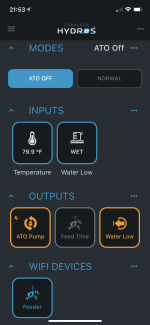
I ran this test tonight with the ATO using modes. From normal mode the ATO process kicked off and was running then I flipped it to ATO off mode and the ATO continued to run and did not turn off. I understand i could go right to the output and select off to stop the pump, however the ATO Off mode should have done the same thing. Kinda like an oh shi* moment/panic button whereby in that special mode it stops multiple outputs allowing you to reset your mind, processes, fix issues, etc and then you can flip back to normal mode.

In my example ATO Off Mode I disable the sensor and the pump, but could very well have several outputs that I’d like to stop immediately.
2BDC00C4-88A8-4CCD-9A34-9CA24C13A8EA.png
 
I ran this test tonight with the ATO using modes. From normal mode the ATO process kicked off and was running then I flipped it to ATO off mode and the ATO continued to run and did not turn off. I understand i could go right to the output and select off to stop the pump, however the ATO Off mode should have done the same thing. Kinda like an oh shi* moment/panic button whereby in that special mode it stops multiple outputs allowing you to reset your mind, processes, fix issues, etc and then you can flip back to normal mode.

In my example ATO Off Mode I disable the sensor and the pump, but could very well have several outputs that I’d like to stop immediately.

View attachment 915
That’s interesting since the tile above actually shows Off Waiting, so the output should be off. So the output was actually ON while the tile was displayed above? That could be a bug if so.

I do not remember if modes trumps the min/max on/off time counters or not. @Don could give you more on the logic there. The only control for sure override I know that ignores the min/max on/off timers is the “depends on” override. That is immediate.

@Carlos @Don you should look at this
 
Jeff in another post the depends on is set to the water off output and set to on if on. I am not sure why but it might the problem.
 
Jeff in another post the depends on is set to the water off output and set to on if on. I am not sure why but it might the problem.
Oh that could be it. depends on is an absolute override. Might even be with modes.
 
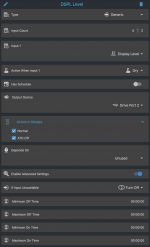
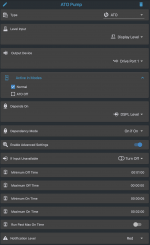
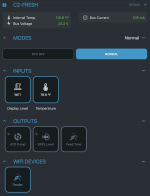
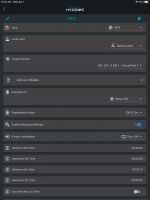
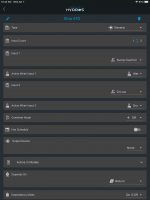
I'm not following you on this. Here is what I have setup now, should this work if I select mode ATO OFF while it is running?

Screen Shot 2021-04-07 at 10.17.58 AM.png Screen Shot 2021-04-07 at 10.18.26 AM.png Screen Shot 2021-04-07 at 10.19.30 AM.png
 
Only using drive port 1, and is connected to the micro pump in the reservoir
 
Ok. Then since you have only 1 ATO pump. Get rid of the DSPL Level output, its not needed, just use the output ATO Pump. All you need for an ATO is a Sensor Input (Display Level) and an output for the ATO pump (ATO Pump). The logic for the ATO is handled all by the output using the ATO output profile. To fix this do this:

Delete DSPL Level output.
Configure ATO Pump outlet as follows:
Select your ATO pump under Output Device, should be either drive port 1 or 2
Remove any depends on selection.
Keep Active In Modes set to Normal only like you have.

This will only run your ATO pump in normal mode, and not ATO off since its not selected. Also this will turn on this output after 1 Min of the Display Level sensor being DRY. That logic is pre-defined in the ATO profile for you. The 1 min timer is from the Minimum Off Time that you have set for 1:00 already.
 
Ok I follow you, but the only reason I wanted to add DSPL Level output, was so that I would get an alert when the sensor was dry, this triggers me to monitor the ATO output action and fill up process. But I think this will be ok I just need to remove it as a dependency from the ATO actions all together and just use it as a simple alert. In my head I was tying them together and trying to accomplish both tasks.
 
If you want to add an alert in addition to the ATO function, you can use the following concept here:

Basically add a generic output that has no output device and call it "ATO Empty Alarm" or similar. And follow the link above on how to generate. This could give you a simple alert when your ATO is functioning. Just set the max on time to something like 15 seconds so you dont get an alarm for every little splash.


If you want to disable your ATO due to this alarm (which wouldn't make sense in this case but something good to know), you would then use the Depends On under your ATO Pump output and select ATO Empty Alarm as the Depends On input, then use OFF if ON. Meaning, force your ATO to not run if your ATO Empty Alarm is ON. Make sure "Run Past Max On Time" is set under ATO Empty Alarm as well.
 
Here is my setup for ATO if it will help. I do use a depends on with it but it is to stop the ATO. I also use a dosing pump so my maximum and minimum times will be different than what you need. I also have a output setup for the DI storage tank called DI low but it is to trigger a refill of the storage tank from the RODI unit and would no apply here other than it is setup to send a alert if it it on too long.

46DEDF6E-0B87-4EDF-91F5-10AC71789BCB.png

Below is the stop ATO it is the Generic Type and has a input count of 2. The inputs are Sump Overfull and DI Low sensors. If either the Sump overfull sensors is wet or the DI Low sensor is dry it will turn this output on. There is no actual output assigned to this but it will still work as if it did as far as the logic in the controller. I have this outputs Depends On setting to the return pump. The Dependency Mode s set to On if Off. So if the return pump is off it will turn this output on. This will keep the ATO off as long as the return pump is off. The level would normally be too high in the sump to turn on the ATO unless you are doing something in the sump that would lower the water level.

60547EF0-B4D3-48D2-801B-86F35B74EDD1.png

There are several ways to do the ATO. I would suggest starting out with the standard settings on the ATO and then once it is working do modifications from there if the mods don't work correctly you can go back to what worked until you figure out what the issue is.
 
Last edited:
All very helpful thank you. And on the ATO Pump output the maximum on time (00:02:00) and the maximum off time (23:59:59) will cover me in the following 2 scenarios I expect:

1. maximum on time: pump will not run more than 2 minutes
2. pump will stay off for at least 23:59:59 hours/minutes until trying to run again (stays in wait mode)

The above covers me if a dog, wife, kid pulls the sensor out of the display tank by accident + the remote mode ATO Off allows me to simply just turn it off if I can't get to the system for a few days.
 
Maximum off time will only send you an alert if the ATO is off longer than the time set. Make sure Run Past Maximum On Time is turned off if you want the pump to turn off.
 
Just to close this out, when using the ATO Pump output, and changing modes for example ATO OFF, it did turn off while it was running. We're good to go. Thank you.
 
Back
Top