Simple schedule to dose Kalkwasser

Users Who Are Viewing This Thread (Total: 0, Members: 0, Guests: 0)

Jeffbear

New member
Joined
Apr 7, 2022
Messages
20
Reaction score
3
Location
Massachusetts
Good evening,
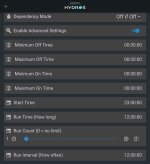
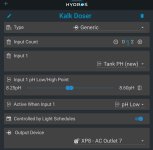
I'm looking to have my kalkwasser doser (X1 PRO t) turn on at 23:00 and run for 12 hours. I'd like it to turn off if the pH spikes above 8.6. I have the attached output set up. So far it works for the pH input, but it doesn't turn on at 23:00 run for 12:00 and shut off. Can anybody show me where I went wrong with this?
 

Attachments

  • SmartSelect_20230210_230930.jpg
    SmartSelect_20230210_230930.jpg
    328.5 KB · Views: 15
  • SmartSelect_20230210_231010.jpg
    SmartSelect_20230210_231010.jpg
    403.2 KB · Views: 15
I ended up setting an LED light schedule, linking that to a Kalk dose LED light output and making the doser output dependant on the light output "on if on". I'm sure there is a more elegant solution. I set the pH range to 8.59 to 8.6 and set the doser output to on if pH low. This worked this morning, I'll know for sure tonight at 23:00 for sure lol
 
Why not just use the "Kalk Reactor" Output type? It has ON and OFF parameters for your pump, pH dependancy, with an optional section for stirrer motor scheduling.
 
Why not just use the "Kalk Reactor" Output type? It has ON and OFF parameters for your pump, pH dependancy, with an optional section for stirrer motor scheduling.
I think this is what I'll end up using for simplifying all of my outputs. Thanks for that suggestion!
 
Generic or Kalk Reactor outputs will both work. I'd suggest reviewing your pH parameters. Your current setting will turn on if pH is less than 8.6, remain on until pH exceeds 8.6, turn off and REMAIN OFF until pH drops below 8.25. Then repeat. Intend to doubt you want that large pH swing. A more desired configuration may be On 8.5 and Off 8.6. Many people also run On 8.59 and Off 8.60.

The schedule componant is below the Enable Advanced Settings toggle. If you continue using Generic, you'll also need to toggle Controlled By Light Schedules. Go back down below Advanced Settings and you'll see Start Time, Run Time, Run Count and Run Interval. If you want to run constantly from 23:00:00 to 11:00:00 then set Start Time 23:00:00, Run Time 12:00:00, Run Count 1. Run Count is important. If unset it will run constantly. Alternately, if you want to run something like five minutes every half hour then you would use Start Time 23:00:00, Run Time 00:05:00, Run Count 24, Run Interval 00:30:00. Tweak as desired.
 
Tacking on, how do you stop a kalk reactor feed pump in the scenario where ph high end isnt hit yet but daily evaporation limit reached. Wouldn’t a level sensor input be warranted to turn off the reactor feed pump to stop runaway sump water level.
 
I have a peristaltic pump running constantly at 2ml/min, which is about 3/4 of a gallon per day. I think this is just below my evaporation rate. I am watching it closely to make sure. Level changes so slowly it is pretty forgiving. Having a level sensor is not a bad idea.
 
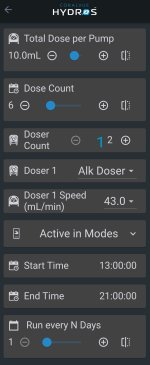
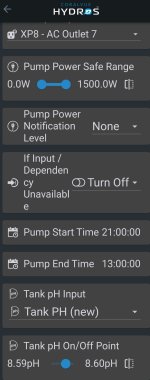
Here's what I have guys. And thank you for all of your help. I am currently dosing Kalkwasser during the night and low light conditions, and All for Reef during the photoperiod using the two dosing methods in the screen captures. I have a Kalk Reactor output running from 9PM to 1PM when lights are low or off. Then the All for Reef doses during the photoperiod from 1PM to 9PM. My evaporation is roughly a gallon a day. I am currently dosing .48 gallons of Kalk a day keeping my Alk at 8.9 and my PH from 8.22-8.32, which peaks about 2 hours after lights out. The tank has really seemed to enjoy the Kalk and AFR dosing.
You may be wondering why dose both? Well First, I have a whole container of AFR Powder I didn't want to waste. Second, it's dosing all of the trace elements that were low on my last ICP test. So for me it's a win win. I'm getting the PH benefits of the Kalk plus the goods from the AFR. My SPS are growing like crazy, and my colors are looking nice.
 

Attachments

  • SmartSelect_20230302_080405 (1).jpg
    SmartSelect_20230302_080405 (1).jpg
    276.6 KB · Views: 25
  • SmartSelect_20230302_080242 (1).jpg
    SmartSelect_20230302_080242 (1).jpg
    296.9 KB · Views: 21
Back
Top