
Switch Input on Sense Port

Users Who Are Viewing This Thread (Total: 0, Members: 0, Guests: 0)

JeffB418

HYDROS Expert
Joined
Jun 25, 2020
Messages
1,316
Reaction score
405
Location
Syracuse NY
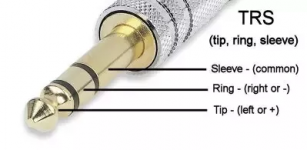
It is possible to connect a float switch (or any switch input for that matter) to any Sense port on the Hydros. The easiest method is to use one of the 3.5mm Sensor Adapter Cables that Coralvue sells (Link to Adapter Cable). Then you can make a switch adapter using a 3.5MM stereo headphone jack cable. These can be commonly found on Amazon like this one here: Stereo Headphone Cable
1604932155008.png

For pinout use the Tip and Sleeve for switch connections and leave the ring unconnected. This can be handy for making a simple float switch for a skimmer overflow container, or any other user input switch.
 
I am also interested in this too....I am currently using a gravity fed ATO with float switch bit my reservoir is too small so i want to upgrade to a bigger reservoir and automated ATO.

I have a brand new float switch and a 2 pin adapter

I already have the hydros Micro pump also which I hope to use for this application.
 

Attachments

  • 20230605_201937.jpg
    20230605_201937.jpg
    1.4 MB · Views: 32
I am also interested in this too....I am currently using a gravity fed ATO with float switch bit my reservoir is too small so i want to upgrade to a bigger reservoir and automated ATO.

I have a brand new float switch and a 2 pin adapter

I already have the hydros Micro pump also which I hope to use for this application.
You will need a 4 pin GX12 connector. The 2 pin connector is only for drive ports. See the highlighted below for where to connect the float switch, to pins 2 and 4 on a GX12-4

1686059292248.png
 
You will need a 4 pin GX12 connector. The 2 pin connector is only for drive ports. See the highlighted below for where to connect the float switch, to pins 2 and 4 on a GX12-4

View attachment 3489
Great info....im electrically illiterate.... the float switch has black and red wire which goes to which? Appreciate it
 
Great info....im electrically illiterate.... the float switch has black and red wire which goes to which? Appreciate it
For a float switch it does no matter but it would probably not be a bad idea to connect the red to pin 2 since it is the +5v supply.
 
Is it possible to wire multiple float switches to one sense port, like the triple optical water level sensor?
 
There is only one analog input on the sense port and that is what is used for the float switch. The triple level sensor uses the digital input but even then two of the level sensor are used to control one input and the third is only an alert and cannot be used for control. So as far as control the triple level sensor on has one control input.
 
There is only one analog input on the sense port and that is what is used for the float switch. The triple level sensor uses the digital input but even then two of the level sensor are used to control one input and the third is only an alert and cannot be used for control. So as far as control the triple level sensor on has one control input.
Can you use 2 of the 5v optical sensor from Amazon into a single sensor port with single GX12 4pin?
 
Can you use a momentary switch? Like to trigger a feed mode?

I want a push button feed mode, but I want it accessible from the outside of the stand. I was going to get a multiple switchbox for 0-10v control, but I don't want to have to remove the whole door (magnetically attached) of the stand every time I needed to push it. I also wanted something faster than pulling up the app on my phone and doing it that way.

I have plenty of sense ports, so this might be what I'm looking for, and it frees up the 0-10v connections for (potentially) other things.
 
I have float switches on a sense port but there is an input you can setup for them. Only a 0-10v input can be used to trigger modes though. So you won't be able to put it in feed mode from a sense port but you may be able to trigger an output and use that output in the depends on settings of any output you want to control with it or schedules you want to enable or disable.
 
Back
Top
