Dosing container fill status

Users Who Are Viewing This Thread (Total: 0, Members: 0, Guests: 0)

BAMatter

Active member
Joined
Aug 31, 2021
Messages
443
Reaction score
48
Location
East coast
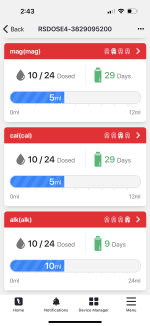
It would be solid if we could add a tile (or multiple tiles) for dosing containers and amount of liquid they contain, with a daily dose amount so we can track how much is left, to be able to get an idea without having to open 3rd party apps. Obviously this will be an estimate since it won’t be direct metering from the pumps and calibration, but would imagine it’s just simple math to display.

Example- I use a RedSea ReefDose and I enter the amount in each container and it displays the amount left and how many days until a refill is needed. It would be nice if I could view this information through Hydros since it’s a 3rd party app and not integrated.
 
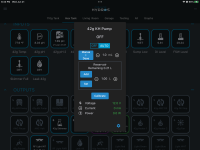
It does keep track of that. It is on the popup when you click on the tile. You have to set a minimum amount in the output settings. Then when you refill it you can either use add to add what you added or use set to set it to a certain amount. The screenshot below has the popup showing Reservoir remaining which is .21 liters.

IMG_9122.png
 
It does keep track of that. It is on the popup when you click on the tile. You have to set a minimum amount in the output settings. Then when you refill it you can either use add to add what you added or use set to set it to a certain amount. The screenshot below has the popup showing Reservoir remaining which is .21 liters.

View attachment 3718
That’s only relevant for an output pump you’ve created. I’m talking about just a tile that is basically a countdown for amounts. I use a 3rd party doser, it has nothing to do with Hydros except that it gets its power from the Wi-Fi strip
 
That’s only relevant for an output pump you’ve created. I’m talking about just a tile that is basically a countdown for amounts. I use a 3rd party doser, it has nothing to do with Hydros except that it gets its power from the Wi-Fi strip
For third party information it would require the third party to be involved also. So if CoralVue wanted it would still require Red Sea to be onboard also.
 
For third party information it would require the third party to be involved also. So if CoralVue wanted it would still require Red Sea to be onboard also.
You’re over analyzing what I’m saying. It would simply be a tile that you label accordingly, whatever it may be that you have a container for. Alk, cal, mag, NO3, PO4, literally anything you have on a pump.

The tile will ask you to enter:
-Name/Element/whatever
-amount of liquid you put into it
-daily dose amount

Then it will automatically calculate daily remaining amount, and display that amount when you click the tile. It doesn’t need to be integrated with a 3rd party, as it will solely rely on the info you enter. Get what I’m saying?
 
You’re over analyzing what I’m saying. It would simply be a tile that you label accordingly, whatever it may be that you have a container for. Alk, cal, mag, NO3, PO4, literally anything you have on a pump.

The tile will ask you to enter:
-Name/Element/whatever
-amount of liquid you put into it
-daily dose amount

Then it will automatically calculate daily remaining amount, and display that amount when you click the tile. It doesn’t need to be integrated with a 3rd party, as it will solely rely on the info you enter. Get what I’m saying?
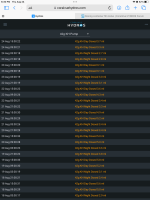
That would only work if you were dosing an exact amount each day. Mine varies depending on the alkalinity reading so it does not dose the same amount each time it doses. My pump output still keeps track of it ans sends an alert once the volume drops below the amount I have set. Here is the log form my KH buffer dosing pump. I would be hard to calculate that without control of the pump.

IMG_9449.png
 
That would only work if you were dosing an exact amount each day. Mine varies depending on the alkalinity reading so it does not dose the same amount each time it doses. My pump output still keeps track of it ans sends an alert once the volume drops below the amount I have set. Here is the log form my KH buffer dosing pump. I would be hard to calculate that without control of the pump.

View attachment 3719
I do dose the exact amount each day. Not every tank, I would actually think a small percentage, even do automated testing and dosing adjustments. This works on the RedSea app. If I change the amount I dose for the week, it calculates the remaining amount. That’s all I’m saying. Again, you’re over analyzing it. I think a tile that has a dumb calculator attached to it to give an estimated time of the vessel being emptied would be a good thing.
 
You’re over analyzing what I’m saying. It would simply be a tile that you label accordingly, whatever it may be that you have a container for. Alk, cal, mag, NO3, PO4, literally anything you have on a pump.

The tile will ask you to enter:
-Name/Element/whatever
-amount of liquid you put into it
-daily dose amount

Then it will automatically calculate daily remaining amount, and display that amount when you click the tile. It doesn’t need to be integrated with a 3rd party, as it will solely rely on the info you enter. Get what I’m saying?
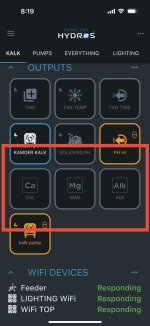
You can add a "false output" dosing tile to your Hydros thats not actually driving a doser to keep track of a reservoir level. Just Make a Simple Doser output and set the pump speed to the same as your other doser, then for output device, leave it at None. Then make a schedule for this simple doser that matches your other doser and it will run like your doser and decrease the reservoir tracker but not actually be controlling anything.
 
You can add a "false output" dosing tile to your Hydros thats not actually driving a doser to keep track of a reservoir level. Just Make a Simple Doser output and set the pump speed to the same as your other doser, then for output device, leave it at None. Then make a schedule for this simple doser that matches your other doser and it will run like your doser and decrease the reservoir tracker but not actually be controlling anything.
While the amount left isnt directly displayed (have to click tile to see), you can set errors on low volume limits which are handy. I do wish they would update the tile to show % remaining but thats on the long wish list.
 
While the amount left isnt directly displayed (have to click tile to see), you can set errors on low volume limits which are handy. I do wish they would update the tile to show % remaining but thats on the long wish list.
That’s what I’m talking about… lemme give that a try. Thanks !!
 
Literally what I wanted to add… I know it’s not 100% accurate but will be a 2nd layer of protection in case bottles get low!

Thanks @JeffB418


IMG_3414.jpeg
 
Back
Top