

JeffB418
HYDROS Expert
This goes over how to control a nicrew LED (hyperreef 50/100/150 only) with Hydros 0-10V output from a X4 or a WELE/WE (with a collective).
What you need:
- 2x of these TRS female to pigtail wires Amazon.com
- 1x of these TRRS male to terminal block Amazon.com
- 1x Hydros quad 0-10V cable
You have to use a TRRS cable system for the NICREWs as shown. One 0-10V channel controls the blue channel intensity and one channel controls the white channel. Wire the adapter as shown, leaving the V port unconnected. Also cut the white unused wires on both pigtails. Remember to use a TRRS cable between lights if you daisy chain them.
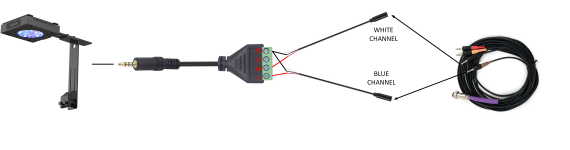
Plug the light itself into a normal always powered outlet.
Next make 2 outputs of variable light type, one for the blue control and one for white control. Note to match the 0-10V output port connectors correctly:
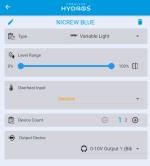
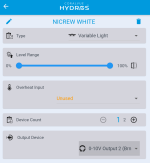
Next you need to make schedules for these above output controls. If you want to be controlled both the same, you can make 1 schedule and tie it to both blue/white channels. Otherwise you need to make 2 separate schedules, one for white and one for blue. The following shows how to make a schedule for the BLUE channel:
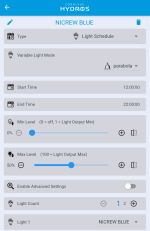
Under light 1 select the output you made in the prev section. Set max levels, start and stop times and light mode. Make another schedule just like this one but name it WHITE and select NICREW WHITE as the output.
What you need:
- 2x of these TRS female to pigtail wires Amazon.com
- 1x of these TRRS male to terminal block Amazon.com
- 1x Hydros quad 0-10V cable
You have to use a TRRS cable system for the NICREWs as shown. One 0-10V channel controls the blue channel intensity and one channel controls the white channel. Wire the adapter as shown, leaving the V port unconnected. Also cut the white unused wires on both pigtails. Remember to use a TRRS cable between lights if you daisy chain them.
Plug the light itself into a normal always powered outlet.
Next make 2 outputs of variable light type, one for the blue control and one for white control. Note to match the 0-10V output port connectors correctly:
Next you need to make schedules for these above output controls. If you want to be controlled both the same, you can make 1 schedule and tie it to both blue/white channels. Otherwise you need to make 2 separate schedules, one for white and one for blue. The following shows how to make a schedule for the BLUE channel:
Under light 1 select the output you made in the prev section. Set max levels, start and stop times and light mode. Make another schedule just like this one but name it WHITE and select NICREW WHITE as the output.


