Generic Outlet Configuration - Question (R2R Repost)

Users Who Are Viewing This Thread (Total: 0, Members: 0, Guests: 0)

JeffB418

HYDROS Expert
Joined
Jun 25, 2020
Messages
1,316
Reaction score
405
Location
Syracuse NY
Reposting this from R2R to hopefully get some answers, here is the post: Hydros Control 2 , Control 4 and accessories question and answer thread.
------------

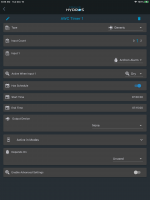
I have run into an issue with timers. It may just be the way I am trying to use it but if I setup like it is in the screen shot below it will work for a one time on during 24 hours.
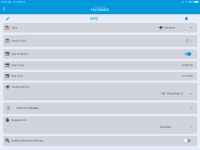
1605201435998.png
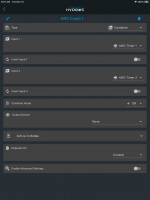
If I set it up like below it comes on and stays on. I doesn’t follow the schedule. Am I setting it up wrong.
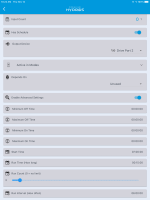
1605201428467.png

-------------------

Jeff B - Is this due to the fact he doesn't have the max/min on time set to something other than 0? Also I noticed the run count, if he only wanted to run 7AM, 1PM and 7PM it should be set to 2 for run count, otherwise it will run at 12PM as well. But unsure of his intentions.
 
Yea I am not sure on this. I have not set up generic outlet yet and was hoping someone else would help on that post. I was just getting ready to post this here myself. Thanks Jeff.


There should be instructions on what some of this is:

What is:

Run interval (how often) the how often throws me off?

What is input count?
 
@Jeffb418

Ha! You caught the bug. We have fixed that on the next version of the firmware. I will let you know when the firmware is ready.
 
Yea I am not sure on this. I have not set up generic outlet yet and was hoping someone else would help on that post. I was just getting ready to post this here myself. Thanks Jeff.


There should be instructions on what some of this is:

What is:

Run interval (how often) the how often throws me off?

What is input count?

That has the best description on what the settings are.
 
I think I found a way to do what I want until the update to fix this issue is out. I created three outputs for each time I want the original output on. I did not assign it to an actual output. I also added in the Archon alarm input to shut off these three outputs if the alarm is active. The one shown below is set to turn on at 7:00am and run till 7:15am. The second one was set to come on at 1:00pm and run till 1:15pm. The third was set to come on at 7:00pm and run till 7:15pm.

D92FD01C-3422-4794-93E3-D0DCCADE7739.png

I also created a combiner output to combine the first two outputs. This also has no physical output assigned. I set the combine mode to or so if either of the inputs are active the output will be active.

DE108D30-15ED-466C-82B1-C5A1A68DA9DC.png


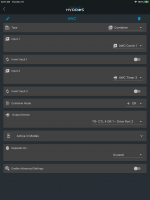
I changed the original output to the combiner recipe and use the combiner output just created for one input and the third timer output for the second. This output has the actual output assigned to it. The combine mode is or here also.

516457BF-1873-4E60-8EAC-0A481D267A58.png


It is working so far. It turned on at 7:00am and turned off at 7:15am this morning. I guess you can call outputs that have no physical output assigned as virtual outputs. This will work as long as there are not a lot of times during the day you want the output on. I came up with this when I was trying to figure out how to turn on a RODI solenoid with a timer along with any time either the DI fill or mix fill solenoid are on. I use the RO out on my RODI for the ice maker on the fridge. Having it run for 10 minutes every hour seems to keep the bladder tank topped off.
 
Back
Top