Any help with WiFi devices?

Users Who Are Viewing This Thread (Total: 0, Members: 0, Guests: 0)

BAMatter

Active member
Joined
Aug 31, 2021
Messages
443
Reaction score
48
Location
East coast
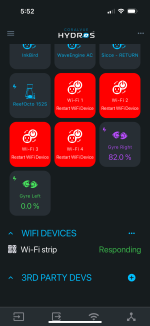
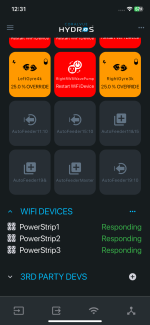
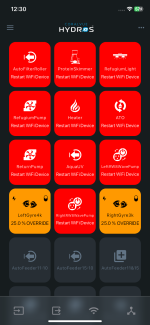
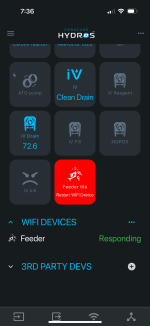
What’s the fix on the WiFi strip and feeder? Telling me to restart… I’ve unplugged and plugged back in. Tried to replace. Don’t know what I’m doing wrong, but some help after a bad day of dealing with controllers is much appreciated… thanks 🙏

Cross posted on FB trying to cast a net!
 

Attachments

  • IMG_8647.png
    IMG_8647.png
    192 KB · Views: 2
  • IMG_8645.png
    IMG_8645.png
    206 KB · Views: 3
When this happens is there any blue light showing around the push button on the wifi power strip?
 
When this happens is there any blue light showing around the push button on the wifi power strip?
can you let me know what to do either way? I took that strip offline, I’ll need to readdress tomorrow.

Any thoughts on the feeder? That’s the more important one at this point…
 
Have you tried rebooting the router. The blue on the wifi strip would indicate it was having an issue communicating with the wifi. Blue means it is not logged into the wifi. If it was blue It could be a signal issue. There are several things that will block wifi signals. One of them is water.
 
Yea, I rebooted it. The feeder is direct shot to
the router. It’s closer to the router than all my devices which get no signal issues whatsoever.
 
Is it a collective? If so can you make a different controller the preferred wifi master. That would rule out the controller and since there are two wifi devices with the issue that would leave the router. Make sure you do not have a 5ghz and 2.4ghz channel with the same name. Also MESH networks are known to cause this. Mine would do the about 2 to 3 times a week and I replaced my router in December and I have not had any issues since then with the wifi devices.
 
Is it a collective? If so can you make a different controller the preferred wifi master. That would rule out the controller and since there are two wifi devices with the issue that would leave the router. Make sure you do not have a 5ghz and 2.4ghz channel with the same name. Also MESH networks are known to cause this. Mine would do the about 2 to 3 times a week and I replaced my router in December and I have not had any issues since then with the wifi devices.
Yes a collective. My Wi-Fi has 2.4 and 5 on different band names, albeit same password, as it’s always been. I did switch routers and now it has a 6ghz as well, also a different name but same password. I changed the device master and replaced the feeder but same thing. Should I maybe change Wi-Fi passwords even though channel names are already different?
 
Yes a collective. My Wi-Fi has 2.4 and 5 on different band names, albeit same password, as it’s always been. I did switch routers and now it has a 6ghz as well, also a different name but same password. I changed the device master and replaced the feeder but same thing. Should I maybe change Wi-Fi passwords even though channel names are already different?
If the name is different it should be ok. When you do a paring make sure the device with the app you are using is also on the wifi channel you want the device being paired to be on. It could be an issue with the wifi feeder if a wifi strip will pair without an issue. Also another issue is that the router thinks that the device is a threat since the way that it communicates with the controller and is blocking the communications. Guest networks are known for doing this also.
 
If the name is different it should be ok. When you do a paring make sure the device with the app you are using is also on the wifi channel you want the device being paired to be on. It could be an issue with the wifi feeder if a wifi strip will pair without an issue. Also another issue is that the router thinks that the device is a threat since the way that it communicates with the controller and is blocking the communications. Guest networks are known for doing this also.
It’s both the feeder and WiFi strip. It is a new router, however. Comcast came and had to update our internet. I had no issues connecting all my devices to the network, actually the feeder and WiFi strip were both working fine until yesterday when I had to completely reprogram my collective after it was deleted. So, it was working fine, and now not.
 
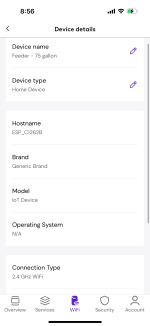
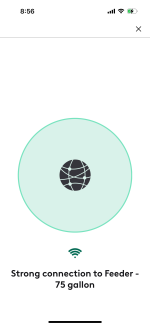
@Danny looks like it’s connected via 2.4 and signal is good. Still getting “restart WiFi device”..What else could it maybe be?
 

Attachments

  • IMG_8654.png
    IMG_8654.png
    155.7 KB · Views: 8
  • IMG_8655.png
    IMG_8655.png
    119.8 KB · Views: 8
@Danny looks like it’s connected via 2.4 and signal is good. Still getting “restart WiFi device”..What else could it maybe be?
If both the wifi strip and controller are connected to wifi and both on the same wifi channel on the router and still cannot communicate it sounds like the router may be blocking the communications and considers it a threat. Not sure what that setting is. The easiest way around that is to use a access point with it's own name and have it connected to the main router with a wired connection so the router does not consider it a threat since it is a wired connection. I have used old routers as access points. Most can be set for use as a access point. You would have to check the manual on the one you have if you have one that is not in use you can use.
 
If both the wifi strip and controller are connected to wifi and both on the same wifi channel on the router and still cannot communicate it sounds like the router may be blocking the communications and considers it a threat. Not sure what that setting is. The easiest way around that is to use a access point with it's own name and have it connected to the main router with a wired connection so the router does not consider it a threat since it is a wired connection. I have used old routers as access points. Most can be set for use as an access point. You would have to check the manual on the one you have if you have one that is not in use you can use.
Yea not too sure since it was communicating just fine as of yesterday. Lots of headaches with Hydros for me lately it seems. Partially me I’ll have to admit, but getting tired of tinkering with this stuff. I spend more time dealing with the controllers than I do my tank.

Thanks for your help.
 
I'm in the exact same boat that you are. I can not get my single or multiple outlet wifi controls to connect. The were working few days ago and now they are not connecting at all. Went and bought a new router to have a dedicated 2.4 wifi just for the controls and nothing else. Can get everything else connected except the wifi outlets. This is really frustrating!! Spent over 5 hours working on this and still can get it to connect.
 
If both the wifi strip and controller are connected to wifi and both on the same wifi channel on the router and still cannot communicate it sounds like the router may be blocking the communications and considers it a threat. Not sure what that setting is. The easiest way around that is to use a access point with it's own name and have it connected to the main router with a wired connection so the router does not consider it a threat since it is a wired connection. I have used old routers as access points. Most can be set for use as an access point. You would have to check the manual on the one you have if you have one that is not in use you can use.
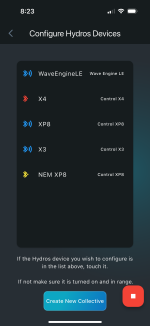
I’m trying to verify that all my devices have the correct password. When I go to the main screen and hit add, my X10 isn’t showing up. Any reason/way to get it there? My collective is 4 devices, the XP8, WELE, X3, and X10. The other 3 show up fine. I’m wondering if maybe this is my issue linking the WiFi devices?
 

Attachments

  • IMG_8669.png
    IMG_8669.png
    385.9 KB · Views: 6
I’m trying to verify that all my devices have the correct password. When I go to the main screen and hit add, my X10 isn’t showing up. Any reason/way to get it there? My collective is 4 devices, the XP8, WELE, X3, and X10. The other 3 show up fine. I’m wondering if maybe this is my issue linking the WiFi devices?
Have you tried rebooting the X10 in the app. It would be in the right menu under device properties.
 
I am having the same issue. My control 4 and wave engine were connecting and disconnecting from the Wi-Fi. I replaced the wireless router and and made sure the 2.4 channel and 5g channel had different names. Connected the control 4, the wave engine and my three quad power strips to the new 2.4 channel. Everything connected fine but the outlets will not turn on. Under Wi-Fi devices in the app all three strips are responding but the outputs all say restart Wi-Fi device. I restarted and reconnected everything 10-20 times now and it will not work.

I called Coralvue for help and the said to buy a 2.4 access point or buy a xp8. I bought an access point but it’s doing the same thing. Very disappointed to hear the answer is to spend another $280 rather then fixing what is wrong.

I bought the control 4 and wave engine when they first came out and my system has been working great up until this point. I also just updated the firmware in the last few weeks. I don’t know if that has anything to do with this or not.
 

Attachments

  • IMG_5738.png
    IMG_5738.png
    146.5 KB · Views: 4
  • IMG_5737.png
    IMG_5737.png
    191.8 KB · Views: 4
Have you tried rebooting the X10 in the app. It would be in the right menu under device properties.
Ok, so the reboot worked. Manually went through and reentered all my passwords. Feeder still wouldn’t link up. I had a brand new feeder as a spare that I was able to link up so that’s a start. Issue now is that feeder is no good apparently, it won’t spin, even hitting the manual gray button I get nothing. When I go to hit manual feed in the app, it forces the tile “on” but nothing. I don’t recall the feeder tile always being lit up, only when it was feeding. Am I wrong on that? Any feeder trouble shooting? Think I got a bad feeder..
 
Ok, so the reboot worked. Manually went through and reentered all my passwords. Feeder still wouldn’t link up. I had a brand new feeder as a spare that I was able to link up so that’s a start. Issue now is that feeder is no good apparently, it won’t spin, even hitting the manual gray button I get nothing. When I go to hit manual feed in the app, it forces the tile “on” but nothing. I don’t recall the feeder tile always being lit up, only when it was feeding. Am I wrong on that? Any feeder trouble shooting? Think I got a bad feeder..
The wifi feeder tile in wifi devices is highlighted. The feeder output itself will not be.
 
The wifi feeder tile in wifi devices is highlighted. The feeder output itself will not be.
Ok, copy. It was definitely highlighted blue. Probably something wrong with it. I’ll try again later to fully reinstall it, not sure why it’s linking up but physically unable to spin and the tile always blue.
 
I am having the same issue. My control 4 and wave engine were connecting and disconnecting from the Wi-Fi. I replaced the wireless router and and made sure the 2.4 channel and 5g channel had different names. Connected the control 4, the wave engine and my three quad power strips to the new 2.4 channel. Everything connected fine but the outlets will not turn on. Under Wi-Fi devices in the app all three strips are responding but the outputs all say restart Wi-Fi device. I restarted and reconnected everything 10-20 times now and it will not work.

I called Coralvue for help and the said to buy a 2.4 access point or buy a xp8. I bought an access point but it’s doing the same thing. Very disappointed to hear the answer is to spend another $280 rather then fixing what is wrong.

I bought the control 4 and wave engine when they first came out and my system has been working great up until this point. I also just updated the firmware in the last few weeks. I don’t know if that has anything to do with this or not.
You able to get this fixed? I’m still dead in the water with WiFi devices..
 
Back
Top