
Wi-Fi quad strips “Restart Wi-Fi Device”

Users Who Are Viewing This Thread (Total: 0, Members: 0, Guests: 0)

jmorgan

New member
Joined
Jan 31, 2021
Messages
24
Reaction score
3
Location
Big Pine, CA
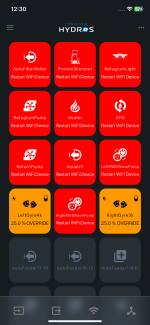
I have a control 4, wave engine and three Wi-Fi strips. I just replaced my Wi-Fi router due to some connection issues. When the new router was setup everything connected fine including the Wi-Fi strips but the individual plugs will not turn on. The outputs in the app goes from not responding to restart Wi-Fi device yet under Wi-Fi devices all three strips show they are responding.

I have also tried an 2.4G access point per Coralvue’s recommendation but I’m having the same issue. This setup has been running for years with no issue. Ive tried everything I can think of but nothing works. Please help.
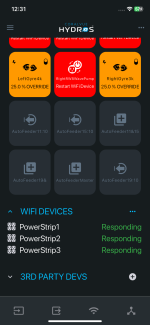
 

Attachments

  • IMG_5738.png
    IMG_5738.png
    146.5 KB · Views: 0
  • IMG_5737.png
    IMG_5737.png
    191.8 KB · Views: 0
I have a control 4, wave engine and three Wi-Fi strips. I just replaced my Wi-Fi router due to some connection issues. When the new router was setup everything connected fine including the Wi-Fi strips but the individual plugs will not turn on. The outputs in the app goes from not responding to restart Wi-Fi device yet under Wi-Fi devices all three strips show they are responding.

I have also tried an 2.4G access point per Coralvue’s recommendation but I’m having the same issue. This setup has been running for years with no issue. Ive tried everything I can think of but nothing works. Please help.
The access point has to have a different name from your other channels and it needs to have a wired connection to the main router in your system. Also you will have setup the wifi credentials on all the controllers and pair the wifi devices again using replace but make sure your device with the app running is also on the access point or the pairing will not work.
 
Danny, thank you for the response. I have the access point plugged into the back of the wireless router. I have given it its own name. I have connect my phone to this new Wi-Fi then I connected the control 4 and Wave Engine. I have blue breathing lights on both. I then replaced all three Wi-Fi strips. When I plug the strip back in I can hear the relay click and my refugium light comes on for a second then shuts off. The strips will pair successfully to the wifi and the Wi-Fi devices section in the app goes from not responding to responding but the outlets will not turn on. Eventually the outputs section goes from not responding to restart Wi-Fi device.
 
Danny, thank you for the response. I have the access point plugged into the back of the wireless router. I have given it its own name. I have connect my phone to this new Wi-Fi then I connected the control 4 and Wave Engine. I have blue breathing lights on both. I then replaced all three Wi-Fi strips. When I plug the strip back in I can hear the relay click and my refugium light comes on for a second then shuts off. The strips will pair successfully to the wifi and the Wi-Fi devices section in the app goes from not responding to responding but the outlets will not turn on. Eventually the outputs section goes from not responding to restart Wi-Fi device.
On the lights on the wifi strip around the push button is there any blue light?
 
It is getting a wifi signal from one of the channels if there is no blue. Not sure why you are unplugging the wifi strips after you do a pair on them. Have you tried a power down reset on the router?
 
The strips have no problem connecting to Wi-Fi they just will not turn on the individual plugs on the strip once connected to Wi-Fi. I unplug them to do the replace in the app to try and get them to work. Trying both my main wireless router and the access point. Yes, I have restarted the router probably 10 times now.
 
The strips have no problem connecting to Wi-Fi they just will not turn on the individual plugs on the strip once connected to Wi-Fi. I unplug them to do the replace in the app to try and get them to work. Trying both my main wireless router and the access point. Yes, I have restarted the router probably 10 times now.
The wifi strips can connect to a 5ghz channel and if they do they cannot communicate with the the controllers on the 2.4ghz channel. To keep this from happening you can add 5ghz to the login name on the 5ghz channel or turn the 5ghz channel off to see if that is the issue. If you have the controllers and wifi strips on the access point with a different name that the other channels then you can turn off the 5ghz channel there. Also make sure the access point is hardwired to the main router in your system and does not rely on wifi. Some routers will not allow communications between the devices connected to it on a wifi channel. Usually if it is a wired connection it will allow it but there are exceptions to this.
 
When I got home I unplugged all three Wi-Fi strips. I then reconnected my control 4 and wave engine to my main 2.4g Wi-Fi router not the access point. Once connected I unplugged both the control and wave engine to allow them to reboot. I then went into the Wi-Fi devices in the app and did a replace on the strips one at a time. About 15 seconds after the first strip connected the plugs came alive. I replaced the remaining two strips and they are all working again.
 
Back
Top