
Some information about the 177 firmware release

  • Thread starter Thread starter Don
  • Start date Start date
  • Tagged users None

Users Who Are Viewing This Thread (Total: 0, Members: 0, Guests: 0)

Don

Administrator
Staff member
Joined
Apr 23, 2020
Messages
327
Reaction score
128
Hi all. I thought might help if I shared a little bit of information about the version 177 firmware release
  • This firmware release was the most major release we have done thus far. That is why it took so long. Much of what was done was infrastructure changes that are not immediately visible but will become apparent in the next few weeks. Some of this infrastructure is:
    • A complete code merge of our various product lines.
    • We moved to a new version of the operating system and a new compiler tool chain
    • A major rework of the software update and release system
    • Introduction of a new "Schedule" sub system to allow future support of Flow Pumps and Dosing Pumps
  • We do not intend to go this long without a release again. This was a special case
  • The current upgrade problems are in the 165 code, which is unfortunate. Keep in mind that when you upgrade to a new version, the upgrade is actually performed by the old version. This problem is totally fixed in 177 but first it needs to get installed which is problematic.
  • I have heard a few reports that there are still graphing issues after installing 177. These should have been fixed. If you are still seeing these issues after this upgrade please report them with a support ticket. They will be fixed very quickly.
I want to apologize for the slowness of this release and also for the difficulties with upgrading.

Having completed this infrastructure upgrade we will now be focusing on features made possible by this infrastructure.

I am going to break the rules slightly and give you a slight peak of the future here. We are currently testing Wave Engines as part of a collective (which totally integrates them) The infrastructure to do that was a major part of 177. As soon as we finish this testing you will have access to it.

Thanks for your support

Don
 
Hi all I installed version 177 which seems to have went fine, just not sure what the graphing is supposed to look like right now I’m just getting a blue dot 🔵And the graph matrix is now showing dates. So I’m not really sure what it supposed to look like once fully operational. Any input would be greatly appreciate. P.S also just wanted to say thank you to the coralvue team for their hard work I’m sure there was many long hours for this latest update
 
Ok been a couple of hours I’m starting to see the graphing lines now. I tip my hat 🎩 to the coralvue crew for a job well done. Can’t wait to see what comes next?
 
What happened to things like alerts without having to create virtual outlets. I see the return pump can now see the leak detector but still no alarm setting.
 
And weren't we supposed to get the ability to silence alarms while you correct the problem?
What happened to that.
All suggestions are added to a list that shuffles around in priority. Unfortunately not everything can be completed at once and priorities shift as new bugs/issues are discovered. Items more critical to operation/stability get higher priority typically and enhancements get pushed down. I am not part of the sw/dev team, so I do not know specifically how items are weighed or sorted. There are work arounds currently for this, so that might have pushed the priority down over critical features.
 
Except, and I would have to dig around to find it, we were told to expect this and other things in this update. Still disappointed.
 
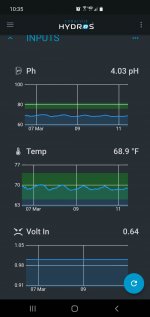
Give thr pH a few days for the scale to change. The Volts in Is a generic type of 0-10v analog input. If so I have already reported an issue with this type input. Mine don't graph at all on that type of input.
 
Had no issues upgrading, guess I got lucky. Does anyone know If the 0-10v bug was fixed? I guess I can get the multimeter out and check.
 
Had no issues upgrading, guess I got lucky. Does anyone know If the 0-10v bug was fixed? I guess I can get the multimeter out and check.
I need to do this also. I have them programmed but do not have anything connected to them yet. If you do this and don't get the correct results let them know about the issue.
 
I need to do this also. I have them programmed but do not have anything connected to them yet. If you do this and don't get the correct results let them know about the issue.

how do i put a ticket in?

I tested output 1 with ‘variable light’ set to 100% and got 1 volt; tested at 50% and got 0.5v so it is sorta working, just not 0-10v but 0-1v
 
I haven’t updated from 165 to 177 yet - can I jump straight to the 177 fix version (178) without installing 177?

Also with a collective is there a preferred order to update firmware on each individual control unit? Thanks
 
I haven’t updated from 165 to 177 yet - can I jump straight to the 177 fix version (178) without installing 177?

Also with a collective is there a preferred order to update firmware on each individual control unit? Thanks
Yes, you can go right to 178.
 
@Danny @Carlos

I updated to 178. Performed the same test as above and it looks to be working! Granted I didn't do extensive testing but 100% was 10v and 60% was 6v

Carlos, @Don , and rest of team -
Thanks for all the hard work on this. I am sure this a much harder process than most realize and even though there’s a lot of pressure for change it seems like it’s coming along, even if it takes time, still worth it.
 
@Danny @Carlos

I updated to 178. Performed the same test as above and it looks to be working! Granted I didn't do extensive testing but 100% was 10v and 60% was 6v

Carlos, @Don , and rest of team -
Thanks for all the hard work on this. I am sure this a much harder process than most realize and even though there’s a lot of pressure for change it seems like it’s coming along, even if it takes time, still worth it.
How did you get 178. I don't see it.
 
Back
Top