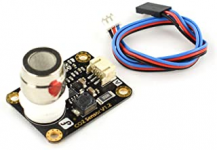
0-10v break out box + temp/humidity sensor

Users Who Are Viewing This Thread (Total: 0, Members: 0, Guests: 0)

HydrosFan

New member
Joined
Mar 13, 2021
Messages
9
Reaction score
1
Location
USA
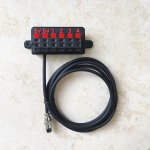
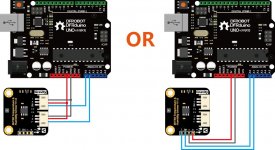
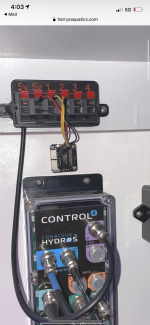
On Harry's aquatics hydros 0-10v break out box page, it mentions you can use this temp/humidity sensor on it. Beginner question here...... where do the blue wires go on harry's breakout box? Do both blue go on the number one positive terminals or both on negative? Or one blue on a positive and one blue on a negative? Thanks.
h1.jpgh2.jpg
 
Red is power (Upper left 5v), black is ground (any lower terminal), blue is the signal output. So you can connect humidity output to 1 channel, and temperature output to another. Etc
 
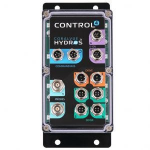
So blue wires goes to a Channel. I'm not sure what channel means. Would that be to the hydros Purple 0-10v, orange drive or Green sense connector? If so, we buy the right bare connector and run that blue wire through the connector to the port figuring out the right pin to choose on that port? Thanks in advance.
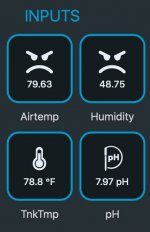
1615668389117.png1615668684754.png
 
So blue wires goes to a Channel. I'm not sure what channel means. Would that be to the hydros Purple 0-10v, orange drive or Green sense connector? If so, we buy the right bare connector and run that blue wire through the connector to the port figuring out the right pin to choose on that port? Thanks in advance.
View attachment 782View attachment 783

No no. I assume you bought the breakout box, which plugs into the 0-10v Input. It makes it plug and play. No other ports are required on the Control4 (besides the 0-10v port it plugs into). All wires just enter my breakout box, no connectors required.

Red bare wire goes into the upper left red 5v port of the breakout. That gives the sensor power.

Black bare wire goes into any lower black port of the breakout box.

Blue goes into an upper red 1-4 channel input (right side) on the breakout box. It is labeled 1-4 on the breakout box, that corresponds to the 4 channels of the Control4.

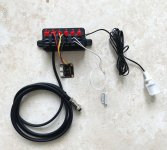
Please IGNORE the cable colors in the following image- I lost the original wire harness. It just demonstrates wires going into the breakout. Strip some wire back (~1/4”) to expose the copper. Press down on the tab for the port you are using, insert wire, release tab.

I thought this was something most people would know to to, but I will modify my instruction sheet with a step by step this evening.

5368B19C-D560-4C43-BD26-8E580AD58C88.png
 
Last edited:
I think Harold was talking about one of the channels on the breakout box labeled 1-4.

Yes, exactly. The purpose of the breakout box is that users can attach wires directly to it instead of having to fiddle with connectors by themselves.
 
Ok thanks, appreciate the help. I'm researching first to try and understand before a Hydros or breakout-box purchase. I don't have either just yet. I sure am glad for the forum.
 
Yes, exactly. The purpose of the breakout box is that users can attach wires directly to it instead of having to fiddle with connectors by themselves.
I've kicking around getting one of those. Silly question I'm sure, but once it's plugged in how do you access the temperature and humidity? How to you set up the input?
 
I've kicking around getting one of those. Silly question I'm sure, but once it's plugged in how do you access the temperature and humidity? How to you set up the input?

You add a 0-10v input, type analog, choose what 0-10v channel it is connected to, then insert the sensors scale factor and offset. That last part *sounds scary*, but are simply numbers that come with the sensor data sheet. I can give you the actual valves to enter there if you need them, as it is always the same for that sensor.

17B25BDC-9DA9-413C-ACDE-60A0E4214CD2.jpeg
 
How expensive is it to do this mod ?
Is there a part list for what I might need?
And or a guide I’m interested in this too. I currently have the Hydros 4
 
How expensive is it to do this mod ?
Is there a part list for what I might need?
And or a guide I’m interested in this too. I currently have the Hydros 4

I sell the breakout box for $39.99 shipped

Of course you can also DIY one if you are good with soldering and wiring. The one I offer is in a custom 3D printed housing with the soldering and assembly already completed.

The humidity + temperature sensor is about $12 from amazon or DFRobot direct, and then you can connect a variety of other switches to the remaining 2 channel inputs.

IMG_8737.jpg
 
Last edited:
Wou
I sell the breakout box for $39.99 shipped (currently marked out of stock, more coming early this week).

Of course you can also DIY one if you are good with soldering and wiring. The one I offer is in a custom 3D printed housing with the soldering and assembly already completed.

The humidity + temperature sensor is about $12 from amazon or DFRobot direct, and then you can connect a variety of other switches to the remaining 2 channel inputs.

View attachment 786 Not quite handy when it comes to electronic programming and building would you sell a plug and play? With the sensors already? I would be willing to pay for the entire thing lol the whole programming hurts my brain 🧠 lol 😆
 
I sell the breakout box for $39.99 shipped

Of course you can also DIY one if you are good with soldering and wiring. The one I offer is in a custom 3D printed housing with the soldering and assembly already completed.

The humidity + temperature sensor is about $12 from amazon or DFRobot direct, and then you can connect a variety of other switches to the remaining 2 channel inputs.

View attachment 786

Ok, so I went to your website and did some reading now I’m better informed! And I’ve come to a decision that I want to add the ambient temperature, the ambient humidity, and I would like the CO2 as well.

now I see you have a link for the inexpensive sensors however where can I get the CO2 sensor?

my other question is where do the sensors mount after they are wired to the brake out just in the cabinet area or do they go somewhere else?
 
Most CO2 sensors that output a 0-5v are in the $75-150 range, depending on the model and if it has a built in display or calibration features.

Typically these sensors come with either a short wire or no wire at all. I just placed it next to the breakout because I wanted to know the humidity in my tank stand, to control a ventilation fan. You can extend the wire to get the sensor further away.

CO2 sensors are available on DFRobot, Ebay, amazon, etc. They need to have an analog output.

Worth mentioning that the 5v supply on the breakout box can supply a max of 150ma, and most CO2 sensors utilize more than that. You would need to power them from a different power supply, or even the USB outputs of the Hydros bars.

 
Last edited:
Most CO2 sensors that output a 0-5v are in the $75-150 range, depending on the model and if it has a built in display or calibration features.
Harry, your the best.
Ordered the temp/humidity thing yesterday on Amazon. Installed it today with the help of your instructions and it works great.
Thanks for this time and all your help in my Hydros journey.
 
Harry, your the best.
Ordered the temp/humidity thing yesterday on Amazon. Installed it today with the help of your instructions and it works great.
Thanks for this time and all your help in my Hydros journey.

Thats great, glad you found it easy! If you want to add any other sensor it would be the same procedure.

My next 'Hydros addition will be adding an analog current sensor to graph the total power use of my system. As long the sensor outputs in the 0-10v range it should be *compatible. Not sure why I want that data... but hey, its data.
*compatible to integrate via 0-10v, depending on the sensor it may need an external power supply.

So on my Control4 I will have: Switch Box, Ambient Humidity, Ambient CO2, Total Current Draw.
 
Last edited:
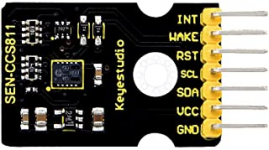
Anyone know if the CO2 sensor is one of these? i found 2 types on amazon but didnt know which one? OR maybe im way off base here. Thanks.
"KEYESTUDIO CCS811 Carbon Dioxide CO2 VOCs Air Quality Gas Sensor" $15 dollars
1615817101865.png
"DFROBOT Gravity: Analog CO2 Gas Sensor " $55 dollars
1615817287608.png
 
Back
Top