

JeffB418
HYDROS Expert
Here is some advanced information on how to setup a more complex step of multiple Hydros devices using the Hydros Command Bus. NOTE: THIS INFORMATION IS SUBJECT TO CHANGE. Coralvue releases new updates that may change how things look, act, or behave. So do note that when reviewing this information. - Updated 5/2024
----------------------------------------------------------------------------------------------------------------------------------
Basic Rule of Thumb for MOST users: If only using standard command bus cables (data and power) in a collective, DO NOT mix the Hydros Control Power Supplies (the wall wort supply that comes with Starter Packs) with any Hydros device that has its own dedicated power supply (XP8/Launch/WE/WELE/XD/X10/Kracken). YOU CAN mix multiple Hydros devices that have dedicated power supplies/sources(XP8/Launch/WE/WELE/XD/X10/Kracken). You CAN NOT use multiple Hydros Control Power Supplies (the wall wort supply that comes with Starter Packs) in the same collective.
----------------------------------------------------------------------------------------------------------------------------------
So some information on the Collective. There is a lot here, and I deep dive into some items that you need to understand for bigger systems. Coralvue is working on a comprehensive instruction for all this stuff, but I wanted to clear up some questions ahead of time.
- Command Bus: If you want to share input/output control/status between any Hydros Control (X2/X3/X4/Launch/XP8/X10/WELE/WEV1/WEV2/KRAKEN/ECT), you MUST have them hardwired using command bus cables. This is because they use dedicated CanBus to share and control that info. You can run Hydros devices separately but can't share input/outputs. You can access all devices with 1 account and in the app, just have to tab to each device. Typically if you have multiple Controls on the same system, you want to be running a Collective.
-Collective: If you have more than 1 device in a Collective, it provides redundancy in case of a module failure. By default you will get wifi/connection and programming redundancy. Based on notes below, you can also get power redundancy. All the devices in a Collective will run the SAME code. One device will act as the MASTER device in the collective. The green icon below shows you which device is the master. Under the DEVICES tab within a Collective, you can change the priority setting of your Collective devices. This can be handy based on the position of devices in respect to your wifi router.

- Topologies: Hydros Command Bus supports only straight/bus and NOT star topologies. Standard cables available currently only make straight topologies.
- Collective/Command Bus Cables: There are 2 types of a Command Bus cable, the first is the standard data + power cable (6ft Command Bus Cable). Coralvue makes a few lengths of this type of cable. The second type of cable is a data only cable. These MUST be used if you want to have a cable more than 15 ft long. These only have the data/ground lines connected and leave the power line disconnected. You can also use a data long cable if you want to use multiple power supplies in a Collective for redundancy/protection. 25 ft and 50 ft DATA Only Hydros Command Bus Cables are available from CoralVue here (Data Only Cables). If you want a custom cable of another length you might be able to contact Coralvue Support and request a custom assembly but no guarantees if they can support all requests.
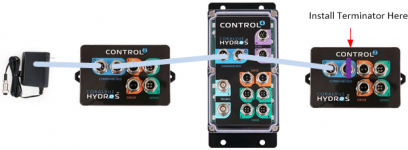
- Terminators: For Collectives to properly and reliability communicate there MUST be at least 1 Communication Bus terminator installed at either end of your collective. For example if you have the following 3 devices in your collective with normal Command Bus cables (data and power), install the terminator at the end of your chain. Terminators are sold separately and do not come with the command bus cable (Hydros Terminator). You can also order Hydros Power Supplies with a terminator built in for situations where you do not have an open command bus port at either end of your Collective setup. That version of the supply can be found here but make sure to order the correct version (both non-terminated and terminated available): Hydros Terminated Supply. Starter kits came with both NON terminated and terminated versions. Older/earlier are NOT terminated but newer units started shipping with only terminated. Only way to tell if you have a terminated supply is to open the GX connector and look for a resistor or use a multimeter and ohm out pins 2/3 for a 100-150 ohm resistor. If you are handy, you can just install a 120 ohm resistor between pins 2/3 on the GX12-5 connector to make a standard power supply a terminated power supply. Running 2 terminators on each end of your bus is the most reliable setup but not required unless you are running a REALLY long (25ft or more) collective bus.
- Power Sources:
There are 3 types of power sources for a Hydros collective. The standard wall wort above that connects to the command bus port is the first type. This is commonly called the Hydros Control Power Supply. The second type of power source are the types that connect to a dedicated 4 pin power input port on a Hydros Control. This type of power source is commonly used on devices like the X10, WE, WELE, XD, MAVEN, and in the future more. IF A DEVICE HAS A 4 PIN POWER PORT, IT MUST HAVE THIS CONNECTION POWERED TO WORK. This is because this type of device requires more power than the command bus can supply. The third type of power source is those that have a direct AC cord and an internal power supply (no 4 port power connector). These devices are currently the XP8, Launch, and the Kraken (even tho the power supply is external).
These power sources can be broken into 2 classes, PROTECTED and UNPROTECTED. A protected source has built in protection to prevent back voltage from damaging it from another supply source. An unprotected source, does not have protection and will become damaged if voltage is applied from another supply (either protected or non). ALL power sourced are PROTECTED EXCEPT for the first power source above, the wall wort command bus Hydros Control Power Supply. So if you use a Hydros Control Power Supply in your collective, you MUST ensure that it is the ONLY power source either in the entire collective if using standard command bus cables OR in the section of your collective thats isolated from the rest of the collective by using data only command bus cables. Sometimes protected power sources are also called "power givers" by Coralvue.
Rule of thumb: If only using standard command bus cables (data and power) in a collective, DO NOT mix the Hydros Control Power Supplies (the wall wort supply that comes with Starter Packs) with any Hydros device that has its own dedicated power supply (XP8/Launch/WE/WELE/XD/X10/Kracken). YOU CAN mix multiple Hydros devices that have dedicated power supplies/sources(XP8/Launch/WE/WELE/XD/X10/Kracken). You CAN NOT mix multiple Hydros Control Power Supplies (the wall wort supply that comes with Starter Packs) in the same collective.
- Multiple Power Supplies/Standard Command Bus Cable(s): If you have multiple devices connected with normal Command Bus cables (Data and Power), you CAN NOT have 2 command bus Hydros Control Power Supplies connected at the same time. Both will be driving the system and one will likely burn out. If you would like redundancy in power, see the next bullet. Similarly, you can NOT mix PROTECTED and UNPROTECTED supplies in this type of collective. YOU CAN mix multiple PROTECTED supplies in this type of collective. For example you CAN have an XP8, Wave Engine, Kraken, and X10 all connected together with standard Command Bus Cables. This type of setup also provides power supply redundancy. Take AWAY: the ONLY power supply you have to be careful with when designing your collective is the wall wort Hydros Control Power Supply that connects directly to the Command Bus, all other power sources CAN be used together.
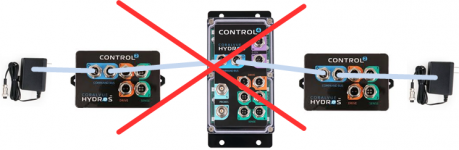
- Redundant Power Supplies (standard Command Bus cables): You can have redundant power sources when using multiple PROTECTED power supply sources (as described above) when using the standard command bus cable. If one supply goes down, another supply will pick up the slack and at minimum power the brain of the device who's power supply died. Now, since its local source is no longer working.... dedicated ports or devices on that specific control may not work. For example if you have a XP8 and an X10 both in a collective and the X10 power supply goes down... the dosers on the X10 will not work but the brain and sensor ports will continue to work until the supply is replaced since the XP8 is providing bus power as well.
- Redundant Power Supplies (data only Command Bus cables):
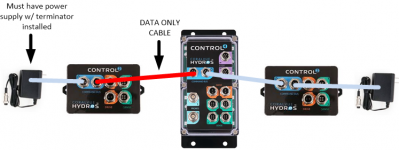
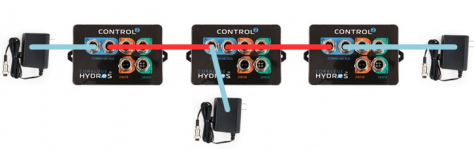
Powered command bus is limited to 15 ft between devices as stated above, so if you have the following scenario where you are going more than 15 ft and using a Data Only Command Bus Cable (Data only, no power), this can also be used in systems where you want to run multiple power supplies to have redundancy as well. Also since the power supply is taking up the last port on both ends, and the system requires at least 1 terminator at one end, you must use a power supply that has an integrated terminator. See above about notes on Terminated Supplies under the Terminator section.
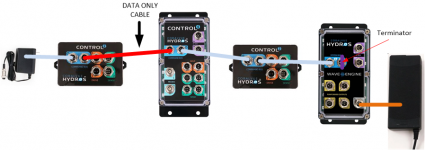
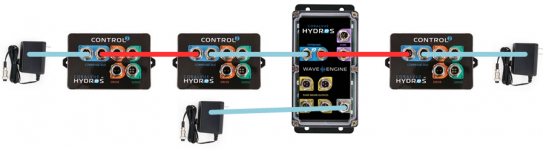
- Another option for powering your Hydros devices is using the Wave Engine. So in the case below you have an extra port to put the standard terminator on the wave engine since power is supplied via a dedicated port. Also no need to use a power supply on the left with a terminator since you have at least 1 on either end. Any PROTECTED power source device can be used in this instance instead of the Wave Engine. You could even have additional PROTECTED power sources on the right side of this collective since they will be all isolated from the left UNPROTECTED supply by the data only cable.
- You can also connect Hydros devices up with Command Bus cables if you just want to share power. You are not required to make a Collective. You can still have any, or all devices run as independent controllers if you wish, you just don't have the abilities to share inputs/outputs and have wifi redundancy. If you connect Hydros devices in this configuration, you do NOT need a terminator. Terminators are only required if you run a Collective.
- Another situation you could possibly have is an unpowered "island". If you use multiple data only Command Bus cables, you could have a device that is isolated in the middle of your bus topology and no way to power it. There's 2 options in this situation. Use a custom made Command Bus cable that allows you to also apply power to the middle C2 device. This type of cable must be DIY. You might be able to reach out to Coralvue Support and ask for a custom solution but no guarantees. Or you could also use a Wave Engine (or other PROTECTED supply device) connected to the middle C2 with a standard Command Bus cable.
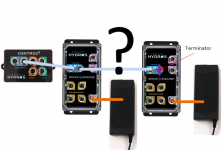
- As for multiple Wave Engines on the same Hydros command bus, you CAN have them connected and powered on the same Collective via Standard Command Bus Cables. This post has been updated but the below image is outdated, please ignore the ?. This configuration is VALID. Like we stated above, you CAN have multiple PROTECTED power supply sources connected together since they all have protection from back voltage.
- Future Hydros Devices: As newer Hydros devices are released from Coralvue, I will update this section with any changes. The general assumption is that any new Hydros device that is released with Command Bus ports, WILL be able to be added to your collective just as any other devices.
- Ice Cap Battery Backup & Kraken: Coralvue now offers an adapter to allow you to power your Wave Engine off the V3 Icecap Battery (LINK). You will need this adapter kit as well (LINK). This is used to power 1 Wave Engine. In addition, any Hydros devices that are connected to the Wave Engine via standard Command Bus Cables (Power+Data), will ALSO run off this battery. Effectively you can run an entire Collective off this battery pack. Currently Coralvue does not sell an adapter for adapting this battery to the Command Bus power pins. In theory you could buy the Wave Engine adapter kit above and modify it to use GX12-5 connectors instead of GX12-4 and use it to power your Collective if you do not have a Wave Engine. But this has not been tested by anyone I know of. If you try this, make sure to refer to the correct pinout of the GX12-5 Command Bus Port and connect the battery ONLY to the correct power pins (see other post on pinouts). The Kraken also will provide battery backup power to the Command Bus if you have a 12V battery connected to the Kraken. Any device on the Command Bus will get bus power from this battery. BUT if any of those PROTECTED power devices (X10, XD, WE, WELE, ETC) have their power supplies connected to normal wall power, then ONLY their brains will run if there is a power outage. If you want more functionality of a device when power goes out, make sure to connect any of these devices with a 4 pin power port to your Kraken's Force Ports (and have them enabled in your battery mode as well). Also, a PROTECTED power source device is considered PROTECTED if it gets its power from EITHER its standard power supply OR a Kraken Force Port. The protection is built inside the Hydros Control, and not the power supply (hence why the direct to command bus power supply is NOT protected).
----------------------------------------------------------------------------------------------------------------------------------
Basic Rule of Thumb for MOST users: If only using standard command bus cables (data and power) in a collective, DO NOT mix the Hydros Control Power Supplies (the wall wort supply that comes with Starter Packs) with any Hydros device that has its own dedicated power supply (XP8/Launch/WE/WELE/XD/X10/Kracken). YOU CAN mix multiple Hydros devices that have dedicated power supplies/sources(XP8/Launch/WE/WELE/XD/X10/Kracken). You CAN NOT use multiple Hydros Control Power Supplies (the wall wort supply that comes with Starter Packs) in the same collective.
----------------------------------------------------------------------------------------------------------------------------------
So some information on the Collective. There is a lot here, and I deep dive into some items that you need to understand for bigger systems. Coralvue is working on a comprehensive instruction for all this stuff, but I wanted to clear up some questions ahead of time.
- Command Bus: If you want to share input/output control/status between any Hydros Control (X2/X3/X4/Launch/XP8/X10/WELE/WEV1/WEV2/KRAKEN/ECT), you MUST have them hardwired using command bus cables. This is because they use dedicated CanBus to share and control that info. You can run Hydros devices separately but can't share input/outputs. You can access all devices with 1 account and in the app, just have to tab to each device. Typically if you have multiple Controls on the same system, you want to be running a Collective.
-Collective: If you have more than 1 device in a Collective, it provides redundancy in case of a module failure. By default you will get wifi/connection and programming redundancy. Based on notes below, you can also get power redundancy. All the devices in a Collective will run the SAME code. One device will act as the MASTER device in the collective. The green icon below shows you which device is the master. Under the DEVICES tab within a Collective, you can change the priority setting of your Collective devices. This can be handy based on the position of devices in respect to your wifi router.
- Topologies: Hydros Command Bus supports only straight/bus and NOT star topologies. Standard cables available currently only make straight topologies.
- Collective/Command Bus Cables: There are 2 types of a Command Bus cable, the first is the standard data + power cable (6ft Command Bus Cable). Coralvue makes a few lengths of this type of cable. The second type of cable is a data only cable. These MUST be used if you want to have a cable more than 15 ft long. These only have the data/ground lines connected and leave the power line disconnected. You can also use a data long cable if you want to use multiple power supplies in a Collective for redundancy/protection. 25 ft and 50 ft DATA Only Hydros Command Bus Cables are available from CoralVue here (Data Only Cables). If you want a custom cable of another length you might be able to contact Coralvue Support and request a custom assembly but no guarantees if they can support all requests.
- Terminators: For Collectives to properly and reliability communicate there MUST be at least 1 Communication Bus terminator installed at either end of your collective. For example if you have the following 3 devices in your collective with normal Command Bus cables (data and power), install the terminator at the end of your chain. Terminators are sold separately and do not come with the command bus cable (Hydros Terminator). You can also order Hydros Power Supplies with a terminator built in for situations where you do not have an open command bus port at either end of your Collective setup. That version of the supply can be found here but make sure to order the correct version (both non-terminated and terminated available): Hydros Terminated Supply. Starter kits came with both NON terminated and terminated versions. Older/earlier are NOT terminated but newer units started shipping with only terminated. Only way to tell if you have a terminated supply is to open the GX connector and look for a resistor or use a multimeter and ohm out pins 2/3 for a 100-150 ohm resistor. If you are handy, you can just install a 120 ohm resistor between pins 2/3 on the GX12-5 connector to make a standard power supply a terminated power supply. Running 2 terminators on each end of your bus is the most reliable setup but not required unless you are running a REALLY long (25ft or more) collective bus.
- Power Sources:
There are 3 types of power sources for a Hydros collective. The standard wall wort above that connects to the command bus port is the first type. This is commonly called the Hydros Control Power Supply. The second type of power source are the types that connect to a dedicated 4 pin power input port on a Hydros Control. This type of power source is commonly used on devices like the X10, WE, WELE, XD, MAVEN, and in the future more. IF A DEVICE HAS A 4 PIN POWER PORT, IT MUST HAVE THIS CONNECTION POWERED TO WORK. This is because this type of device requires more power than the command bus can supply. The third type of power source is those that have a direct AC cord and an internal power supply (no 4 port power connector). These devices are currently the XP8, Launch, and the Kraken (even tho the power supply is external).
These power sources can be broken into 2 classes, PROTECTED and UNPROTECTED. A protected source has built in protection to prevent back voltage from damaging it from another supply source. An unprotected source, does not have protection and will become damaged if voltage is applied from another supply (either protected or non). ALL power sourced are PROTECTED EXCEPT for the first power source above, the wall wort command bus Hydros Control Power Supply. So if you use a Hydros Control Power Supply in your collective, you MUST ensure that it is the ONLY power source either in the entire collective if using standard command bus cables OR in the section of your collective thats isolated from the rest of the collective by using data only command bus cables. Sometimes protected power sources are also called "power givers" by Coralvue.
Rule of thumb: If only using standard command bus cables (data and power) in a collective, DO NOT mix the Hydros Control Power Supplies (the wall wort supply that comes with Starter Packs) with any Hydros device that has its own dedicated power supply (XP8/Launch/WE/WELE/XD/X10/Kracken). YOU CAN mix multiple Hydros devices that have dedicated power supplies/sources(XP8/Launch/WE/WELE/XD/X10/Kracken). You CAN NOT mix multiple Hydros Control Power Supplies (the wall wort supply that comes with Starter Packs) in the same collective.
- Multiple Power Supplies/Standard Command Bus Cable(s): If you have multiple devices connected with normal Command Bus cables (Data and Power), you CAN NOT have 2 command bus Hydros Control Power Supplies connected at the same time. Both will be driving the system and one will likely burn out. If you would like redundancy in power, see the next bullet. Similarly, you can NOT mix PROTECTED and UNPROTECTED supplies in this type of collective. YOU CAN mix multiple PROTECTED supplies in this type of collective. For example you CAN have an XP8, Wave Engine, Kraken, and X10 all connected together with standard Command Bus Cables. This type of setup also provides power supply redundancy. Take AWAY: the ONLY power supply you have to be careful with when designing your collective is the wall wort Hydros Control Power Supply that connects directly to the Command Bus, all other power sources CAN be used together.
- Redundant Power Supplies (standard Command Bus cables): You can have redundant power sources when using multiple PROTECTED power supply sources (as described above) when using the standard command bus cable. If one supply goes down, another supply will pick up the slack and at minimum power the brain of the device who's power supply died. Now, since its local source is no longer working.... dedicated ports or devices on that specific control may not work. For example if you have a XP8 and an X10 both in a collective and the X10 power supply goes down... the dosers on the X10 will not work but the brain and sensor ports will continue to work until the supply is replaced since the XP8 is providing bus power as well.
- Redundant Power Supplies (data only Command Bus cables):
Powered command bus is limited to 15 ft between devices as stated above, so if you have the following scenario where you are going more than 15 ft and using a Data Only Command Bus Cable (Data only, no power), this can also be used in systems where you want to run multiple power supplies to have redundancy as well. Also since the power supply is taking up the last port on both ends, and the system requires at least 1 terminator at one end, you must use a power supply that has an integrated terminator. See above about notes on Terminated Supplies under the Terminator section.
- Another option for powering your Hydros devices is using the Wave Engine. So in the case below you have an extra port to put the standard terminator on the wave engine since power is supplied via a dedicated port. Also no need to use a power supply on the left with a terminator since you have at least 1 on either end. Any PROTECTED power source device can be used in this instance instead of the Wave Engine. You could even have additional PROTECTED power sources on the right side of this collective since they will be all isolated from the left UNPROTECTED supply by the data only cable.
- You can also connect Hydros devices up with Command Bus cables if you just want to share power. You are not required to make a Collective. You can still have any, or all devices run as independent controllers if you wish, you just don't have the abilities to share inputs/outputs and have wifi redundancy. If you connect Hydros devices in this configuration, you do NOT need a terminator. Terminators are only required if you run a Collective.
- Another situation you could possibly have is an unpowered "island". If you use multiple data only Command Bus cables, you could have a device that is isolated in the middle of your bus topology and no way to power it. There's 2 options in this situation. Use a custom made Command Bus cable that allows you to also apply power to the middle C2 device. This type of cable must be DIY. You might be able to reach out to Coralvue Support and ask for a custom solution but no guarantees. Or you could also use a Wave Engine (or other PROTECTED supply device) connected to the middle C2 with a standard Command Bus cable.
- As for multiple Wave Engines on the same Hydros command bus, you CAN have them connected and powered on the same Collective via Standard Command Bus Cables. This post has been updated but the below image is outdated, please ignore the ?. This configuration is VALID. Like we stated above, you CAN have multiple PROTECTED power supply sources connected together since they all have protection from back voltage.
- Future Hydros Devices: As newer Hydros devices are released from Coralvue, I will update this section with any changes. The general assumption is that any new Hydros device that is released with Command Bus ports, WILL be able to be added to your collective just as any other devices.
- Ice Cap Battery Backup & Kraken: Coralvue now offers an adapter to allow you to power your Wave Engine off the V3 Icecap Battery (LINK). You will need this adapter kit as well (LINK). This is used to power 1 Wave Engine. In addition, any Hydros devices that are connected to the Wave Engine via standard Command Bus Cables (Power+Data), will ALSO run off this battery. Effectively you can run an entire Collective off this battery pack. Currently Coralvue does not sell an adapter for adapting this battery to the Command Bus power pins. In theory you could buy the Wave Engine adapter kit above and modify it to use GX12-5 connectors instead of GX12-4 and use it to power your Collective if you do not have a Wave Engine. But this has not been tested by anyone I know of. If you try this, make sure to refer to the correct pinout of the GX12-5 Command Bus Port and connect the battery ONLY to the correct power pins (see other post on pinouts). The Kraken also will provide battery backup power to the Command Bus if you have a 12V battery connected to the Kraken. Any device on the Command Bus will get bus power from this battery. BUT if any of those PROTECTED power devices (X10, XD, WE, WELE, ETC) have their power supplies connected to normal wall power, then ONLY their brains will run if there is a power outage. If you want more functionality of a device when power goes out, make sure to connect any of these devices with a 4 pin power port to your Kraken's Force Ports (and have them enabled in your battery mode as well). Also, a PROTECTED power source device is considered PROTECTED if it gets its power from EITHER its standard power supply OR a Kraken Force Port. The protection is built inside the Hydros Control, and not the power supply (hence why the direct to command bus power supply is NOT protected).
Attachments
Last edited:


