
Fuppets
New member
I want to run an under cabinet light off of the strip plug 5, the USBs. I'd like to set it up so that I turn it on and off using the app, but have it time out and turn off if I leave it on by accident. How can I setv that up.
Follow along with the video below to see how to install our site as a web app on your home screen.
Note: This feature may not be available in some browsers.


The AWS server might have timed out. Please restart the unit, and it should be ok. We got a new firmware coming out soon that will fix these issues.Thx. I set all this up. Waiting on the light to arrive. Now my control 2 LEDs are chasing green. What does that mean?

I just set this up on my nature tank... Thanks for the cheat sheet! \,,/You will need to make 2 outputs to do this. The first output you make will be your manual control of your strip, this will be set to OFF or ON via by you using the app. The second one will be tied to your 5V USB outlet on your wifi strip and will run in AUTO. By running in AUTO you can have it automatically turn off after a certain amount of time.
First make a constant type output for your manual control of your strip, in this example I called it "LED Override B". The details within this output wont matter since you will never run this output in auto, only force it OFF or ON. Also do not assign an Output Device to this output either. Its basically a "false output" or "virtual output". On your dashboard you will turn this OFF or ON to control your LED strip.
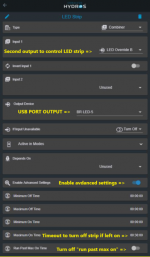
Next the output for your 5V strip for the USB output:
View attachment 872
Use a combiner type port but only use 1 input, link this to the output you made in the first step.
Tie this to the physical port for powering your LED strip.
Enable advanced settings so you can use the Max On Time function.
Set the max on time to how long you want it to run before it turns it off.
Then disable the "Run Past Max On Time" so that Hydros turns off your LED strip after the timer expires.
Should be that easy, use the first output you generated as your OFF/ON switch then run the second output always in AUTO and that will override the state of your manual control output (ON/OFF) in the event of a timeout.