

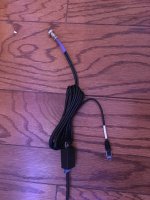
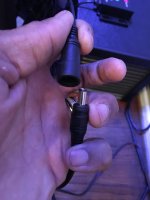
I’m using (1) wave engine apex link connected to (1) CAT5 female to female adapter connected to a reefbrite dual channel dimmer connected on one end to (2) reefbrite XHO lights on one end and connected to (2) power blocks on the other end.
Navigation
Install the app
How to install the app on iOS
Follow along with the video below to see how to install our site as a web app on your home screen.
Note: This feature may not be available in some browsers.
More options
You are using an out of date browser. It may not display this or other websites correctly.
You should upgrade or use an alternative browser.
You should upgrade or use an alternative browser.
ReefBrite XHO
- Thread starter tdg910
- Start date
- Tagged users None
Users Who Are Viewing This Thread (Total: 0, Members: 0, Guests: 0)

Danny
HYDROS Expert
So this is what connects to the cable from the Control 4 using a coupler.
 www.reefbrite.com
Reef Brite™ APEX™ Single or Dual channel LED interface – Reef Brite
www.reefbrite.com
Yes sir!!So this is what connects to the cable from the Control 4 using a coupler.
Reef Brite™ APEX™ Single or Dual channel LED interface – Reef Brite
Danny
HYDROS Expert
Since both plugs are made to plug into a Apex port it should work. The only thing common was the coupler and the dimmer since you tried the other plug for the other 2 ports on the Control 4 and got the same issue. The input and output connectors on the Control 4 is the same pinout other than one has inputs and the other has outputs. I don't have one of those cables to check for you. I checked the outputs on all 4 channels of mine and they are working correctly. That should rule out a firmware issue. I would suggest you continue with Carlos on trying to figure out what is happening.
Thanks for helping @DannySince both plugs are made to plug into a Apex port it should work. The only thing common was the coupler and the dimmer since you tried the other plug for the other 2 ports on the Control 4 and got the same issue. The input and output connectors on the Control 4 is the same pinout other than one has inputs and the other has outputs. I don't have one of those cables to check for you. I checked the outputs on all 4 channels of mine and they are working correctly. That should rule out a firmware issue. I would suggest you continue with Carlos on trying to figure out what is happening.

JeffB418
HYDROS Expert
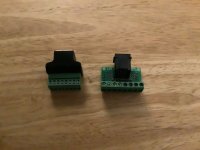
The only questionable item that might be causing issues is the RJ45 coupler. Wonder if it is not a 1 to 1 pin mapping or possibly some passive device on the data lines like a bypass cap. If that's the case you could get something like this. Then use discreate wires between the 2 sides to know for sure what's being connected.
JeffB418
HYDROS Expert
Or you could look at this part: 133513 ERNI Electronics, Inc. | Connectors, Interconnects | DigiKey
The datasheet provided shows a 1 to 1 connection for pins 1-8 https://www.erni.com/fileadmin/import/products/assets/DC0005586.PDF
Just a couple of options, but see what @Carlos recommends first.
The datasheet provided shows a 1 to 1 connection for pins 1-8 https://www.erni.com/fileadmin/import/products/assets/DC0005586.PDF
Just a couple of options, but see what @Carlos recommends first.
- Admin
- #69

So if I understand this correctly, the lights have an ethernet port supposed to connect directly to "the other" controller via their ethernet port. Technically, you would use a regular ethernet port to go from the controller directly to the light.
If that is the case, then this is what you need:
0-10V cable that connects to the 0-10V OUT on the Control: HYDROS WaveEngine 0-10V Quad Cable
An IceCap Y-cable that connects to the ethernet port on the light fixture: IceCap Y Cable
I set of female-to-female 3.5mm adapters to connect the both 3.5mm male ends together: https://www.amazon.com/Ksmile®-Stereo-Adaptor-Connectors-Plated/dp/B01C9U3XI4
Conversely, you could go directly from the HYDROS Control to the light fixture, but it would mean not using the other 2 channels on the Control 0-10V OUT.
HYDROS WaveEngine APX Link
Forgive me if I misunderstood it, and this post does not apply.
If that is the case, then this is what you need:
0-10V cable that connects to the 0-10V OUT on the Control: HYDROS WaveEngine 0-10V Quad Cable
An IceCap Y-cable that connects to the ethernet port on the light fixture: IceCap Y Cable
I set of female-to-female 3.5mm adapters to connect the both 3.5mm male ends together: https://www.amazon.com/Ksmile®-Stereo-Adaptor-Connectors-Plated/dp/B01C9U3XI4
Conversely, you could go directly from the HYDROS Control to the light fixture, but it would mean not using the other 2 channels on the Control 0-10V OUT.
HYDROS WaveEngine APX Link
Forgive me if I misunderstood it, and this post does not apply.
@Carlos i have the Hydros WE APX Link setup now and it’s not working, it’s only dimming one light.
current setup:
C4 0-10v out -> Hydros WE APX Link -> female to female CAT5 adapter -> ReefBrite Dual channel LED interface-> XHO LEDS
the questions are why is this setup only dimming one light fixture? What can be done to get them both dimming?
current setup:
C4 0-10v out -> Hydros WE APX Link -> female to female CAT5 adapter -> ReefBrite Dual channel LED interface-> XHO LEDS
the questions are why is this setup only dimming one light fixture? What can be done to get them both dimming?
- Admin
- #71
Most likely, the problem is the pinout. If you swap the cables and connect the cable that was working to the channel that was not working, does the channel start to work? Or does it still not work at all?
- Admin
- #72
Using the Y-Cable would allow you to isolate the two wires on the channel where one goes to the tip, and the other goes to the sleeve on the 3.5mm jack. Coupling that with the HYDROS WaveEngine 0-10V Quad Cable where the two wires on each channel follow the tip/sleeve pattern, you should have no problems running the two different channels.
If i use the 1&2 cable, only channel 1 dimsMost likely, the problem is the pinout. If you swap the cables and connect the cable that was working to the channel that was not working, does the channel start to work? Or does it still not work at all?
if i use the 3&4 cable, only channel 3 dims
- Admin
- #74
Yeah, it sounds like the issue is the pinout. The wiring used by other controllers is not conventional and not as straightforward. Using an ethernet port for 2 channels when you have 8 wires also not the most efficient way to connect things. It is easy, but for manufacturers, it created the need for custom wiring.If i use the 1&2 cable, only channel 1 dims
if i use the 3&4 cable, only channel 3 dims
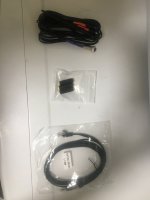
If that is the case, most likely, this is what you will need:
0-10V cable that connects to the 0-10V OUT on the Control: HYDROS WaveEngine 0-10V Quad Cable
An IceCap Y-cable that connects to the ethernet port on the light fixture: IceCap Y Cable
I set of female-to-female 3.5mm adapters to connect them both 3.5mm male ends together: https://www.amazon.com/Ksmile®-Stereo-Adaptor-Connectors-Plated/dp/B01C9U3XI4
To be 100% transparent, we do not have access to the XHO dimming adapter you are using, so we cannot double-check, but it should work.
Danny
HYDROS Expert
That sounds great.
JeffB418
HYDROS Expert
I figured out why you were seeing the issue you were. Turns out the Wave Engine APX adapter cable is not fully wired how the apex is. This is the comparison:If i use the 1&2 cable, only channel 1 dims
if i use the 3&4 cable, only channel 3 dims
| RJ45 Pin | Apex VDM Port | WE APX Cable |
| 3 | Ground | Ground |
| 4 | 0-10V (Ports 1/3) | 0-10V (Ports 1/3) |
| 7 | Ground | Not Populated (NO connection) |
| 8 | 0-10V (Ports 2/4) | 0-10V (Ports 2/4) |
I reviewed a cable I had and it looks like they only used 1 ground per RJ45 for the APX cable and not 2 grounds like the VDM port. Looks like when you use the APX cable to link a wave engine to an Apex VDM, they share a common ground internally so it works fine for using both channels.
But using this cable to interface to the reef brite, their LED driver must be looking for independent grounds for both channels. And since there's no ground on pin 7, channels 2/4 wont work. So this is why only ports 1/3 worked for you. So yeah unfortunately just using the coupler didn't work because I didn't know that pin 7 wasn't populated on the APX cable.
Danny
HYDROS Expert
Using two of these and running the wires between them would work instead of a coupler then.
JeffB418
HYDROS Expert
Correct. You’d need to split the ground from the single side of the APX rj45 to both grounds on the reefbrite RJ45Using two of these and running the wires between them would work instead of a coupler then.
View attachment 888
I actually got the APX to Kessil RJ45 adapter to work with a coupler but that’s because they use 1 ground and 2 signals on a TRS 3.5mm phono plug. So no sep grounds needed.