Firmware wont update from v165 tp v180 Please Help

Users Who Are Viewing This Thread (Total: 0, Members: 0, Guests: 0)

ccclapp

New member
Joined
Apr 16, 2021
Messages
7
Reaction score
0
Location
Usa
Installed new Control 4 tonight and proceeded to install firmware update (as requested by App). Seemed to proceed fine and took about 10 min and seemed to complete. However I continue to get notice of new firmware upgrade from v165 to v180, so seems like upgrade is not completing. Now when I hit "update", controller reboots and flashes all colors and seems fine, but still has v165 FR.

@Don Any solution to this?

Thanks
 
Update: I saw in the firmware section of this forum that one has to trick the app by immediately closing it after initiating the firmware update. I did that and I no longer get the "update firmware" message. However, when I pull the hamburger dots on the right edge of the app/webpage it still indicates the firmware as 164 so either the update still did not take but the notifications have stopped; or, the firmware did proceed but it still reports as the 164
 
Do it again, if it seems unresponsive just wait a few minutes, be patient. Then try re- booting the control device after if still a problem. Had to learn this the hard way too, some better fynamic feedback would be nice!
 
  • Tap on "Install 180" and then immediately kill the app. Do not just minimize it but terminate the app
  • Wait 60 seconds and then start the app again
That will fix the issue.
 
  • Tap on "Install 180" and then immediately kill the app. Do not just minimize it but terminate the app
  • Wait 60 seconds and then start the app again
That will fix the issue.
Hi Carlos , yes I did that and see my 2nd post above stating that the device still shows earlier firmware (but I am no longer getting the message to update the firmware) how does one definitively determine what firmware has been loaded on the device because there is conflicting feedback from it ?

Thanks
 
  • Go into the device and view the status
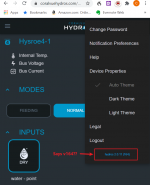
  • Tap on the 3 horizontal dots on the upper RIGHT hand corner
  • Select Device Properties
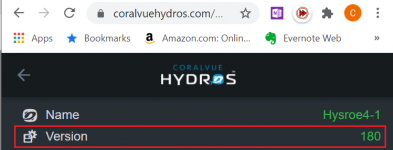
  • At the top, you will see device info including the version which is the version the unit is currently running
 
  • Go into the device and view the status
  • Tap on the 3 horizontal dots on the upper RIGHT hand corner
  • Select Device Properties
  • At the top, you will see device info including the version which is the version the unit is currently running
Yes, I did that and it reports the earlier firmware even though the device is no longer asking me to update the firmware. This is my confusion.

I will try disconnecting and de-powering everything and going through the routine again and see I either get the message giving me the ability to upgrade the firmware , or if the device shows the upgraded firmware as you describe. So far it does not do either.

Thanks for your help
 
I can see your controller from here and it is running 180.
 
Thank you Carlos
See attached screenshot showing FW= 164
I am not doubting you, just pointing out that the controller lists the earlier FW
Thanks

1619106815396.png
 
Carlos

Oh, yes, sorry you are absolutely correct my mistake sorry for the aggravation!!

1619108493927.png
 
Allot of people get confused by that especially with the number being so close to the firmware version.
@Carlos is there way to label it App version to help with confusion.
 
Back
Top