1-10v Switch/Button question

  • Thread starter Thread starter Hind
  • Start date Start date
  • Tagged users None

Users Who Are Viewing This Thread (Total: 0, Members: 0, Guests: 0)

Hind

New member
Joined
May 3, 2021
Messages
14
Reaction score
1
Location
tampa, fl
Hello all,

I’m having trouble setting up a on/off switch on a JBAquatics button box. No matter the combo of button or switch in hydros, the same result is a momentary ON. I need a toggle switch for on and off. I’m using for cabinet lighting. Can someone check me? Thanks in advance!

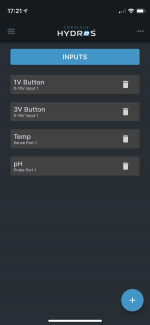
pic below is the button input. Then the power strip 4 output. The lights stay on as long as I hold the button down. I need an on off command like a regular light.
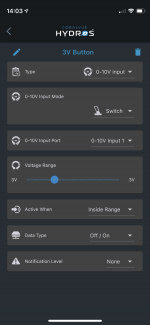
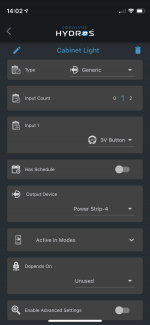
E5A21923-F1A5-4FCC-9E3A-78A5598012A3.png98BEDA2E-EFC2-4870-8086-76F979522959.png
 
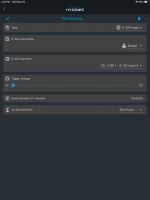
You can set the Event Duration on the push button. I set one for 5 minutes to test it. It stayed on for 5 minutes. I had to push and hold till it responded with on.

FB0DE051-ED53-4485-8151-7775CCC1E70A.png
 
Hi Danny,
After copying your approach it continued to not work. I had to completely delete the 3v input and remake one again and now it works. I know this system is still new, but these bugs are concerning.

I hope that the Input-Mode Switch feature should perform this task rather than making a duration on button mode just to make an on/off simple command? Am I missing something?

On a side note my ATO eye level sensors keep disappearing/reappearing on my status page.. Not sure what that's about... Thanks for the advice.
 
Hi Danny,
After copying your approach it continued to not work. I had to completely delete the 3v input and remake one again and now it works. I know this system is still new, but these bugs are concerning.

I hope that the Input-Mode Switch feature should perform this task rather than making a duration on button mode just to make an on/off simple command? Am I missing something?

On a side note my ATO eye level sensors keep disappearing/reappearing on my status page.. Not sure what that's about... Thanks for the advice.
I have 25 inputs setup and have never had one disappear before. I am not sure about what could case that. @Carlos do you have any idea on disappearing inputs?

364AE9C2-C17D-4162-852D-A978111BD0C1.png
 
Last edited:
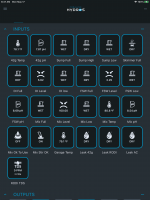
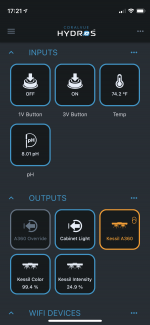
Here is screenshot of my phone status, inputs, and inputs on my PC.
It was all working on the tiles about an hour ago, now gone. :(
29F9F5E1-BD7F-41A8-ACE9-5CC680AE43EE.pngAA37B860-991F-49A0-A903-7889C303CD8E.pngFB88466A-F79C-4599-9D7D-DC3D1B5D24BB.jpeg
 
What happens if you power down the control 4 and power it back up? Do they show up again?
 
I rebooted my C4, but the two-level sensors and the ATO pump output I programed are still missing on the Status screen. In the Add/edit of Input and Output, it's all missing. It's like it just deleted them all.

I re-recreated the two eye-level inputs and my ATO pump output and they are on the status page now. I'll let you know if this happens again.
 
No. I wasn’t aware this was necessary. I will ensure I exit on the mobile app. Thanks for the responses.
 
No. I wasn’t aware this was necessary. I will ensure I exit on the mobile app. Thanks for the responses.
Not sure but I always exit when I am done. That way it opens up with the most current data. That is the only way I know to reset the app if that is the issue instead of the control unit.
 
Hello all,

I’m having trouble setting up a on/off switch on a JBAquatics button box. No matter the combo of button or switch in hydros, the same result is a momentary ON. I need a toggle switch for on and off. I’m using for cabinet lighting. Can someone check me? Thanks in advance!

pic below is the button input. Then the power strip 4 output. The lights stay on as long as I hold the button down. I need an on off command like a regular light ...

What you are describing is a stateful output. That is, it remembers the previous state of conditions that no longer exist. In this case, it needs to remember that the on switch was pressed more recently than the off switch, so the output should be on or vice versa. There is no way to determine based on current input whether the output should be on or off.

We do not currently support stateful outputs. I am not aware of any competitive system that does either. However, this is actively being developed and will be in one of the next few releases.
 
Not sure if this is helpful, but here is the product button box I am using with the instructions.
https://www.jbaquaticsllc.com/hydros-0-5v-button-box


Quoted from his site: "The second type of button control is the use of an Input mapped to a physical button. This method allows you to map a Hydros input to any of your physical box buttons and in turn use that input to control any output or outputs you wish. This is handy if you want to use a button to turn off and on your main pump or skimmer for example."
 
Not sure if this is helpful, but here is the product button box I am using with the instructions.
https://www.jbaquaticsllc.com/hydros-0-5v-button-box


Quoted from his site: "The second type of button control is the use of an Input mapped to a physical button. This method allows you to map a Hydros input to any of your physical box buttons and in turn use that input to control any output or outputs you wish. This is handy if you want to use a button to turn off and on your main pump or skimmer for example."
Unfortunately that statement is slightly ambiguous. A button can turn something off or something on but not both. It can be programmed to stay in that state for a particular time period. And it can be programmed to either restart the time period when pressed again or to end the time period when it is pressed again. You could come very close to what you want with a single button. Set it's event duration very long (23:59) and set OnSecondPress to EndEvent. Then when you press it the output will come on and will go off after a day. Or if you press it again it will turn off immediately.
 
Unfortunately that statement is slightly ambiguous. A button can turn something off or something on but not both. It can be programmed to stay in that state for a particular time period. And it can be programmed to either restart the time period when pressed again or to end the time period when it is pressed again. You could come very close to what you want with a single button. Set it's event duration very long (23:59) and set OnSecondPress to EndEvent. Then when you press it the output will come on and will go off after a day. Or if you press it again it will turn off immediately.
Exactly. This is how I created my cabinet light switch, and an override OFF for my display light. I'll keep this info in mind when brainstorming what other cool ways to use this button box ( I have 3 more buttons to use :). Thanks, DON
 
Unfortunately that statement is slightly ambiguous. A button can turn something off or something on but not both. It can be programmed to stay in that state for a particular time period. And it can be programmed to either restart the time period when pressed again or to end the time period when it is pressed again. You could come very close to what you want with a single button. Set it's event duration very long (23:59) and set OnSecondPress to EndEvent. Then when you press it the output will come on and will go off after a day. Or if you press it again it will turn off immediately.

Ah good catch. When I wrote this tutorial I assumed setting the time to 0 was equal to an indefinite state but as you pointed out that’s not the case. I’ll have to update this to say use a long timer to make it effectively act like a switch but with the understood limit that after a max of 24 hrs it will always revert back to the default state. If you wanted an indefinite switch control you’d have to use a dedicated switch to a single 0-10v input to achieve that.
 
Back
Top