Firmware Fails to Install

Users Who Are Viewing This Thread (Total: 0, Members: 0, Guests: 0)

TangGuy

New member
Joined
Apr 30, 2021
Messages
14
Reaction score
4
Location
London, ON, Canada
Hey All,

I just received a replacement Control 4 from Coralvue to replace my defective unit. It wanted me to upgrade to firmware 190 so I downloaded it. The firmware page has the option to "Install 190" in blue. If you click it, it reboots the controller and loops back to the upgrade page. Any thoughts?

Thanks!
 
Hey All,

I just received a replacement Control 4 from Coralvue to replace my defective unit. It wanted me to upgrade to firmware 190 so I downloaded it. The firmware page has the option to "Install 190" in blue. If you click it, it reboots the controller and loops back to the upgrade page. Any thoughts?

Thanks!
That sounds about right. It might take a few minutes for it to show the upgrade has taken place. What happens is after you upgrade a few minutes later you'll see a rainbow pattern on the controller. The controller's do a reboot after an install. Give it a few minutes and go back into the App and verify that the controller did update. The " Running Firmware"
 
That sounds about right. It might take a few minutes for it to show the upgrade has taken place. What happens is after you upgrade a few minutes later you'll see a rainbow pattern on the controller. The controller's do a reboot after an install. Give it a few minutes and go back into the App and verify that the controller did update. The " Running Firmware"
I clicked the installed firmware 190 button (it was running firmware 165). The lights changed to yellow, blue, white, red and white then it beeped, then went yellow, blue. Then a rainbow pattern and back to blue but never upgraded. I have repeated the process at least 5 times and it's still running firmware 165.
 
If it is on 165 you will need to click install and quickly kill the app. Wait a few minutes and start the app back up. It is a known bug with 165.
 
If it is on 165 you will need to click install and quickly kill the app. Wait a few minutes and start the app back up. It is a known bug with 165.
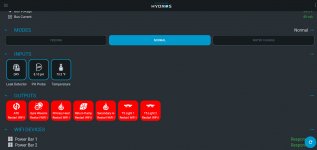
Thanks guys, that worked and its now upgraded to 190. I restored my old configuration and both my WiFi power strips are "responding" but all the tiles for my Outputs are red and saying "Restart WiFi". Any idea what I need to do here? I am controlling it from the cloud to WiFi is working. See attached photo.
 

Attachments

  • 2021-06-25_11-44-51.jpg
    2021-06-25_11-44-51.jpg
    171.2 KB · Views: 0
how long did you wait? It does take a few minutes for everyting to start communicating once the control unit reeboots.
 
Try restarting your WiFi router and Access Point as well. It might be crashed and not accepting new connections.
 
Thanks guys, that worked and its now upgraded to 190. I restored my old configuration and both my WiFi power strips are "responding" but all the tiles for my Outputs are red and saying "Restart WiFi". Any idea what I need to do here? I am controlling it from the cloud to WiFi is working. See attached photo.
Hey All, I finally got it working. I ended up deleting the configuration for the WiFi power strips and reconfigured them from scratch. It seems to be working fine now. Thank you to everyone that provided advice. Much appreciate!
 
Back
Top