
App not displaying status

Users Who Are Viewing This Thread (Total: 0, Members: 0, Guests: 0)

Eldritch Blast

New member
Joined
Sep 5, 2021
Messages
29
Reaction score
3
Location
Maple Valley
Hello. I’m sure I’ve done something wrong. I have tried disconnecting power and reconnecting. I seem to run into this issue every so often, but usually refreshes pretty quick. However, I’ve been waiting and trying for 20 minutes to turn on my sump light which is connected to the usb on power strip and must be toggled on in the app. Seems this was a bad idea to have only way to turn on be through the app.
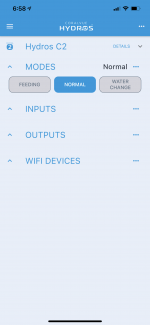
No inputs/outputs/WiFi devices showing up, does this happen often?
 

Attachments

  • 213C7238-825D-4552-A8E7-8E22E3A1E3E0.png
    213C7238-825D-4552-A8E7-8E22E3A1E3E0.png
    290.2 KB · Views: 4
Try selecting outputs in the menu. Click on one of the outputs and change something. Upload the changes and see if everything will come back. Make sure and change it back.
 
Try selecting outputs in the menu. Click on one of the outputs and change something. Upload the changes and see if everything will come back. Make sure and change it back.
It is not displaying any of my outputs to select and change any thing on.
 
Click on the three horizontal bars in the upper left of the app. It should popup a menu. In that menu is a selection called outputs. Select that and if there are any outputs select on and change something minor and upload changes and see if the status pages will now show you inputs and outputs.
 
Click on the three horizontal bars in the upper left of the app. It should popup a menu. In that menu is a selection called outputs. Select that and if there are any outputs select on and change something minor and upload changes and see if the status pages will now show you inputs and outputs.
There is nothing listed within this area, they are not showing up. They do not show up on the web app either.
I doubt it is a coincidence the day I’m having the most troubles, was after my ISP performed maintenance to our network in the area. It was disconnected from cloud overnight, it may have been this way since.
I have seen it take some time to display in the past two weeks I have been using the CX2, but this is the first time I have been unable to do anything at all for hours.
This isn’t a critical issue because I am just cycling the tank, and everything is working properly, I just can’t turn on my sump light without just manually turning power strip on (I’m assuming I could do that haven’t tried).
 
If there is nothing there you can try restoring from an archived version of the settings. The only thing with that is you might loose the last change you did to any input or output.
 
Have you tried to login with bluetooth to see if the stuff shows up there?

If it shows up when logged in with bluetooth then it sounds like your unit might be disconnected from the cloud.

Did you reboot your controller? Unplug for a bit and replug it in. Also might try doing the same to your router.
Slight chance this fixes stuff but I doubt it. You would most likely get a notification you are not connected to the cloud.
Just a couple of things to try first.


Otherwise you may have to do a restore like Danny said.
 
Last edited:
Have you tried to login with bluetooth to see if the stuff shows up there?

If it shows up when logged in with bluetooth then it sounds like your unit might be disconnected from the cloud.

Did you reboot your controller? Unplug for a bit and replug it in. Also might try doing the same to your router.
Slight chance this fixes stuff but I doubt it. You would most likely get a notification you are not connected to the cloud.
Just a couple of things to try first.


Otherwise you may have to do a restore like Danny said.
No Bluetooth luck.

Looks like I’m just going to have to manually add everything again, I guess it got wiped or something. I have approached this pretty plug and play so far that’s kind of what I was hoping I was getting. Not a big deal to have to dig a bit deeper and learn some things but it was definitely a concern of mine running in to these types of things. I’m just cycling so not too big of a deal but with my heaters plugged into the powerstrip I think my heaters were actually off. I finally had toggled the power strip on manually and everything fired up fine.
Am I making a bad decision using this as my heater control? I’d like something that doesn’t get wonky with WiFi issues or do I just need to fully read up on the ins and outs of this system.
 
Did you install an archive version of you settings. That should restore it to where it was when that version was saved on the cloud.
 
As far as heaters mine are set to come on at 76 degrees. when we had rolling blackouts that lasted a week back in February my tank got down to just below 70 degrees at one time. Once the blackouts were over it took two day before the tank was back up to 76. I didn't loose anything in the tank. I think the most likely heater issue is if they stay on and over heat a tank.
 
There is a archived version saved every time you make a change. Have you ever done a restore before?
 
Back
Top