

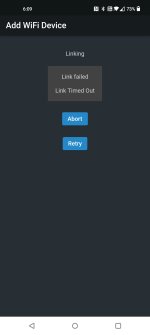
So im trying to add another Wifi X4 power strip to my collective, but no matter how many times i try it fails and timeouts. I cant seem to get it to work. My 1st one i added worked flawlessly. Im doing it exactly as the directions say to do. Any suggestions here.
Navigation
Install the app
How to install the app on iOS
Follow along with the video below to see how to install our site as a web app on your home screen.
Note: This feature may not be available in some browsers.
More options
You are using an out of date browser. It may not display this or other websites correctly.
You should upgrade or use an alternative browser.
You should upgrade or use an alternative browser.
Wifi X4
- Thread starter ABursiek
- Start date
- Tagged users None
Users Who Are Viewing This Thread (Total: 0, Members: 0, Guests: 0)

Danny
HYDROS Expert
Is the device you are using on the same wifi channel you want the power strip on?
The one that is working is connected to my wifi network. The new one doesnt give me the option to connect to wifi as it times out before it wven gets that far. Im just following the 1st steps of holding the power button down for 5 seconds. The process starts and fails after 2 minutes. It then says abort or retry.Is the device you are using on the same wifi channel you want the power strip on?
Danny
HYDROS Expert
I was asking about the phone or tablet or whatever you have the app running on.
Gotcha, yes that is on the same networkI was asking about the phone or tablet or whatever you have the app running on.
Danny
HYDROS Expert
When you hold down the power button is it flashing when you release it?
Yup, just keeps flashing and never gets addedWhen you hold down the power button is it flashing when you release it?
Danny
HYDROS Expert
You might want to submit a support ticket for this here Submit ticket
Thank you. I literally repeated the same process at least 30 times and it all of a sudden connected. Not sure what was happening as i didnt do anything different, but it's working now.You might want to submit a support ticket for this here Submit ticket
Well I guess Im going to have to now. It finally programmed in but the power kept turning off and wouldn't stay on. Im assuming i have a defective unit.You might want to submit a support ticket for this here Submit ticket
Danny
HYDROS Expert
Setup an output and use one of the outlets on the new strip and see if that takes care of it.
I tried. The strip kept turning off. I already deleted it from my collective.Setup an output and use one of the outlets on the new strip and see if that takes care of it.
- Admin
- #13

Are you trying to turn it off manually even AFTER you paired it to the control? If so, that is what it is supposed to do. Once you pair the strip to the control, the control is the ONLY master. If you manually turn ON the strip, the control will turn it off. That prevents children or pets from accidentally turning on an outlet strip when they should not. If you want to turn an outlet on the strip, you need to tell the controller to tell the WiFi strip. You are the controller's master. The controller is the strips master.
Are you trying to turn it off manually even AFTER you paired it to the control? If so, that is what it is supposed to do. Once you pair the strip to the control, the control is the ONLY master. If you manually turn ON the strip, the control will turn it off. That prevents children or pets from accidentally turning on an outlet strip when they should not. If you want to turn an outlet on the strip, you need to tell the controller to tell the WiFi strip. You are the controller's master. The controller is the strips master.
No, i was just trying to add an outlet through the app and it wouldn't power on. When i manually hit the power button it turned the outlet on and then went off right away. I removed it from system as something didn't seem right and now once again i am having a hard time trying to add it. It keeps saying failed. Retry or abort.
Danny
HYDROS Expert
That is what carlos is trying to say once paired do not use the manual button on the wifi power strip. setup an output for the outlet you want on and turn it on that way. There is now way to turn one on from the wifi strip itself.
Well the problem now is i cant get it to pair. I have BRS sending a replacementThat is what carlos is trying to say once paired do not use the manual button on the wifi power strip. setup an output for the outlet you want on and turn it on that way. There is now way to turn one on from the wifi strip itself.
Danny
HYDROS Expert
You don't have a mesh network do you?
Yes i do, but i even tried disabling the 5 ghz as well as connecting my phone to the same mesh as the system and it still fails.You don't have a mesh network do you?
Danny
HYDROS Expert
How close is the power strip to the router?