0-10 Variable Light output help

Users Who Are Viewing This Thread (Total: 0, Members: 0, Guests: 0)

jlreefer

New member
Joined
Dec 12, 2021
Messages
7
Reaction score
1
Location
Merritt Island
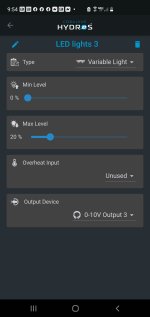
I need some help from the experts. So I have my Nicrew Hyper Reef leds connected to the 0-10 output of the wave engine and it works great manually but I want to create a schedule and it is not allowing me that option. I have see on other posts that there should be an "variable light mode" but I do not have that option. What am I doing wrong?
Any help is greatly appreciated.
TIA
Screenshot_20220102-215410.jpg
 
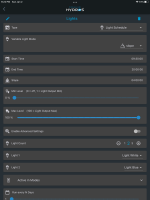
it does not let you create a schedule under schedules like the one in the screenshot? just remember a 100% max here is whatever the max is when you setup the light. The minimum also is the same except 0 will turn them off.

CFCEC38E-4379-43BC-AE27-824B9C83A645.png
 
I just have the wave engine.
Ok yes, I want to white (led light 3 seen in the screenshot) to be at 20% max.
 
I’m not sure. I created the output as a variable light then went to schedules. Created a schedule using the variable light. But I have a Control x4
 
The WaveEngine does not normally have lights controlled by it's 0-10v. If it is in a collective with a control unit it may be different. In a collective all inputs and outputs are shared by the collective. So it may be the X4 is controlling the output but the output is on the WaveEngine.
 
Thanks all!
So far it seems like it's the wave engine. It allows me to add the light but won't let me set a schedule.
@Carlos maybe a firmware update to allow the wave engine to create light schedule?
 
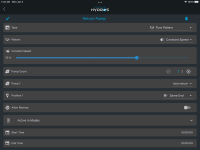
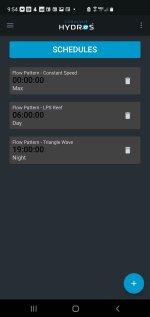
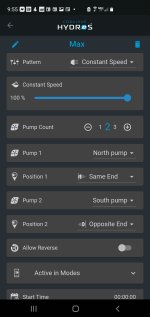
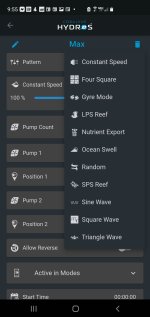
In the schedule there should be a place to choose the type of schedule at the top. Yours does not seem to have that. Is your app and firmware up to date? Below is a Flow pattern schedule on mine.

B7FFF262-DB8D-4D36-9510-7AEF85DBCD4E.png
 
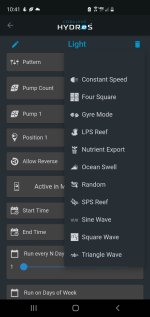
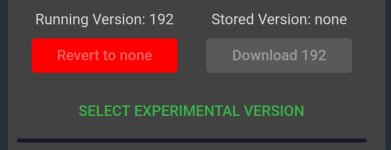
I have schedules setup for my pumps but I just don't have the option for a light schedule. I think I am on the latest firmware. I have attached a screenshot for confirmation.Screenshot_20220103-100037.jpgScreenshot_20220103-095450.jpgScreenshot_20220103-095513.jpgScreenshot_20220103-095517.jpg
 
It sounds like you may have to have a control unit in a collective to have the type as part of the schedule. I would check with CoralVue to be sure. I would also ask if any of them will make this work or does it take the X4.
 
It sounds like you may have to have a control unit in a collective to have the type as part of the schedule. I would check with CoralVue to be sure. I would also ask if any of them will make this work or does it take the X4.
That is correct. We did not design the WaveEngine to control lights. That is beyond the scope of the individual device. But, if you add it to a Collective, then the features grow, and the capabilities multiply. For example, you can use the Waveengine's 0-10v OUT to control lights in a Collective setting.
 
That is correct. We did not design the WaveEngine to control lights. That is beyond the scope of the individual device. But, if you add it to a Collective, then the features grow, and the capabilities multiply. For example, you can use the Waveengine's 0-10v OUT to control lights in a Collective setting.
This does not apply to the WE v2 correct? The WE v2 is all that is needed to start a collective right?
 
This does not apply to the WE v2 correct? The WE v2 is all that is needed to start a collective right?

A collective permits you connect multiple Controls together to share Inputs, Outputs and Schedules. Typically a collective consists of multiple devices. However there is nothing preventing you from creating a collective which only includes your WEv2. When you do so, you will see output types and features such as Light Schedules the WEv2 doesn't natively do on its own as a single Control.
 
A collective permits you connect multiple Controls together to share Inputs, Outputs and Schedules. Typically a collective consists of multiple devices. However there is nothing preventing you from creating a collective which only includes your WEv2. When you do so, you will see output types and features such as Light Schedules the WEv2 doesn't natively do on its own as a single Control.
Yes, and according to the websites you must have a control device to setup a collective, the sites state that the WE v1 is NOT a control device that can setup a collective, however the websites state that the v2 is a control device, so I am just asking for confirmation from Coralvue that the WEv2 that I own can in fact setup a collective to control my lights the 0-10v ports or not. But I want a actual yes no answer which yours does not give.
 
Yes, and according to the websites you must have a control device to setup a collective, the sites state that the WE v1 is NOT a control device that can setup a collective, however the websites state that the v2 is a control device, so I am just asking for confirmation from Coralvue that the WEv2 that I own can in fact setup a collective to control my lights the 0-10v ports or not. But I want a actual yes no answer which yours does not give.
Yes. The Wave Engine V2 will need to be set up in a Collective of one. Yes you will need the proper cable for the 0-10v port function to your lights. Yes this will work if your lights have a 0-10v port for this function. And yes this is a yes answer. :) Enjoy. :)
 
Back
Top