0-10v and Drive Ports - Help me understand

  • Thread starter Thread starter Hasted
  • Start date Start date
  • Tagged users None

Users Who Are Viewing This Thread (Total: 0, Members: 0, Guests: 0)

Hasted

New member
Joined
Dec 16, 2020
Messages
12
Reaction score
1
Location
Ohio
Alright, a couple months into owning my Hydros Control4. I have gotten really comfortable with most of it. I want to get more out of my C4!

Let's run through each port:
Probe Ports (1/2): Easy enough. Also why I chose the C4 over C2. Just pH probe currently.
Sense Ports (2/4): Using, just not to full potential. I need to pick up a couple more sensors (leak rope!) to get the most out of them. Currently Temp Sensor and a water level sensor is in transit which will monitor my ATO reservoir level.
Command (0/2): No use atm
Drive Ports (0/2): ?
0-10v (0/2): ?

WiFi Strip (4/4): Controls my Return (VarioS6), Skimmer (RSK300), MP40, and 2 other jank Powerheads (single plug).
WiFi Plug (0/1): Will connect ATO once I upgrade from stock. Currently on my nano upstairs just to test things.

USB (1/4): Just have my Wyze Cam in sump hooked up atm.


So... About these 0-10v and Drive Ports. I don't really know how to utilize them? I don't understand them in the first place, so that makes it even harder.

It doesn't appear that any of my pumps can use these ports (Varios6, MP40, RSK300) without the WaveEngine . I currently not planning to use the Hydros ATO. So... what CAN I do? I am not crazy tech heavy yet, so I don't even know if I even have anything to utilize them.

What are some basic to intermediate type things to use with these ports? I don't think any advanced "things" are going to really benefit me as I am not crazy tech heavy yet, as mentioned before. Still open to knowing advanced stuff, though.

I don't feel like I NEED to use those ports, but I WANT to use them to make me feel like I am getting more out of my C4. Any and all suggestions welcome.


Current equipment List
Red Sea XL300
Return: VarioS-6
Flow: Mp40 and 2 jank other powerheads
Skimmer: RSK300
Light: Kessil AP9x

BRS Inkbird temp
Control4
-Power Strip
-Power Plug
-Temp Sensor
-pH Probe
- Water Level Sensor (ATO level)
 
I use the drive ports for ATO and auto water change. I also have a Control 2 along with the control 4. So I also use 2 drive ports for 2 of the three solenoids on my RODI system. There is a set of 4 0-10v input and a set of 0-10v outputs. The outputs can control lighting that has the 0-10v control input. The 0-10v inputs can be used as switch inputs for one thing. There are some third party assemblies that you can get that breaks thees out form push buttons or float switches. Hope this helps.
 
I use the drive ports for ATO and auto water change. I also have a Control 2 along with the control 4. So I also use 2 drive ports for 2 of the three solenoids on my RODI system. There is a set of 4 0-10v input and a set of 0-10v outputs. The outputs can control lighting that has the 0-10v control input. The 0-10v inputs can be used as switch inputs for one thing. There are some third party assemblies that you can get that breaks thees out form push buttons or float switches. Hope this helps.
That does help. My current take is FAR away from my RODI. I am, however, setting a tank up as we speak that will be right next to my RODI. If I use a Hydros on it also, I could utilize that! Thanks for the idea!

What equipment are you using for AWC? Similar to above, the new build COULD utilize that due to location.
 
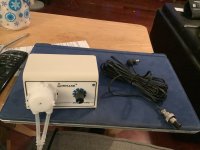
For AWC I use two of these connected to the same drive port. One removes water and the other adds water. Both pumps are in my garage and the tank is in a bedroom 35ft away from the garage. The knob controls the flow rate. Once they were connected up I used a container at the tank that one was filling and the other was removing water. I set the desired flow rate on the fill pump and then used the container and would run both pumps for several minutes till I got the same in as out by measuring the water in the container before and after and adjusted the drain pump to match the fill. The drain pump pulls water from the refugium and the fill pump adds water to the return section of the sump. I have the tubing running through the attic. The drain pump also pumps it back up through the attic and down a wall and empties into the drain for the kitchen sink. I got the pumps from Amazon for around $26 each. I made the cables from the hydros to the pumps. The pump in the photo I plan on using for dosing All for Reef. I currently dose it with a DP1 on my Archon.

BECDCA70-352B-4D04-B8AF-D905DDBC6E49.jpeg
 
The 0-10v inputs can be used with analog sensors, float switches, magnetic door switches, buttons, toggles, etc. One of the best features of the Control4- I make a breakout so its easy to use.

For example you can add a <$10 air temp and humidity sensor to monitor room conditions, float switches to monitor level of ATO reservoir or return chamber, buttons to trigger special modes instead of using the app, etc.
 
The 0-10v inputs can be used with analog sensors, float switches, magnetic door switches, buttons, toggles, etc. One of the best features of the Control4- I make a breakout so its easy to use.

For example you can add a <$10 air temp and humidity sensor to monitor room conditions, float switches to monitor level of ATO reservoir or return chamber, buttons to trigger special modes instead of using the app, etc.
I have seen your work a lot! It definitely interests me, but I also don't understand it. I am not savvy in the electrical department. Even though my father is an electrician...

Let me ask a couple questions to see if I interpret this correctly.

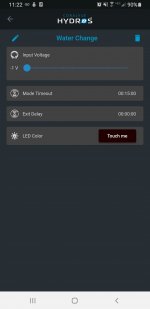
Let's use the push button for mode example. With your breakout box, I can get a button connected and mounted inside my stand. Press it and the Hydros Control sees that. To use that specific voltage for the mode, you just set the top slider Input Voltage to what ever voltage that button produced.
Screenshot_20210129-112205.jpg

........


Next

The Air Temp / Humidity sensor link shows a board. Do you just wire it up to the Box and then it actually sends the temp and humidity to the Hydros to read? Or is the reading somewhere else?
 
I have seen your work a lot! It definitely interests me, but I also don't understand it. I am not savvy in the electrical department. Even though my father is an electrician...

Let me ask a couple questions to see if I interpret this correctly.

Let's use the push button for mode example. With your breakout box, I can get a button connected and mounted inside my stand. Press it and the Hydros Control sees that. To use that specific voltage for the mode, you just set the top slider Input Voltage to what ever voltage that button produced.
View attachment 603

........


Next

The Air Temp / Humidity sensor link shows a board. Do you just wire it up to the Box and then it actually sends the temp and humidity to the Hydros to read? Or is the reading somewhere else?
Yes you 100% get the idea

Mode control with single button:

1. Go to Options and select the mode channel input (Lets say channel #1)
2. Connect the momentary button between Channel 1 and Ground (0v)
2. Go to your mode (lets say your Feed Mode) and put 0v as the trigger, with Exit Delay for the desired amount of time.

When you press the button, the Control sees 0v and starts your timed mode!

If you want something that is NOT timed (perhaps for water change) you can buy a "latching" button or toggle switch that stays triggered until you press it for a second time. Pretty easy.

That little board gets wired to the breakout and then the data can be displayed in Hydros like a typical input (Same as normal temperature probe, ph, etc). It does require two of the four channel inputs, one for temperature and one for humidity.

I include a get started guide for these basic functions as well, if you shoot me your email I can send you it to take a look.
 
Back
Top