4 pumps, four square pattern

Users Who Are Viewing This Thread (Total: 0, Members: 0, Guests: 0)

archgetty

Member
Joined
Nov 4, 2021
Messages
79
Reaction score
7
Location
Los Angeles
I have four circulating pumps, one in each corner. I'm trying to set up the Four Square Pattern so the pumps run in a circular pattern. So one pump on, the others off, then the next pump clockwise on, the others off, etc. etc.

I can't figure out how to set the pump positions (front, back, opposite front, etc. etc.) so they take turns on, one at a time, in sequence around the tank.
 
There are two parts to Flow Pump configuration. The pump itself with minimum and maximum operating speeds. And then the schedule which tells it what pattern to run, when to run, pump position and percentages relative to the min/max defined below the pump. Guessing you haven't done the schedule piece yet. Links are below.


Thanks, but I've done that long ago. I've had a schedule for the back pumps and another one for the front pumps. Both work well. What I'm looking for is the Four Square Pattern in a new schedule, which as I understand it, can control four pumps one in each corner. But I don't understand within that what to put in the Position pull-down for each of the four pumps in that Pattern.
 
Thanks, but I've done that long ago. I've had a schedule for the back pumps and another one for the front pumps. Both work well. What I'm looking for is the Four Square Pattern in a new schedule, which as I understand it, can control four pumps one in each corner. But I don't understand within that what to put in the Position pull-down for each of the four pumps in that Pattern.

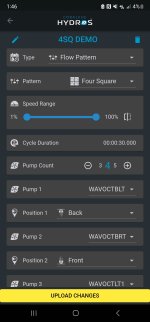
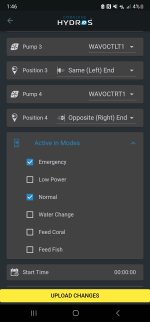
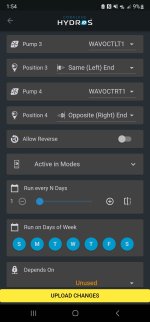
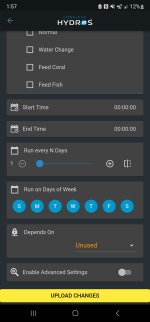
If I understand correctly, you're creating a different schedule for each position and that is the source of your problem. Each schedule operates independently and activity/flow of the pumps is not coordinated when configured in this manner. Create a Schedule and increase your Pump Count to 4. Then select each pump and associate a position. Position is relative to each member pump and not the entire schedule.

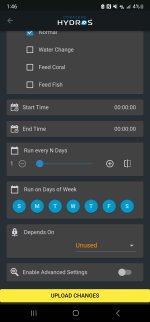
Screenshot_20230419_014629.jpgScreenshot_20230419_014638.jpgScreenshot_20230419_014648.jpg


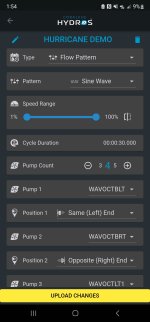
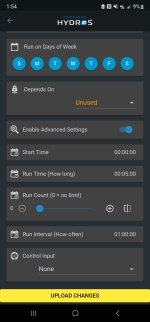
You would use different schedules if you want to run different patterns. Not a schedule for each position associated with each pattern. So a typical use case is your basic 4SQ DEMO above which runs all day (Start Time 00:00:00 and End Time 00:00:00) unless a more specific time- based or mode-based schedule is running. For instance a HURRICANE DEMO below which runs for five minutes at the top of the hour... Notice in HURRICANE my pump positions are different then 4SQ. It doesn't matter. Position is only relative per pump per schedule

Screenshot_20230419_015414.jpgScreenshot_20230419_015423.jpgScreenshot_20230419_015431.jpg


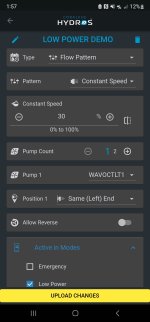
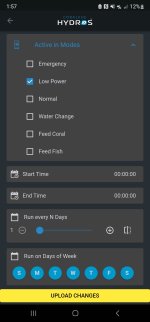
Or you could do a mode-based schedule...

Screenshot_20230419_015723.jpgScreenshot_20230419_015732.jpgScreenshot_20230419_015739.jpg


It is not necessary that all pumps be active in all schedules. In the LOW POWER schedule immediately above only one pump is active and others would be off unless you specifically created another schedule associated with that mode. Or if you only had a subset of pumps in the sample HURRICANE schedule then the remaining pumps would run 4SQ in this situation. So pumps may or may not run the same pattern based purely on your wishes. That is only required if you want a coordinated activity. Four Square, four pumps, four positions...

The only situation where pattern and flow can't be accurately predicted is if you have overlapping schedules with the same Start Time/End Time or same repeating Start Time/Run Time/Run Interval and active in the same Modes. Active schedule in these situations will be determined by a hash.

 
If I understand correctly, you're creating a different schedule for each position and that is the source of your problem. Each schedule operates independently and activity/flow of the pumps is not coordinated when configured in this manner. Create a Schedule and increase your Pump Count to 4. Then select each pump and associate a position. Position is relative to each member pump and not the entire schedule.

View attachment 3365View attachment 3366View attachment 3367


You would use different schedules if you want to run different patterns. Not a schedule for each position associated with each pattern. So a typical use case is your basic 4SQ DEMO above which runs all day (Start Time 00:00:00 and End Time 00:00:00) unless a more specific time- based or mode-based schedule is running. For instance a HURRICANE DEMO below which runs for five minutes at the top of the hour... Notice in HURRICANE my pump positions are different then 4SQ. It doesn't matter. Position is only relative per pump per schedule

View attachment 3368View attachment 3369View attachment 3370


Or you could do a mode-based schedule...

View attachment 3371View attachment 3372View attachment 3373


It is not necessary that all pumps be active in all schedules. In the LOW POWER schedule immediately above only one pump is active and others would be off unless you specifically created another schedule associated with that mode. Or if you only had a subset of pumps in the sample HURRICANE schedule then the remaining pumps would run 4SQ in this situation. So pumps may or may not run the same pattern based purely on your wishes. That is only required if you want a coordinated activity. Four Square, four pumps, four positions...

The only situation where pattern and flow can't be accurately predicted is if you have overlapping schedules with the same Start Time/End Time or same repeating Start Time/Run Time/Run Interval and active in the same Modes. Active schedule in these situations will be determined by a hash.
Many thanks! I really appreciate the time you took to explain this. Very helpful.
 
Back
Top