Add Run On Days Of Week capabilities to outputs

Users Who Are Viewing This Thread (Total: 0, Members: 0, Guests: 0)

thom_smith

HYDROS Expert
Joined
Aug 11, 2021
Messages
1,079
Reaction score
147
Location
Albany, NY
A Facebook group member inquired how to run feeder on particular days of week while he is away. Seems a somewhat logical request. But as currently built, it is pretty much an everyday or nothing proposition without excessively complex configuration. Explained to him how to do so..


Yes, but not directly and more complex than it needs to be. We should probably submit a feature request over at CoralVue HYDROS Forum to simplify the process. May be other ways but this is what I have done to perform actions on particular days of the week.. If it seems confusing, that's kinda because it is but it works. Create a new Flow Pump output with Demo Pump pump model. Then create a Flow Pattern schedule, Pattern Constant, Pump count 1, Pump 1 will be whatever you named the Demo Pump, Start Time and End Time 00:00, Run On Days of Week Wednesday and Thursday. Then lastly make your auto feeder Depend On the demo pump you created first with Dependency Mode Off If Off. If you need help, feel free to message me. If you want to submit the feature request to simplify, let me know and I'll submit it on your behalf then you can jump in and comment "I'd really like this." I'm sure there are others that will jump onboard also.


Wouldn't a Run On Days Of Week parameter be much easier? Feeder is just one example where this would be desirable. I have numerous others myself where I've done this workaround. I would suggest adding Run On Days Of Week capability to anything anything such as Feeders which have a schedule by default AND any outputs that include the Has Schedule toggle to simplify and give greater flexibility.
 
Last edited:
Yeah this would be nice especially for the Hydros 4 outlet to help automate my mixing station
 
Yeah this would be nice especially for the Hydros 4 outlet to help automate my mixing station
I have my mixing station automated and it has nothing to do with the days of the week. My DI reservoir refills when it goes low. My fresh salt water reservoir refills when it goes low by transferring the mixing tank to it if the water is ready to use in the mixing tank. It will then refill the mixing tank. All I have to do is add the salt mix and press a button when the mix tank is ready for use.
 
Yeah, so what I’m trying to do is just turn on the basic heater and start the mixing pump Wednesday night because I do my water changes Thursday morning. So I’d like to have everything mixed up or should I say remixed up and up to temperature?
I don’t need any controls for that really Because when I change my heaters out from my main display, they move over to the mixing station.
So basically I would like the mixing pump and the heater to turn on for about 12 hours the day before and then turn off.
 
Yeah, so what I’m trying to do is just turn on the basic heater and start the mixing pump Wednesday night because I do my water changes Thursday morning. So I’d like to have everything mixed up or should I say remixed up and up to temperature?
I don’t need any controls for that really Because when I change my heaters out from my main display, they move over to the mixing station.
So basically I would like the mixing pump and the heater to turn on for about 12 hours the day before and then turn off.
I don't use heaters but I do AWC so it is a low amount of water changed at any one time. For now you can setup a schedule using a flow pump output type. and set the pump to demo pump. The go to schedules and create a schedule for that pump to be on when you want your heater and mixing pump to be on. Then go to the mixing pump and mix tank heater output and set depends on to the flow pump output you created. Then set the dependency mode to off if off. So it that demo pump output is on then it will allow your heater and pumps to be on as long as any inputs you have set on those outputs are active.
 
I got it. Thank you for the help everybody. That process should be a lot easier though.
You would think you could just select your output and also select the day and time or duration that you want it to run.
Same would be nice to go with the skimmer.
Like I said, I got it but all it does is clutter up your home screen.
 
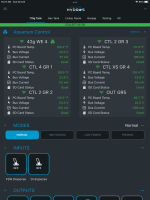
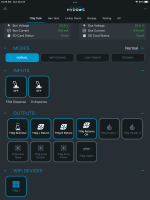
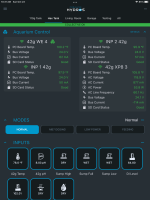
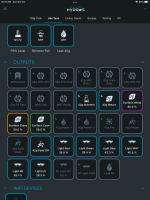
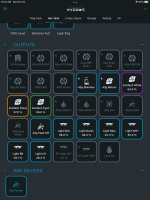
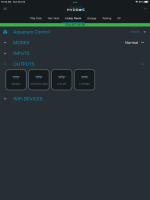
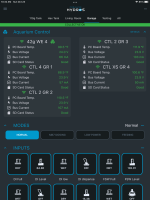
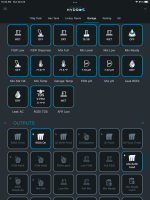
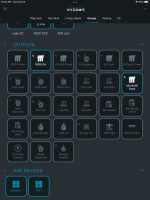
You can set which items are visible on which page. Below are screenshots of four of the pages I have setup. It takes more than one screenshot on each page to get the whole page. As you can see I only have the things I want on each page. To do that press an hold one of the items in the category you want to do. It will come up with a screen where each tile has a checkbox. If you uncheck that box then that item will not show on the page you are on. Press and hold on one of the items to go back to the normal screen.

30DB6730-F6C7-41B9-8515-E6EAC0481C8F.png
7B5AA2F1-4D78-4C6B-8787-4F5DF2D70A10.png


1834ACD6-6F5B-486E-A02A-54061096A5DA.png
687B5E9E-38F3-497E-8181-8332E99189F1.png
D51AF58B-9896-4187-A71D-310D54B16604.png


74F4BF5B-147B-4939-8285-EC0590796998.png


8458C6C0-5229-4184-8E93-23C47C89A748.png
DAAFCFEC-ECC4-4FD5-B684-C2156709095A.png
00C683E2-D850-44FE-A38A-42C389531D8E.png
 
Oh I see, thank you Danny for your insight on that one. I’m gonna go to play around with it.
Thank you for your help.
 
Hey Danny, one more quick question for you well it probably won’t be a quick question.
Do you think it would be possible to set up something similar to a light mode using the same technique listed above?
Basically I have cheaper.Jebao powerheads. And what I would like to do would be to cut the power to two out of the three after the tank goes to bed and the lights go out.
I tried playing with a little bit this morning.
But then I couldn’t figure out how to get them to come on during the daylight.
Again, your help is greatly appreciated, in everything else above.

I’m sure you have some workaround solution for this question as well
 
I just got my system Friday. It’s the first controller I had.
I’ve been keeping Reef Tank’s since 2010.
I’m not sure why I haven’t done the sooner
 
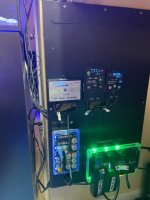
Pic of setup
 

Attachments

  • E296F45D-D8CF-4196-BA98-33F3BEA22171.jpeg
    E296F45D-D8CF-4196-BA98-33F3BEA22171.jpeg
    116.2 KB · Views: 3
Hey Danny, one more quick question for you well it probably won’t be a quick question.
Do you think it would be possible to set up something similar to a light mode using the same technique listed above?
Basically I have cheaper.Jebao powerheads. And what I would like to do would be to cut the power to two out of the three after the tank goes to bed and the lights go out.
I tried playing with a little bit this morning.
But then I couldn’t figure out how to get them to come on during the daylight.
Again, your help is greatly appreciated, in everything else above.

I’m sure you have some workaround solution for this question as well

Powering down your pumps nightly at the same time is doable and very easy. Set them up as Generic outputs, toggle Has Schedule then set the Start and End Time. The other option is make them Depend On your light output with a Dependency Mode Off If Off. This works well if you are managing your lights with Hydros. Not so much if the Output is constantly on and you're managing light schedules with an external app. Often many ways of accomplishing something with Hydros
 
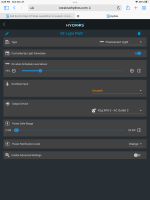
You can alway use a generic output with input count set to 0 like @thom_smith mentioned. Then set has schedule to on. It will then let you set a on and off schedule for that output. If you need it to sync with a light schedule that you change you can use it as a florescent light type and have it come on with a light schedule like I do with this output here. You will have to create a schedule like you use with the flow pumps but for lights to use a version of the output in the screenshot and then use depends on in the pump outputs.

3751E839-0522-4ABB-BBAC-A9BE0E8773F4.png
 
Awesome I just got it figured out. Thank you for all your help once again.
I hear y’all’s names mention on the CV TV, YouTube channel.
You guys truly are awesome.
I can’t wait till the system really gets some development behind it.
I chose the system over the Apex because of the support it provides truly awesome
 
Need this feature as well for magnetic stirrer only once a week.
 
Back
Top