GainesvilleReef
Member
I have 9 power supplies. I tested 6 that I could easily get to. None had the resistor installed. Perhaps a small pass-through cable with one installed might be handy. I will open a support ticket.
Follow along with the video below to see how to install our site as a web app on your home screen.
Note: This feature may not be available in some browsers.

I have 9 power supplies. I tested 6 that I could easily get to. None had the resistor installed. Perhaps a small pass-through cable with one installed might be handy. I will open a support ticket.
The problem is my project has part of the collective on the other side of a data-only cable. I can't use a terminator and supply power to that side because there are not enough sockets. I bought some of these fairly recently just to get the ones with the terminators installed. Either I got old inventory or power supplies with terminators do not exist. I really don't want to have to solder my own. And frankly, I should not have to. That is not being easy to use. I am seeking help from @Carlos already.
Lol, we posted at the same time. Thanks for your help.Yeah completely understand. For sure Coralvue can help ya out. The information posted in my org post was all I had at the time back then. I’ll have to talk to Carlos and update it with the latest info. I apologize if my information may have lead you astray but hopefully you find a reasonable resolution.
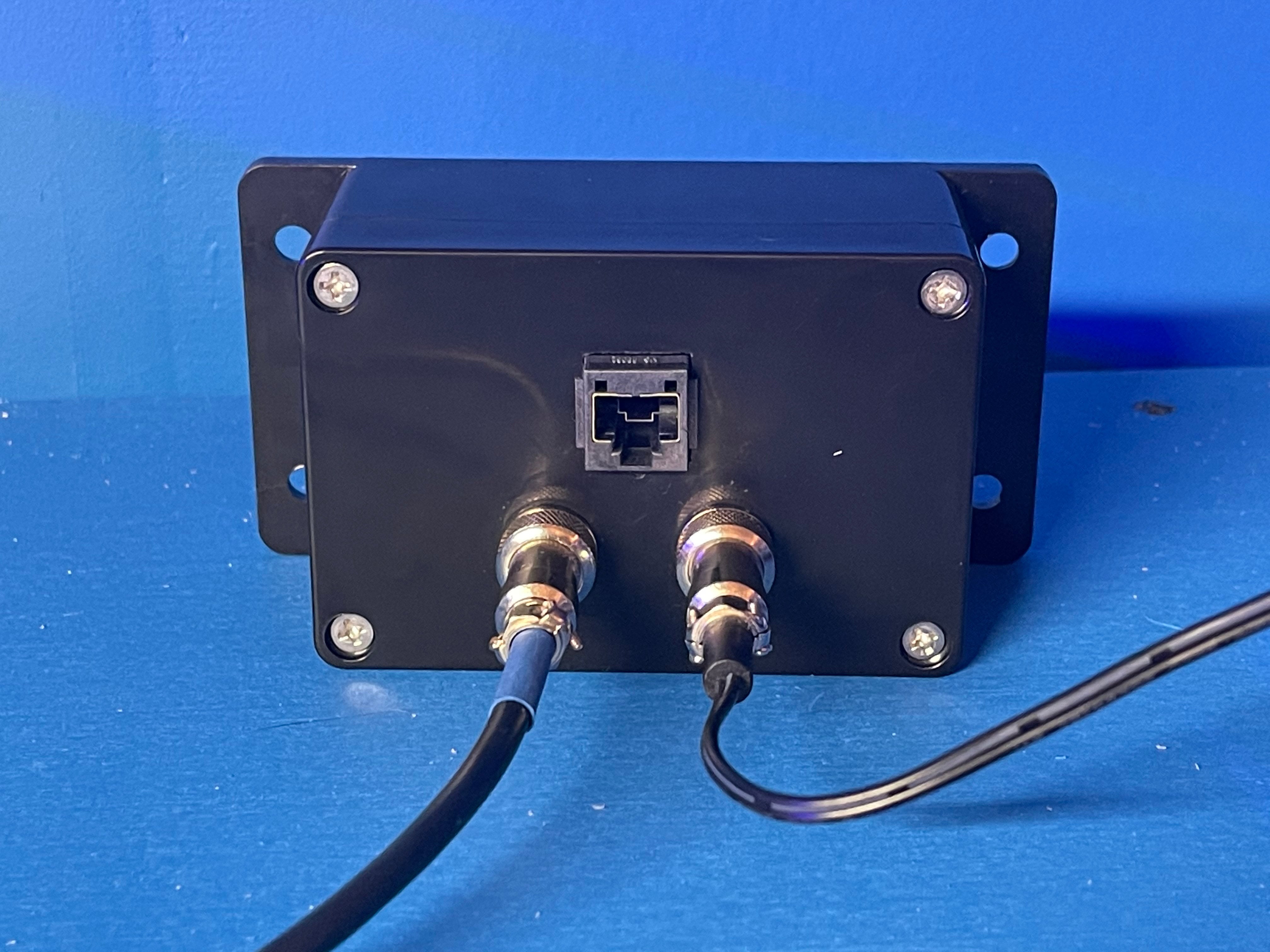
Another item you could consider is something I made to cover this situation. It’s a circuit board that converts a regular hydros command cable to Ethernet cable. So you use 2 of these. One on each end of a data only link over a Ethernet cable. Then from this box you connect it to the standard command bus port on your first hydros device on each side. In addition I added a second gx12-5 port that allows you to connect a hydros power supply to that end of your collective. Which also allows you to use the standard terminator at the end of each side of your collective since my box provides power. I use this to go between my garage devices and my basement devices. Price isn’t cheap on these cuz of the relative low qty of units I have built. Plus for the price you get 2 boxes. One for each side. If you already bought a data only cable, this option prob isn’t finically ideal but it’s more attractive if you haven’t. I mainly made this for people who might have RJ45 cables run in their house and wanted to do hydros point to point without having to make their own adapters.
Hydros Command Bus RJ45 Adapter Set (Pair) (Built to Order) | JB Aquatics LLC
Shipping is FREE! Each order includes 2 boxes! One for each end of your RJ45 cable.NOTE: These take 2-4 weeks to manufacture and are BUILT TO ORDER due to low demand. Please reach out to JBAQUATICSLLC@GMAIL.COM for more info.These boxes allow you to use any standard CAT5/6 ethernet cable as as...www.jbaquaticsllc.com

If you are wanting a shorter one then you can always ask CoralVue if you can special order one from them. Also make sure you get a terminator or get a power supply with one already added.I would like to have 3 probe ports available. 2x ph, 1x orp. It seems like the only option is to purchase another Control 4. I'm ok with that. They would be mounted side by side. Is there an off the shelf cable from Amazon that could be used in lieu of a 6' command bus cable?
Is there a place to get the correct canbus cable? I don't like to use solid wire for connectors like this because a little too much bending and a single wire breaks. Also, I believe that the impedance of ethernet cable is 100 ohm and the canbus is 120 ohm.Here is some advanced information on how to setup a more complex step of multiple Hydros devices using the Hydros Command Bus. NOTE: THIS INFORMATION IS SUBJECT TO CHANGE. Coralvue releases new updates that may change how things look, act, or behave. So do note that when reviewing this information. - Updated 5/2021
----------------------------------------------------------------------------------------------------------------------------------
So some information on the Collective. There is a lot here, and I deep dive into some items that you need to understand for bigger systems. Coralvue is working on a comprehensive instruction for all this stuff, but I wanted to clear up some questions ahead of time.
- Command Bus: If you want to share input/output control/status between Control 2/4/XS modules (and even Wave Engines in the future), you MUST have them hardwired using command bus cables. This is because they use dedicated CanBus to share and control that info. You can run Hydros devices separately but can't share input/outputs. You can access all devices with 1 account and in the app, just have to tab to each device. Typically if you have multiple Controls on the same system, you want to be running a Collective.
-Collective: If you have more than 1 device in a Collective, it provides redundancy in case of a module failure. By default you will get wifi/connection and programming redundancy. Based on notes below, you can also get power redundancy. All the devices in a Collective will run the SAME code. One device will act as the MASTER device in the collective. The green icon below shows you which device is the master. Under the DEVICES tab within a Collective, you can change the priority setting of your Collective devices. This can be handy based on the position of devices in respect to your wifi router.
View attachment 380
- Topologies: Hydros Command Bus supports both straight/bus and star topologies. Standard cables available currently only make straight topologies possible unless you DIY your own cables. Straight/bus topologies are PREFERRED for reliability. A star topology can be used only if 1) stubs on the star are less than 3M each and 2) there are 2 terminators on the bus positioned as far apart as possible. Refer to Coralvue support for details/recommendations on this setup but do note that this configuration requires DIY cables and advanced HYDROS understanding and not a normal configuration so there are added risks. That being said, the rest of this tutorial will reference standard bus/straight topologies.
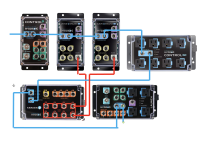
- Collective/Command Bus Cables: There are 2 types of a Command Bus cable, the first is the standard data + power cable (6ft Command Bus Cable). This is currently available from Coralvue in only the standard 6ft length, any other lengths between 1ft and 15ft must be DIY. The second type of cable is a data only cable. These MUST be used if you want to have a cable more than 15 ft long. These only have the data/ground lines connected and leave the power line disconnected. You can also use a data long cable if you want to use multiple power supplies in a Collective for redundancy/protection. 25 ft and 50 ft DATA Only Hydros Command Bus Cables are available from CoralVue here (Data Only Cables). If you want a custom cable of another length you might be able to contact Coralvue Support and request a custom assembly but no guarantees if they can support all requests. - Updated 5/2021
- Terminators: For Collectives to properly and reliability communicate there MUST be at least 1 Communication Bus terminator installed at either end of your collective. For example if you have the following 3 devices in your collective with normal Command Bus cables (data and power), install the terminator at the end of your chain. Terminators are sold separately and do not come with the command bus cable (Hydros Terminator). You can also order Hydros Power Supplies with a terminator built in for situations where you do not have an open command bus port at either end of your Collective setup. That version of the supply can be found here but make sure to order the correct version (both non-terminated and terminated available): Hydros Terminated Supply. As of writing this (5/2021), all supplies that come in Hydros Starter packs are NOT terminated. At some point in the future that will change but I currently do not have that information. So for now assume your supply is NOT terminated unless you specifically ordered it in that configuration from the link above. If you are handy, you can just install a 120 ohm resistor between pins 2/3 on the GX12-5 connector to make a standard power supply a terminated power supply. Running 2 terminators on each end of your bus is the most reliable setup but not required. Section updated 5/2021
View attachment 381
- Multiple Power Supplies: If you have multiple devices connected with normal Command Bus cables (Data and Power), you CAN NOT have 2 power supplies connected at the same time. Both will be driving the system and one will likely burn out. If you would like redundancy in power, see the next bullet.
View attachment 382
- Redundant Power Supplies: Powered command bus is limited to 15 ft between devices as stated above, so if you have the following scenario where you are going more than 15 ft and using a Data Only Command Bus Cable (Data only, no power), this can also be used in systems where you want to run multiple power supplies to have redundancy as well. Also since the power supply is taking up the last port on both ends, and the system requires at least 1 terminator at one end, you must use a power supply that has an integrated terminator. See above about notes on Terminated Supplies under the Terminator section. (Updated 5/2021)
View attachment 383
- Another option for powering your Hydros devices is using the Wave Engine. At the time of publishing this post, Wave Engines can't be added to a collective (coming in the future) but it can be connected via the Command Bus for power. So in the case below you have an extra port to put the standard terminator on the wave engine since power is supplied via a dedicated port. Also no need to use a power supply on the left with a terminator since you have at least 1 on either end. Previous issues users have seen when powering devices off a wave engine have been corrected with the latest FW updates. Updated 5/2021.
View attachment 384
- You can also connect Hydros devices up with Command Bus cables if you just want to share power. You are not required to make a Collective. You can still have any, or all devices run as independent controllers if you wish, you just don't have the abilities to share inputs/outputs and have wifi redundancy. If you connect Hydros devices in this configuration, you do NOT need a terminator. Terminators are only required if you run a Collective. (Updated 5/2021).
- Another situation you could possibly have is an unpowered "island". If you use multiple data only Command Bus cables, you could have a device that is isolated in the middle of your bus topology and no way to power it. There's 2 options in this situation. Use a custom made Command Bus cable that allows you to also apply power to the middle C2 device. This type of cable must be DIY. You might be able to reach out to Coralvue Support and ask for a custom solution but no guarantees. Or you could also use a Wave Engine connected to the middle C2 with a standard Command Bus cable.
View attachment 385
View attachment 386
- As for multiple Wave Engines on the same Hydros command bus, you CAN have them connected and powered on the same Collective via Standard Command Bus Cables. This post has been updated but the below image is outdated, please ignore the ?. This configuration is VALID. (Updated 5/2021)
View attachment 387
- Future Hydros Devices: As newer Hydros devices are released from Coralvue, I will update this section with any changes. The general assumption is that any new Hydros device that is released with Command Bus ports, WILL be able to be added to your collective just as any other devices. In addition, some devices may be able to power your Command Bus but at this time this is just a guess and I have no factual information to back this up. Added 5/2021.
- Ice Cap Battery Backup: Coralvue now offers an adapter to allow you to power your Wave Engine off the V3 Icecap Battery (LINK). You will need this adapter kit as well (LINK). This is used to power 1 Wave Engine. In addition, any Hydros devices that are connected to the Wave Engine via standard Command Bus Cables (Power+Data), will ALSO run off this battery. Effectively you can run an entire Collective off this battery pack. Currently Coralvue does not sell an adapter for adapting this battery to the Command Bus power pins. In theory you could buy the Wave Engine adapter kit above and modify it to use GX12-5 connectors instead of GX12-4 and use it to power your Collective if you do not have a Wave Engine. But this has not been tested by anyone I know of. If you try this, make sure to refer to the correct pinout of the GX12-5 Command Bus Port and connect the battery ONLY to the correct power pins (see other post on pinouts). Added 5/2021.
DIY Command Bus Cables:
- Standard Cable: If you would like to DIY your own command bus cable, you can pickup standard GX12-5 pin connectors from Amazon. Then wire 2 connectors together with pin numbers matching (1 to 1, 2 to 2, etc). Pins 2/3 MUST use twisted pair wire, same goes for pins 1/4.
- Data Only Cable: Follow the same instructions above but leave pin 5 disconnected on each side. For this you can use standard ethernet cable since it uses 4 twisted pair wires.
View attachment 389
DIY CAT5/6 Cable Adapter: Want to use any standard CAT5/6 straight through ethernet cable as a data only cable? Buy a standard Hydros Command Bus cable from Coralvue and cut it in half. Then purchase a set of RJ45 Terminal Adapters from amazon. Connect the GX12 pins as follows to the adapters on both sides:
* for shorter cables (15 ft or less), you could connect pin 5 up to pins 4,5,7,8 to provide power but not recommended.
GX12-5 Pin RJ45 Adapter Pin 1 Pin 3 Pin 2 Pin 1 Pin 3 Pin 2 Pin 4 Pin 6 Pin 5 Unconnected for data only cables*
If you are more tech/solder savvy and want a more elegant solution you could also purchase a RJ45 cable with female connectors and solder/shrink wrap the assembly to make it more presentable.
IMPORTANT NOTE: this method of using RJ45 cables for longer command bus cables is ONLY intended to be used in direct point to point applications where you are reusing Ethernet cables as an alternate wiring method. Command bus is not Ethernet protocol compliant and should NEVER be connected to any active Ethernet products like switches or routers. The above section is only intended on a method of reusing commonly available Ethernet cables as another wiring option.

It is probably easier to search for RS-485 cable, they are the same impedance. Belden 3105A is a good example. But this is expensive cable. Unless the distance is large you won't see any difference between 100 and 120 ohm at these frequencies. You need a twisted pair plus a ground.Is there a place to get the correct canbus cable? I don't like to use solid wire for connectors like this because a little too much bending and a single wire breaks. Also, I believe that the impedance of ethernet cable is 100 ohm and the canbus is 120 ohm.
The only reasons for using a data only would be length of cable if over 14ft or you are using one of the power supplies that connect directly to the command bus port of a controller. If the power supply connects to a separate port or the controller has an AC cord then there is no issue using them together. It is only the one that connects directly to a command bus port that would be an issue using with other sources of power connected to the command bus.So, this won't work... using all data/power command bus cables?

Updated. Added new term of PROTECTED and UNPROTECTED power sources. Should help clear up some of the outdated info.It would be nice to see this updated with the new devices like XP8.
I doubt it would matter which one you use other than size. The 1/4 watt would be the smaller one. I would say stick with either 1/4 or 1/2 watt resistors. You can get terminators for $4.99 and that comes with the connector and resistor. Not sure it would be worth the time to make one. You also only need 2 per collective. You don't want to use more than 2 on a collective. Not sure you can since there should only be two bus ports where you can connect them.I need to make a few command bus terminators, went straight to amazon looking for 120ohm resistors.
I ran across a few and noticed they have different wattages: .24, .5, 1, does it matter?
I doubt it would matter which one you use other than size. The 1/4 watt would be the smaller one. I would say stick with either 1/4 or 1/2 watt resistors. You can get terminators for $4.99 and that comes with the connector and resistor. Not sure it would be worth the time to make one. You also only need 2 per collective. You don't want to use more than 2 on a collective. Not sure you can since there should only be two bus ports where you can connect them.
If you like doing that then go for it. I get enough of it at work though. I assume you found the pinouts for the connectors in the forum.I figured Id make my own since I have so many connectors.
Just wanted to utilize them since I bought them for future expansion.