All kinds of problems - 2

Users Who Are Viewing This Thread (Total: 0, Members: 0, Guests: 0)

DaReefer

Member
Joined
Sep 6, 2021
Messages
34
Reaction score
6
Location
Maryland
This morning I had 63 emails from Hydros with various issues.

I did a bunch of digging into the wifi logs last night. I went through the 25 devices that are connected to the wifi and was able to rename the devices using their mac addresses except for 6 of them. I am assuming that three of them are the Hydros power strips and 2 are the other 2 kamoer dosing pumps, leaving 1 that I am unsure of.

This morning I saved the wifi log as text file and imported it into a MS Access database and ran a query..........

The Hydros Control 4 was deauthenticated 22 times and the Gyre Controller was deauthenticated 17 times. This is just from the overnight because I cleared the log before I went to bed.

I don't know what is happening, but these two are the only two things that appear to be deauthenticating. In the short period of time of me writing this, the Control 4 has been deauthenticated twice and is breathing red.

Any help would be appreciated.
Thank you!
 
Linksys RE6300.

Now the alarm on the Control xs is going off and I have no idea why becuase the app says "No Status" and is not displaying any of the devices.
 
WiFi disconnects do not trigger alarms. Most likely, the alarm is something else. You can always go into Bluetooth mode, and if you set up an alarm outlet, you can override it to OFF and mute the alarm.

If you want us to investigate this issue (though it sounds like a WiFi setup issue), please submit a ticket at CoralVue Support Portal.
 
Linksys RE6300.

Now the alarm on the Control xs is going off and I have no idea why becuase the app says "No Status" and is not displaying any of the devices.

Just to confirm, you are using a wifi extender? Are you extending 2.4g or 5.0g or both? Are the 2.4g and 5.0g ssids the same? Is the 2.4g extended ssid the same as the 2.4g native ssid?
 
Yes, it's an extender, but I am using it in "hardwired" mode. It's connected via a ethernet cable.
 
Yes, it's an extender, but I am using it in "hardwired" mode. It's connected via a ethernet cable.

Extended via an ethernet cable is definitely desirable. Is the Netgear extending both 2.4g and 5.0g networks? Are the ssids the same? Also, is the 2.4g extended ssid the same as the 2.4g native ssid? You're better off using a different ssid for the Netgear 2.4g serving Hydros then you are using elsewhere.
 
Problem Solved! (I hope)

After connecting the controller to the main wifi in the house yesterday, I haven't had any issues. Usually in the morning I have a few emails from Hydros, but this morning I have none.

I am going to reset the range extender back to its factory settings and try to use it again. If the same issues resurface, I will just toss the range extender.
 
Well...that didn't last long. The controller has been on the main house wifi since Friday and has been fine until now. It keeps connecting and disconnecting. The wifi power strips are still on the old wifi and now they are acting up. It almost feels like they are being attacked....putting a ticket in.
 
Yeah.....this is ridiculous. The heater is turning off again and now the return pump turns off and then on and off and on.
 
Can you share the email notifications you're getting fron Hydros? Are Controls/Wave Engines indicating they have been disconnected too long and reconnecting? Are they breathing yellow or red? Yellow is not good but also not terrible. Disconnect from the cloud but local witi functional. Red is problematic and more likely in your situation. This is an indication Controls/Wave Engine have lost wifi connection and with absolute certainty your wifi strips did too. Or are just your wifi feeders/plugs/strips just disconnecting?

I reviewed the RE6000 manual. It didn't include screenshots to configuration pages or description of features I think may causing issues. I'm specifically looking for ap isolation or client isolation or something of that nature. Can you goto your Basic Settings screen, expand Advanced Settings below 2.4ghz and share a screenshot? I want to see what configuration options you have enabled. Also want to see that Make same as router settings is disabled and you're using different ssids for 2.4ghz and 5ghz. And just confirming your extender is operating on Access Point mode?

I am still very confident your heater and return pump and other items aren't disconnecting individually. There is a communication problem between the collective master and wifi strip(s). If you want another set of networking professional eyes to scope it out, message me directly and we can schedule something.
 
I delete the emails from Hydros almost as soon as I read them. For the outlet strips the message is usually "Device not responding" and for the controller it's "Device has been offline too long". Sometimes the controller breaths yellow, but mostly red and that's when things usually get crazy.

I am definitely running the range extender in "Access Point" mode and an ethernet cable is attached. I even removed the cable a few days ago and removed the existing connectors, re-crimped new ones and tested the cable. The extender IP address is Automatic Configuration. The advanced settings are set to, Network Mode: B/G/N Mixed, Channel Width: Auto (20mhz to 40mhz), Channel: 9 - 2.452Ghz, Security Mode: WPA2 Personal and SSID Broadcast is enabled. The firmware is also up to date.

Yesterday I switched the controller back to being connected to the wifi in my office which was about 8 feet from the controller. While I was making the switch, I noticed that I could see multiple wifi SSID's that belong to my neighbors'. I could see what channels that they were using so I changed the channel on my access point to 9, it had been 1. This appeared fine, but then I received several emails overnight. This morning I moved the access point to about 2 feet from the controller. There were no issues all day until around 8pm....like clockwork. The issue appears to start around 8 pm for whatever reason. I looked at the log on the range extender and the controller was de-authenticated at the same time. The log shows that immediately after de-authentication then the controller was re-associated. The time stamp for both is Mar 23 19:57:55. No delay at all.

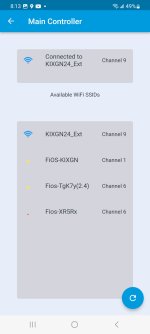
I am attaching a screenshot of the available wifi SSID's that the app can see. KIXGN24_Ext is what the controller is attached to now. FiOS-KIXGN is the wifi SSID at the other end of the house. There are usually two other wifi SSID's, but they are not showing at this time. I know that one is on channel 1 and the other is on channel 11.

I really wish the controller had an ethernet port. :-(

Thank you for your help again!
 

Attachments

  • Screenshot_20230323_201311.jpg
    Screenshot_20230323_201311.jpg
    202.7 KB · Views: 1
I am going to purchase a new access point today to see if I can resolve this issue. There were a few times that the unit connected and disconnected this morning. At one point the lights were solid blue - not breathing. I was unable to view the status of the controller from the app. I left it like that for a few minutes to see if it would correct itself, but I ended up unplugging it to reset it. Now the blue lights are breathing, and I can view the controller within the app.
 
I did a little bit more poking around.

I was trying to change the dosage amount on one of my Kamoer pumps and I noticed that all the schedules were missing. I restarted the app and that did not help. I went into the time sync part of the app and the dosing had a date of December 31, 1969. I tried over and over to time sync it, but if kept failing. I then signed onto the access point and looked at the log and right at the top were a bunch of entries from December 31, but no year. HMM.

I unplugged the access point and the pumps for a few minutes. I was able to then correct the dates. This whole thing is just odd.
 
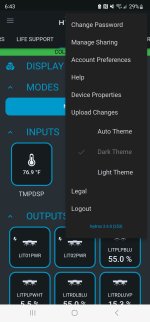
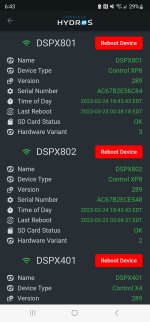
Let's double check app version and firmware is current before you did go too deep down this networking rabbit hole. App should be 253 and firmware should be 289. App is below three dots on right. Firmware is three dots on right then Device Properties.

Screenshot_20230324_184303.jpgScreenshot_20230324_184345.jpg
 
Last edited:
The app is 253 and the firmware was 286. The funny thing is that I upgraded to 286 most likely a few hours before 289. This issue has been happening long before the new update came out, but has only gotten worse recently.

I updated the firmware to 289 a few minutes ago. I will be in my office most of the day today to keep an eye on it.
 
The app is 253 and the firmware was 286. The funny thing is that I upgraded to 286 most likely a few hours before 289. This issue has been happening long before the new update came out, but has only gotten worse recently.

I updated the firmware to 289 a few minutes ago. I will be in my office most of the day today to keep an eye on it.

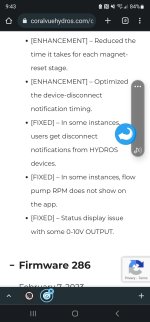
Changelog screenshot from 289 is below. This is why I asked you to check app and firmware first. Upgrade to 289 before you continue diagnosing network. I believe you still have network issues going on but deal with the potentially easier part first.

Screenshot_20230325_095145.jpg
 
I agree. I usually procrastinate with the updates because they almost never work the first time for me. When I upgraded to 286, I had to do it 10 times I believe.
 
That wasn't it. The all of the devices just disconnected and reconnected. When I look at the log from the access point all of the dates are Dec 31 and I am going to assume that the year is 1969. It kind of looks as if the access point rebooted on its own. I connected my phone to the same access point and reloaded the log and the log for my phone shows the date of March 25 while everything else that connected shows the Dec 31st date.
 
Back
Top