Any help with WiFi devices?

Users Who Are Viewing This Thread (Total: 0, Members: 0, Guests: 0)

No I have not been able to fix it. Right now I just pushed the red button to turn on the whole power strip on so everything on the tank runs. I had to shut unplug the ato so it is no longer automatic or it will keep filling. Sounds like there are three of us with the same problem. I did start a trouble ticket this afternoon. I’m starting to think it is something with the update. If I get it figured out I will let you know.
 
No I have not been able to fix it. Right now I just pushed the red button to turn on the whole power strip on so everything on the tank runs. I had to shut unplug the ato so it is no longer automatic or it will keep filling. Sounds like there are three of us with the same problem. I did start a trouble ticket this afternoon. I’m starting to think it is something with the update. If I get it figured out I will let you know.
I have a ticket in too. They said it’s probably the WiFi password but I triple checked it. I had to create a new collective and when I did that my WiFi strip and feeder stopped communication. I don’t know what the issue could be since it was working fine. Seems like something is blocking it for some reason.
 
No I have not been able to fix it. Right now I just pushed the red button to turn on the whole power strip on so everything on the tank runs. I had to shut unplug the ato so it is no longer automatic or it will keep filling. Sounds like there are three of us with the same problem. I did start a trouble ticket this afternoon. I’m starting to think it is something with the update. If I get it figured out I will let you know.
I would not run a ATO, AWC or dosing pump from a wifi power strip. If communications between the controllers and wifi power strips is lost the outlets on the wifi strips will remain in whatever state they are in until communications is restored or the wifi strip is powered down. Use a drive port if they are 12v or use a AC outlet on an XP8 or Launch instead.
 
I would not run a ATO, AWC or dosing pump from a wifi power strip. If communications between the controllers and wifi power strips is lost the outlets on the wifi strips will remain in whatever state they are in until communications is restored or the wifi strip is powered down. Use a drive port if they are 12v or use a AC outlet on an XP8 or Launch instead.
Definitely agree with all of that, with the original issue aside.
 
No I have not been able to fix it. Right now I just pushed the red button to turn on the whole power strip on so everything on the tank runs. I had to shut unplug the ato so it is no longer automatic or it will keep filling. Sounds like there are three of us with the same problem. I did start a trouble ticket this afternoon. I’m starting to think it is something with the update. If I get it figured out I will let you know.
I ended up flipping the fuse panel my tank is on, and was able to link up my feeder and WiFi strip. Maybe try fully killing the power to your system and trying again!
 
I ended up flipping the fuse panel my tank is on, and was able to link up my feeder and WiFi strip. Maybe try fully killing the power to your system and trying again!
That’s funny because when I got home I unplugged all three Wi-Fi strips. I then reconnected my control 4 and wave engine to my main 2.4g Wi-Fi router not the access point. Once connected I unplugged both the control and wave engine to allow them to reboot. I then went into the Wi-Fi devices in the app and did a replace on the strips one at a time. About 15 seconds after the first strip connected the plugs came alive. I replaced the remaining two strips and they are all working again.
 
I'm in the exact same boat that you are. I can not get my single or multiple outlet wifi controls to connect. The were working few days ago and now they are not connecting at all. Went and bought a new router to have a dedicated 2.4 wifi just for the controls and nothing else. Can get everything else connected except the wifi outlets. This is really frustrating!! Spent over 5 hours working on this and still can get it to connect.
You get yours sorted? Looks like most of the people with this issue were able to get linked back up..
 
That’s funny because when I got home I unplugged all three Wi-Fi strips. I then reconnected my control 4 and wave engine to my main 2.4g Wi-Fi router not the access point. Once connected I unplugged both the control and wave engine to allow them to reboot. I then went into the Wi-Fi devices in the app and did a replace on the strips one at a time. About 15 seconds after the first strip connected the plugs came alive. I replaced the remaining two strips and they are all working again.
When pairing the device you are using with the app installed on it has to be on the wifi channel you want the wifi strip to connect to which is the same one the controllers are on or it will not pair since the wifi strip will connect the the same wifi channel the device with the app is connected to. Could this have been the issue?
 
When pairing the device you are using with the app installed on it has to be on the wifi channel you want the wifi strip to connect to which is the same one the controllers are on or it will not pair since the wifi strip will connect the the same wifi channel the device with the app is connected to. Could this have been the issue?
No, that was not the issue. My phone with the app was on my 2.4g channel. I then paired both my control 4 and wave engine to the same 2.4g channel. I then paired the three Wi-Fi strips to the same 2.4g channel. The Wi-Fi strips paired as the light went from red and flashing blue to solid red. In the app under Wi-Fi devices all three said the were responding but they would never turn on the plugs for my equipment. The output section in the app would go from not responding to restart Wi-Fi device after the strips were paired. No matter what I did from Thursday of last week until it last night would fix it.

I bought my hydros equipment in either 2020 or 2021 when it first came out and I’ve never had any issues. In that time I’ve changed the wireless router three times. The first and third router were the same exact one as I had bought two and had one in the closet. The only difference I can think of was from router #1 to router #2 the channel names and passwords stayed the same and from router #2 to #3 the channel names changed requiring everything to be relinked.

 
No, that was not the issue. My phone with the app was on my 2.4g channel. I then paired both my control 4 and wave engine to the same 2.4g channel. I then paired the three Wi-Fi strips to the same 2.4g channel. The Wi-Fi strips paired as the light went from red and flashing blue to solid red. In the app under Wi-Fi devices all three said the were responding but they would never turn on the plugs for my equipment. The output section in the app would go from not responding to restart Wi-Fi device after the strips were paired. No matter what I did from Thursday of last week until it last night would fix it.

I bought my hydros equipment in either 2020 or 2021 when it first came out and I’ve never had any issues. In that time I’ve changed the wireless router three times. The first and third router were the same exact one as I had bought two and had one in the closet. The only difference I can think of was from router #1 to router #2 the channel names and passwords stayed the same and from router #2 to #3 the channel names changed requiring everything to be relinked.
My guess is something in the way the router was setup was preventing the communications between the controllers and wifi strips for some reason. It also could be something the user cannot change in the settings. When you were trying the access point it did have a different name from the router channels and had a hardwired connection between it and the router. The access point has to be hardwired to the router are it will not work for the Hydros wifi strips communications to the controllers.. It would have to be either in the access point or router itself. The wifi strips are standard Tuya protocol power strips. They do not have different firmware from the ones sold under different brand names. They use a local communication via the router instead of relying on going through the cloud.
 
My guess is something in the way the router was setup was preventing the communications between the controllers and wifi strips for some reason. It also could be something the user cannot change in the settings. When you were trying the access point it did have a different name from the router channels and had a hardwired connection between it and the router. The access point has to be hardwired to the router are it will not work for the Hydros wifi strips communications to the controllers.. It would have to be either in the access point or router itself. The wifi strips are standard Tuya protocol power strips. They do not have different firmware from the ones sold under different brand names. They use a local communication via the router instead of relying on going through the cloud.
Yes, I used the channel name the access point came with. I also tried changing it to a unique name and neither way worked. At first I plugged the access point into the back of the wireless router and based on your suggestion earlier I also unplugged the wireless router from the main router and plugged the access point straight into the main router. Neither way worked.
 
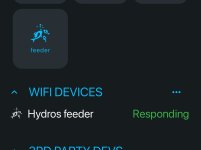
The wifi feeder tile in wifi devices is highlighted. The feeder output itself will not be.
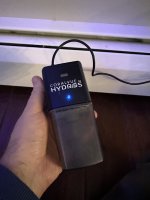
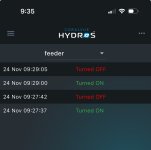
@Danny does this seem like the feeder is no good? Everything is connected and linked as it should be. It doesn’t physically spin when scheduled to, and it won’t even spin when I hit the gray button on top… and the tile is constantly highlighted. Wondering if internally it’s stuck “on”. Can you think of any troubleshooting?
 

Attachments

  • IMG_8763.jpeg
    IMG_8763.jpeg
    73.5 KB · Views: 3
  • IMG_8753.jpeg
    IMG_8753.jpeg
    846.2 KB · Views: 3
  • IMG_8755.jpeg
    IMG_8755.jpeg
    177.3 KB · Views: 3
@Danny does this seem like the feeder is no good? Everything is connected and linked as it should be. It doesn’t physically spin when scheduled to, and it won’t even spin when I hit the gray button on top… and the tile is constantly highlighted. Wondering if internally it’s stuck “on”. Can you think of any troubleshooting?
It sounds like it might be. Have you submitted a support ticket with CoralVue yet?
 
It sounds like it might be. Have you submitted a support ticket with CoralVue yet?
Yea, they said it’s cooked. Also 3-4 months back ordered for warranty so I’m just going to try and find one to buy. They’re not expensive.
 
Back
Top