
corynactis
New member
Hello! Totally new to Hydros, and recently bought a Hydros Start to be a heater controller and to create an auto water change, but it reports my AWC setup as “INACTIVE” and I can’t get it to run on a schedule. The setup is:
• Two triple water level sensors (high and low levels) connected to two sense ports, mounted in the return pump chamber of an AIO 7 gallon nano tank.
• Two diaphragm pumps (drain and fill) connected to two drive ports.
• No ATO system controlled by Hydros (that will be a separate system)
• Water change about 20 fl oz twice a day at midnight and noon.
I’ve verified that the diaphragm pumps work when triggered manually, but the schedule doesn’t run at all. Here’s what I see in the Status:
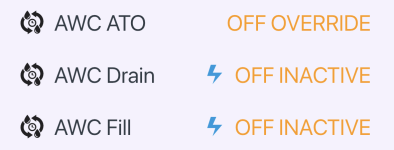
What am I doing wrong? I tried both the internal and external scheduling, and they don’t work. My Auto Water Change Output setup is below:
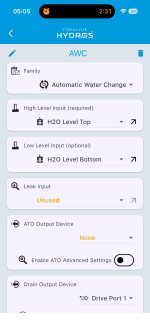
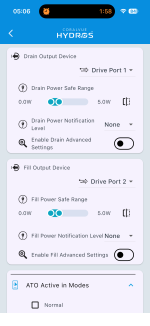
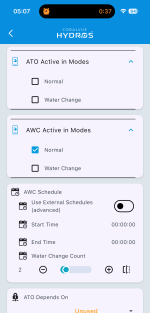
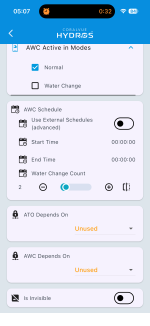
Thanks!
• Two triple water level sensors (high and low levels) connected to two sense ports, mounted in the return pump chamber of an AIO 7 gallon nano tank.
• Two diaphragm pumps (drain and fill) connected to two drive ports.
• No ATO system controlled by Hydros (that will be a separate system)
• Water change about 20 fl oz twice a day at midnight and noon.
I’ve verified that the diaphragm pumps work when triggered manually, but the schedule doesn’t run at all. Here’s what I see in the Status:
What am I doing wrong? I tried both the internal and external scheduling, and they don’t work. My Auto Water Change Output setup is below:
Thanks!
