Avast/Emergency

Users Who Are Viewing This Thread (Total: 0, Members: 0, Guests: 0)

KenRexford

Member
Joined
Dec 25, 2020
Messages
31
Reaction score
8
Location
Lima, Ohio
So, I decided upon the Avast Autofeeder. Disaster. It was all fine until today. I set up as generic. However, the HC4 went into spinning green. When that happened, the WiFi outlet went to on continuously and dumped a full bin of pellets into the tank.
The orp probe worked by telling me of the disaster, which is good. Also pH dropped noticeably. I siphoned out as much food as I could and now am dealing and hoping the tank survives.

For future reference, is there a means of avoiding this catastrophe? I mean, I am kicking myself for lazily overfilling the feeder. Won’t make that mistake again. But, how do I program the setup to avoid the feeder locking “on” if the controller goes out? Any other suggestions?
 
So, I decided upon the Avast Autofeeder. Disaster. It was all fine until today. I set up as generic. However, the HC4 went into spinning green. When that happened, the WiFi outlet went to on continuously and dumped a full bin of pellets into the tank.
The orp probe worked by telling me of the disaster, which is good. Also pH dropped noticeably. I siphoned out as much food as I could and now am dealing and hoping the tank survives.

For future reference, is there a means of avoiding this catastrophe? I mean, I am kicking myself for lazily overfilling the feeder. Won’t make that mistake again. But, how do I program the setup to avoid the feeder locking “on” if the controller goes out? Any other suggestions?
I’m not familiar with that feeder. Does it have separate compartments? I wonder if a max on time setting would stop that . 🤔
 
The issue is that with the HC4 offline, the outlet stays on. Nothing stops it except Pulling the plug.
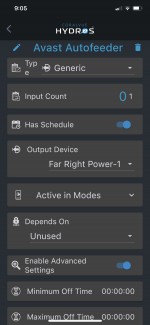
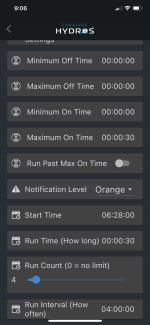
So you don’t have it set on a schedule? It’s currently powered always on? Can you provide some screen shot of how you have the output setup.
 
So you don’t have it set on a schedule? It’s currently powered always on? Can you provide some screen shot of how you have the output setup.
I think what he is saying is that his C4 lost connection to his wifi power strip. When that happens whatever is plugged into the strip stays on or off until connection is hopefully re-established. Heaters stay on or off etc. Not sure there is anything programming wise that can stop this from happening unfortunately.
 
I think what he is saying is that his C4 lost connection to his wifi power strip. When that happens whatever is plugged into the strip stays on or off until connection is hopefully re-established. Heaters stay on or off etc. Not sure there is anything programming wise that can stop this from happening unfortunately.
I’m thinking that more than a few of these type of issues have now been resolved via the 180 firmware update. I don’t know if you can ever make anything 💯 . I do know that I don’t use a fish feeder. I’ve dealt with them before and like most things anything can have a hiccup and or outright fail. Sounds like something had a hiccup at the wrong time. :/
 
I’m surprised also that the fish feeder doesn’t have some kind of internal timer that would shut it off. Is that common? Are most fish feeders “ dumb devices” ??
 
Last edited:
Agreed. Hopefully a rare event. I have a wifi feeder that runs independently of the Hydros system. It’s own power, own app, etc.
 
Someone posted a controlled outlet a while back that can be controlled with a DC voltage such as the drive port. I think it was sold on Amazon. This would remove the WiFi from the equation if you used one of those.
 
Back
Top