
Collective broken after internet outage

  • Thread starter Thread starter Raiden
  • Start date Start date
  • Tagged users None

Users Who Are Viewing This Thread (Total: 0, Members: 0, Guests: 0)

Raiden

Member
Joined
Mar 28, 2022
Messages
181
Reaction score
14
Location
Orlando, FL
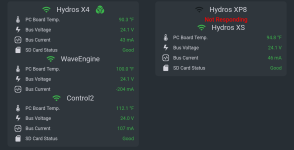
I'm not home at the moment, so can't really do anything about it now, but looks like xp8 did not reconnect to internet after local maintenance (got email about that from ISP) Although maybe something else gone wrong.

This is just sitting in the closet while I set tank up, so not a big deal now, but in future I'd rather not see patts get stuck out of service like that.

I tried rebooting collective, but that did not help. Any other ideas or is the suggestion to put all of this one 3rd party controllable outlet, so I could force reboot?
 

Attachments

  • Screenshot_20220516-105521.png
    Screenshot_20220516-105521.png
    241.5 KB · Views: 9
How long until you get home to check on it? I have battery backup for my wave pumps and I have been without power for over 4 hours at a time without any issues. There was no return pump or skimmer running during power outages. The two wave pumps are MP10's and they will run at a low level if there is no control to them. When you do setup your tank make sure it is setup so it can survive several hours until you can intervene.
 
It's not power, it's internet that went out and i guess XP8 never rejoined. Which seems like rather big potential problem if you're away when this happens. Not sure if outlets would still do right things on it.

So again just trying to figure out if this is expected behavior or what can be done to improve this. Thought devices shared internet access, so if one is connected from collective all get it as well.

Otherwise my only thought again would be to plug it all into some 3rd party wifi outlet(s), so I could force reboot collective. I use both Kasa and Wemo ones and both seem to be reliable in sense of power or internet outages.
 
I have 9 controllers in a collective and my internet goes out multiple times a day and that is not normal for it to cause this issue. Given that though when setting up your tank make sure it can survive an issue like this until you can either check on it or have someone go check on it. Adding controllable outlet just adds to the complexity and then there are more points of failure. As an example I have 2 MP10 flow pumps with battery backups. The tank could get by with just one but I want two just in case on were to fail the other would keep the flow going until I can take action. Neither is powered by the Hydros. The WEv2 usually controls them but in no power mode the pump speed is set in the pump itself, My controller has no backup power on it. If you have a separate modem from your router you can simulate no internet by powering off your modem and see what happens. The app will not work with no internet unless it is on a device with only mobile service selected and then you will have to connect via bluetooth to the controllers.
 
Yeah, once I get back I will test internet outage, but so far first outage and it failed so 100% failure rate :D
 
By the way the collective communicates via the command buss. It does not rely on wifi or internet. That said each controller still needs a wifi connection to communicate to the cloud. So if for some reason one looses wifi or internet access you will get an alert. In fact if internet goes down you will more than likely get an alert for each controller if the internet is down long enough for it to trigger alerts from the cloud.
 
Got home yesterday, XP8 was blinking WIFI. Powering everything fixed it, but looks like there is a possibility for the whole thing to get stuck like that forever with only solution a power cycle of the whole collective, which is unfortunate when you are not there. So I guess I will need to add another always - on guaranteed thing between outlet and Hydros to be able to remotely power cycle them when needed. Although it would be nice if firmware could be hardened against this happening in the future.

I will do some testing with this later by simulating internet outage, to see how often various modules will get stuck disconnected like this and other thing I haven't checked is if XP8 was still running its programming, so will need to get them stuck and check that. If it least it could still run its normal programming still, I guess that would suffice without need for external power cycle device.
 
Did you try a reboot on the XP8 from the app first? Also no wifi should not cause it not to run the setup since it talks to the other controllers via command buss.
 
Last edited:
That wasn't really an option, while I could go to the screen with all devices listed and button would be there for it dates etc would be something like 1960 etc. so it didn't really respond to that request. Rebooted collective , but again it would come back as collective broken and XP8 unknown as show in screen shot. So only way was really to unplug xp8 and WaveEngine from power sources.
 
That wasn't really an option, while I could go to the screen with all devices listed and button would be there for it dates etc would be something like 1960 etc. so it didn't really respond to that request. Rebooted collective , but again it would come back as collective broken and XP8 unknown as show in screen shot. So only way was really to unplug xp8 and WaveEngine from power sources.
What was the color of the STATUS led on the XP8 when it restarted, but the app was reporting it as not available?
 
Was just blinking yellow WiFi. I do not believe it actually obeyed any commands to restart and was just stuck.

Just did few quick outage tests, looks like everything behaves fine through that, I can still trigger things locally and things turn on etc. as expected. All eventually blink yellow for no WiFi.

My guess would be, perhaps if internet is out for too long, things maybe get stuck and that what happened to XP8 in this collective.

But it would be awkward for me to test as I do not really want to cut a lot of other things off for an extended period of time. Would have to add another router with a new network and reconnecting everything to that, but that's sounds like too much work right now :) Might be easier to test this on your side, so see if there some weird edge case of trying to reconnect to WiFi for 1024th time and getting stuck or something :D
 
Once the internet goes out, the HYDROS goes into WiFi recovery routines. The longer the internet is out, the more significant the gap between each recovery cycle. Depending on how long the internet was out and where during the cycle the internet returns, it might take a few seconds or a few minutes for the unit to go through the steps and recover WiFi. You might have caught the device after it had just ended the routine, so if given enough time, it would have eventually recovered.

This is just speculation without knowing more details and knowing what was going on inside the unit.
 
Wasn't at home so do not know exactly the duration, but email from ISP mentioned 6 hour window with 15 minute duration. After that collective was broken with status in the screenshot above and remained so for several days until I got home.

So it clearly got stuck and would not recover in any way aside from cutting power to the whole collective.

I tried both rebooting whole collective, which came back with same status (XP8 likely did not comply with the command to reboot) as well as rebooting just XP8, which I do not believe it actually did as information next to the reboot button of Device properties screen was placeholder with version either blank or 0 (I do not recall) Time of Day and Last Reboot being same and something like 1962 for year, don't recall how rest was filled.
 
Wasn't at home so do not know exactly the duration, but email from ISP mentioned 6 hour window with 15 minute duration. After that collective was broken with status in the screenshot above and remained so for several days until I got home.

So it clearly got stuck and would not recover in any way aside from cutting power to the whole collective.

I tried both rebooting whole collective, which came back with same status (XP8 likely did not comply with the command to reboot) as well as rebooting just XP8, which I do not believe it actually did as information next to the reboot button of Device properties screen was placeholder with version either blank or 0 (I do not recall) Time of Day and Last Reboot being same and something like 1962 for year, don't recall how rest was filled.
Next time something like that happens, please contact us at CoralVue Support Portal. If we can connect to the unit from here, we can troubleshoot and possibly find a solution. We will try to recreate the problem here, but sometimes, it proves to be challenging. If we can recreate the problem, we can fix it. If we have a hard time recreating the problem, it is more difficult to fix.
 
Back
Top