Collective MisMatch, upload is failing..

Users Who Are Viewing This Thread (Total: 0, Members: 0, Guests: 0)

rduffy64

Member
Joined
Mar 6, 2021
Messages
35
Reaction score
4
Location
Indianapolis, Indiana
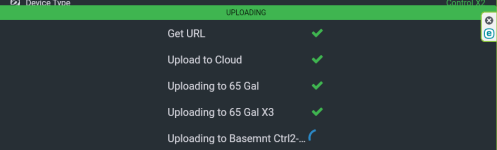
Collective Mismatch.... I've tried the following..
*** reboot collective
*** unplug failing controller and rebooting
*** reload config previous to the issue
*** Unplug the main collective controller..
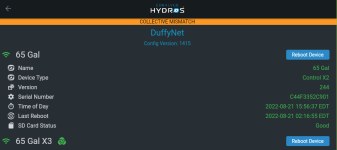
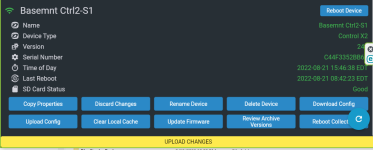
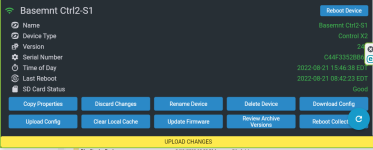
1661111824941.png

1661111459615.png


I'm assuming this is the controller in question because all the others get a check mark when uploading and the one in question does not.
1661111689543.png

Help and Thanks!!
 
Have you tried rebooting the controller in question. Wait a few minutes and retry the upload?
 
Collective Mismatch.... I've tried the following..
*** reboot collective
*** unplug failing controller and reboot/ed, several times.
*** reload config previous to the issue
*** Unplug the main collective controller..


Here is another thing I've noticed... When trying to upload I've noticed the WIFI signal on the device properties page is amber like it's not getting a good WIFI signal... Is the only way to change WiFi router for the controller, delete and recreate?? Also how can I tell which SSID/WIFI router it is on??


Thanks
 

Attachments

  • 1661200368765.png
    1661200368765.png
    56.2 KB · Views: 2
They all have to be on the same channel. If you have an amber wifi icon it is prbably not getting a good signal. The upload changes is done via wifi so if you have a weak signal for a controller it probably won't upload. A wifi signal will not go through a body water. So if there is water between the controller and the router or access point that could be the issue.
 
Last edited:
You could also try rebooting the router and access point, but as Danny mentioned, most likely, the device is located in a dead spot, and moving it to a different location will help. Remember that WiFi cannot travel through water. If you draw an imaginary line between the router and the affected HYDROS device, is there a body of water (aquarium or sump) directly in the path? If so, the HYDROS device will have connectivity issues, and you must move the device, router, or both.
 
I want to thank both of you guys for your encouraging information and support. I rebooted the suspected router and that took care of it.
* The only puzzling thing is when I unplugged the router, 2 out of 3 of the controllers stayed online. If I am needing to unregister a controller from one router and move to another, is that possible without deleting and re-adding it??? If this is a totally new subject, I can repost.... Thanks again...
 
I want to thank both of you guys for your encouraging information and support. I rebooted the suspected router and that took care of it.
* The only puzzling thing is when I unplugged the router, 2 out of 3 of the controllers stayed online. If I am needing to unregister a controller from one router and move to another, is that possible without deleting and re-adding it??? If this is a totally new subject, I can repost.... Thanks again...
Yes, here is how you update the WiFi credentials:

 
If it were me and I was replacing the router. I would give the new router the same names and passwords at the old one. Then all your devices will connect without changing anything on the devices. Much easier to change it on one device than several other devices.
 
I agree Danny, it's an IT security thing, I have 2 networks separated by firewall rules because the aquarium WIFI is bound by 2.4GHz and my computer WIFI is all 5.0GHz. I will definitely install a router with the same name and password because it is 100% failing as it went down yesterday...

Having the information to switch routers will allow me to help my clients as I install their Hydros controllers initially and switch over to a new closer router if the current routers becomes overwhelmed by distance, and segment their house security system from their aquarium network.

Thanks again,

Richard Duffy
 
Having same problem . Seems like my collective wifi is the issue , even though I placed a wired wifi extender in the same room . I keep moving the wifi priority from control 4 to my X8 but when changing modes from day to feed what ever controller has the wifi priority starts flashing red.
 
Having same problem . Seems like my collective wifi is the issue , even though I placed a wired wifi extender in the same room . I keep moving the wifi priority from control 4 to my X8 but when changing modes from day to feed what ever controller has the wifi priority starts flashing red.
It is normal for it to breath a different color when not in normal mode. There is a setting for which color in the settings for each mode. Yours may be set for red for feed mode. Mine is a white color and all the controllers in the collective breath the color.
 
my feed mode is green and from the Health menu they indicate flashing red hat is a Wi-Fi connection issue so I did put an extender in as they asked me to do. And my whole house is running at 2.4 GHz eliminated all the 5 GHz issue seems like there’s a glitch to the new 244 download it
 
That what mine is like on what ever controller has the wifi priority . It only happens when I go into feed mode because the wave engine not being able to connect to wifi to shut down my gyres to feed tank then I manually unplug my return pump because of still having pairing issues with quads, single and feeders.
 
That what mine is like on what ever controller has the wifi priority . It only happens when I go into feed mode because the wave engine not being able to connect to wifi to shut down my gyres to feed tank then I manually unplug my return pump because of still having pairing issues with quads, single and feeders.
I have a WEv2 and it will go into feed mode without an issue it is part of the collective and happens to be the wifi master also. It breaths white in feed mode as do the other 8 controllers in the collective. I just check all my alerts and out of 67 alerts not one of them is for a wifi device. I have 5 wifi devices connected to the collective. Four are power strips and one is a feeder. I do not normally use feed mode though since I have the feeder. I use it to trigger the WE into a feed schedule using a combiner output that has a minimum on time and is triggered on by the feeder output. I don't turn off my return for feed mode. I just lower the flow rate of my MP10's using the WEv2.
 
That what mine is like on what ever controller has the wifi priority . It only happens when I go into feed mode because the wave engine not being able to connect to wifi to shut down my gyres to feed tank then I manually unplug my return pump because of still having pairing issues with quads, single and feeders.
After thinking about it since you have wifi devices that are not linked and outputs you use in feed mode are on those that is probably why you get the wifi breathing red since it cannot communicate with them. Did you submit a support ticket for this issue?
 
That sound smart . I purchased my Control 4 and the Wave when you guy introduced it on the market . Loved Hydros since then and talked stores into stalking them in Canada not many places are up on new products but glad you guys seem to keep updating them and as far as you care goes your never second to none !!!! Great Job Guys ..... Since then have purchase more products and looking always for more. I know the issue I am having will be fix soon with next upgrade and not worried
 
That sound smart . I purchased my Control 4 and the Wave when you guy introduced it on the market . Loved Hydros since then and talked stores into stalking them in Canada not many places are up on new products but glad you guys seem to keep updating them and as far as you care goes your never second to none !!!! Great Job Guys ..... Since then have purchase more products and looking always for more. I know the issue I am having will be fix soon with next upgrade and not worried
I you are replying to me I am not a CoralVue employee. I am a user just like you that really believes in their system. Since I am not a employee I cannot do everything to help that an employee can do. That is why I suggested submitting a support ticket. They can ask you things off line and even access your system if needed to check things out. I also have had one since a couple of weeks after they came on the market. I have since become a beta tester for them and help with issues and questions someone might have. Most have had success at rebooting the wifi master after every replace or pairing. Just make sure after rebooting the wifi master that it becomes the wifi master again. You may need to make it the preferred wifi master in the settings for this to happen. Otherwise you will be rebooting the entire collective. Just wait 2-3 minutes to reboot the wifi master after it pairs or is unsuccessful. If it is successful or not you will need to reboot before a retry. Also wait 2-3 minutes after you reboot to make sure it completes and is reconnected to the cloud. Also make sure it has resumed as wifi master. Hope this helps with getting all your wifi devices reconnected.
 
Back
Top