
NorCal Reefer
New member
Comcast's gateway that is provided with their systems is set up as a Combined 2.4/5GHz band system that at first glace through their app, it does not look like there is a way to separate the 2 channels and runt hem independently.
That being said, I was able to get my whole system to link up and work with this router by disabling the 5GHz network in the Wireless Gateway Administration site that Comcast provides for access into their gateway router.
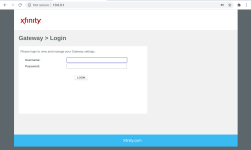
To do this, you will need to go to http://10.0.0.1
The default username and password will be:
username: admin
password: password
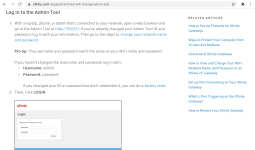
Comcast has detailed instructions on how to access and login on their site linked below.
 www.xfinity.com
Once you log in, you will then be prompted to change the admin password for logging in going forward, DO NOT forget the password you choose on this one haha.
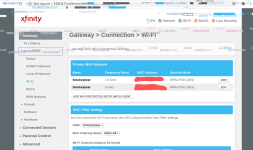
Once logged in you will then need to go to the Connection Tab from the menu on the left, this will then "drop down" more options.
Click on Wi-Fi.
You will see your two private networks listed at the top of the screen, on the right you will see the option to edit each channel.
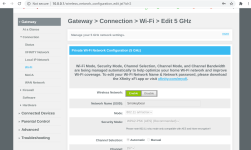
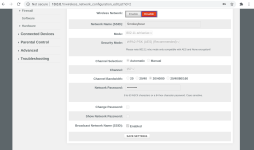
Click edit on the 5GHz Channel. The next screen that opens will have a Green Enable icon lit up, you will want to press Disable and then scroll down and click save settings.
Now go unplug and plug back in your router and you will be isolated on the 2.4GHz Channel only.
You will now be able to link your Power strips and Wifi Feeders without an troubles from my experience.
Once you have set your devices up, you can then go back into the admin too and re-enable your 5GHz Wi-Fi Channel and return to normal combined operation that the Comcast gateway performs
My system has been running flawlessly since.
I hope this helps anyone struggling with this router!
That being said, I was able to get my whole system to link up and work with this router by disabling the 5GHz network in the Wireless Gateway Administration site that Comcast provides for access into their gateway router.
To do this, you will need to go to http://10.0.0.1
The default username and password will be:
username: admin
password: password
Comcast has detailed instructions on how to access and login on their site linked below.
Change your WiFi network name and password with the Xfinity WiFi Gateway Admin Tool
Learn how to use the admin tool and change your WiFi network name and password for Xfinity Gateway XB2 or XB3 devices.
www.xfinity.com
Once you log in, you will then be prompted to change the admin password for logging in going forward, DO NOT forget the password you choose on this one haha.
Once logged in you will then need to go to the Connection Tab from the menu on the left, this will then "drop down" more options.
Click on Wi-Fi.
You will see your two private networks listed at the top of the screen, on the right you will see the option to edit each channel.
Click edit on the 5GHz Channel. The next screen that opens will have a Green Enable icon lit up, you will want to press Disable and then scroll down and click save settings.
Now go unplug and plug back in your router and you will be isolated on the 2.4GHz Channel only.
You will now be able to link your Power strips and Wifi Feeders without an troubles from my experience.
Once you have set your devices up, you can then go back into the admin too and re-enable your 5GHz Wi-Fi Channel and return to normal combined operation that the Comcast gateway performs
My system has been running flawlessly since.
I hope this helps anyone struggling with this router!
Attachments
-
 Screenshot 2021-12-06 at 12.38.14 AM.png83.1 KB · Views: 2
 -
 Screenshot 2021-12-06 at 12.39.12 AM.png276.9 KB · Views: 2
 -
 Screenshot 2021-12-06 at 12.40.25 AM~2.png325.8 KB · Views: 1
 -
 Screenshot 2021-12-06 at 12.42.45 AM.png261.5 KB · Views: 1
 -
 Screenshot 2021-12-06 at 12.43.25 AM.png188.9 KB · Views: 2