Control 3 shield pH circuit from interference

Users Who Are Viewing This Thread (Total: 0, Members: 0, Guests: 0)

Reefbeta

Member
Joined
Mar 31, 2021
Messages
31
Reaction score
2
Location
Seattle
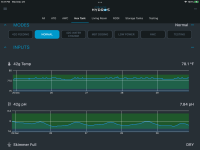
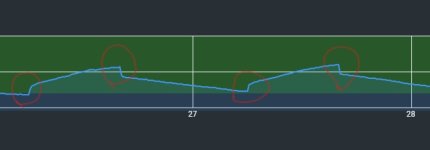
I have recently noticed that the pH reading in Control 3 have these jump and fall.
Screenshot (3)_LI.jpg
The timing coincide with the light turning on and off. I checked with a pinpoint hand held pH meter, but didn't see a reading change when turning lights on or off.

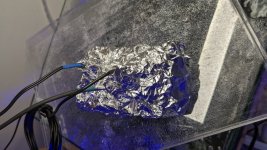
After some debugging, I found out that it's probably from some signal interference from the LED PWM driver. I tried to wrap the control with tin foil like this, and that reduced the difference from 0.11 to 0.03.
PXL_20211230_010918683.jpg
But I assume I can't let it run that permanently as it would block the wifi signal too? I actually tried to mount it back with tin foil wrapping from behind it, and somehow the pH reading went crazy and down to 2.X. I don't understand what's going on anymore.

So, what's the proper way to shield the head unit from signal interference for pH reading?
 
How close to the pH probe is the controller with PWM. I use PWM on my lights and I have s X3 at the tank and my PH does not look like that. My pH of the canopy so they are several feet away from each other.The X3 is also down in the stand.

CD0C498C-562D-493B-87DF-91D83502D0EC.png
 
The lights are like 10" above the tank, a 40 breeder. Their power supplies was on a shield above, another 2ft or so.

I initially have X3 mounted on a cabinet next to the tank. Then I moved it to under the tank. That seem to reduced the interference by a bit, like 0.02 or so.
 
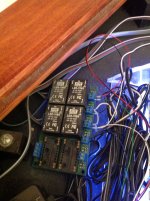
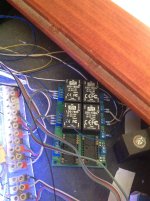
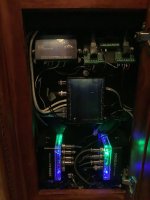
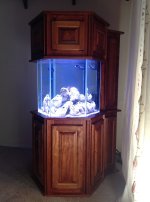
Here is the PWM LED drivers in the canopy and the X3 in the stand. Also a photo of the tank. The X3 is on the right in the third photo. Are any of the power cables for the lighting or cables for it near any of the cable to the X3 or near the pH probe? Another thing to try would be to place the pH probe in a glass of tank water when this happens and see if the reading changes back. If it does then somehow the PWM is causing it via the water.

42CA0037-DBFD-4A71-BE95-A845F8E2C714.jpeg

9AC97B93-EF5D-4496-B648-828C0ED684E7.jpeg

3D987C39-70E5-4C28-9239-8601FDF51195.jpeg

0A67BB6C-467E-41CD-8AC0-83FDC48BB3C8.jpeg
 
Last edited:
Two possibilities come to mind. In one case I had a bad ground combined with sufficient salt and moisture on a light fixture, it's mount and the tank frame to cause significant voltage to leak into the tank. Despite things appearing to be dry. Took a bit of trial and testing with my multi meter to figure that one out. Doesn't take much voltage to screw with a probe that works with milli volts.

The other possibility is electro magnetic interference from cheap leds. The drivers of cheap leds can emit considerable interference. It's enough of a problem that just one or two cheap led bulbs on a boats low watt navigation lights can completely stuff up a vhf radios ability to receive and transmit. If that is the case for your pH probe (the probe wire makes a great antenna), possibly a ferrite on the wire might help. Otherwise the solution is high quality leds. I am not aware of anyone making a highly shielded pH probe.
 
Tried the water in a cup testing, it didn't make a difference. It seem the interference happen in the head unit rather than in the probe.

The light is hanging from the shelf above. There is a power strip on top of the shelf, along with the light's power bar. So nothing about the light is close to the X3.

I did a bit more digging, and found that it's one of the two LED bar. So for curiosity, I took that light bar down, and bring it close to the Control X4 on my other tank and turn it on. That didn't really cause any reading swift on the X4 (well, 0.01 difference). Then I bring that light back to the X3, at the similar distance under the tank and run it. That brought a 0.2 difference on the pH reading. So somehow my X3 was not shielded properly? Is it the difference between X3 vs X4, or individual problem on my particular unit of X3?
 
Two possibilities come to mind. In one case I had a bad ground combined with sufficient salt and moisture on a light fixture, it's mount and the tank frame to cause significant voltage to leak into the tank. Despite things appearing to be dry. Took a bit of trial and testing with my multi meter to figure that one out. Doesn't take much voltage to screw with a probe that works with milli volts.

The other possibility is electro magnetic interference from cheap leds. The drivers of cheap leds can emit considerable interference. It's enough of a problem that just one or two cheap led bulbs on a boats low watt navigation lights can completely stuff up a vhf radios ability to receive and transmit. If that is the case for your pH probe (the probe wire makes a great antenna), possibly a ferrite on the wire might help. Otherwise the solution is high quality leds. I am not aware of anyone making a highly shielded pH probe.
I actually tried two probes. I started with an old probe borrowed from the pinpoint meter. Then I change it to a new replacement pH probe, the problem persist. The old probe in the pinpoint meter didn't register any difference with light on and off, so it doesn't look like it's the problem of the probe, does it?

As it's only one of the two same LED bar that cause the interference, it's possible that particular light is emitting more interference than others. But the X3 is also the only device that got interfered. My X4 and pinpoint meter are both unaffected by that same light.
 
RF Interference can be like that. The X3 and X4 are not made the same. They have different power supplies and the circuitry may be laid out differently even if it uses the same parts so it is possible that it could have this same affect on other X3's as well. I assume the other light is not interfering. I had an electronic ballast years ago on a tank that would interfere with the TV when it was on and they were not even close to each other. They were in different parts of the house. You can submit a support ticket and mention this thread and see what CoralVue has to say. Here is a link to submitting a support ticket Submit ticket
 
Back
Top