Delay for an output

  • Thread starter Thread starter JD371
  • Start date Start date
  • Tagged users None

Users Who Are Viewing This Thread (Total: 0, Members: 0, Guests: 0)

JD371

New member
Joined
Apr 2, 2021
Messages
4
Reaction score
0
Location
Levittown, NY
I know there's a maximum off time you can set but it's not applicable in my situation. When I do a water change I have that mode set for an hour but I always finish before that and the time always varies. Since I manually go from water change to normal it would be nice if there was a feature to delay one of the outputs turning on. If I don't remember to empty the skimmer before going into normal it overflows.
 
Use minimum off time instead of maximum off time.
Yes, but if I manually go from water change to normal under the minimum off time for the skimmer does it continue to count down or does it turn on right away?
 
If you are turning off the return pump it will if you have the depends on setting set to the return pump and have it set for off if off. It is a good idea to have that setup that way anyway.
 
Last edited:
If you are turning off the return pump it will if you have the depends on setting set to the return pump and have it set for off if off. It is a good idea to have that setup that way anyway.
Yeah, I have the return pump, reactor pump and skimmer shut off when in water change, going from water change to normal they all turn on so the skimmer will see it as on.
 
The minimum off time will start when the return pump comes on if you have the depends on setting set to the return pump.
 
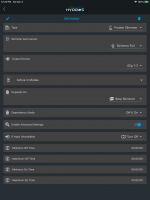
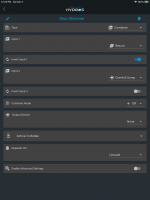
This is my setup for my simmer. Since I have a overfull sensor which I also have an output that follows that sensor. I use a combiner type output to use either return pump off or overfull sump to turn off the skimmer with it Depends On setting. Below are the screenshots for the skimmer output and the skimmer off output. The minimum off time counter will start when the skimmer ff output goes from on to off. So the skimmer will stay off for 5 minutes after the return pump comes back on or the overfull condition clears.

78418FF6-C5CB-459B-93B5-70DE0888735E.png

CD76D10A-6948-4083-9402-53E07A0C57C5.png
 
This is my setup for my simmer. Since I have a overfull sensor which I also have an output that follows that sensor. I use a combiner type output to use either return pump off or overfull sump to turn off the skimmer with it Depends On setting. Below are the screenshots for the skimmer output and the skimmer off output. The minimum off time counter will start when the skimmer ff output goes from on to off. So the skimmer will stay off for 5 minutes after the return pump comes back on or the overfull condition clears.

View attachment 903

View attachment 902

I'm assuming that you have this setup incase you want to add future input(s) for "Stop Skimmer," but at the time shown this is not really different than selecting return pump in 'Depends On'. More specifically, is there any difference between using a combine w/ 1 input and Depends On outside Future Expansion options.

If I may, tagging into a question on on advanced settings (times). If you wanted to use a combiner (started by other input(s)) to delay a pump for x mins, then run for y mins, then cycle, would you use the minimum off time and maximum on time?
 
I'm assuming that you have this setup incase you want to add future input(s) for "Stop Skimmer," but at the time shown this is not really different than selecting return pump in 'Depends On'. More specifically, is there any difference between using a combine w/ 1 input and Depends On outside Future Expansion options.

If I may, tagging into a question on on advanced settings (times). If you wanted to use a combiner (started by other input(s)) to delay a pump for x mins, then run for y mins, then cycle, would you use the minimum off time and maximum on time?
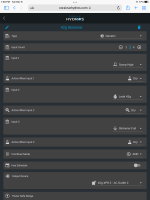
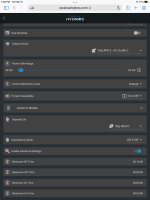
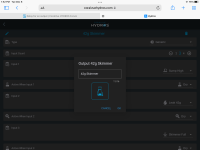
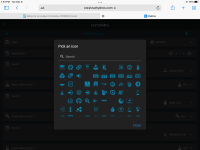
That was quite a while back. Things have changed. I use the generic output type for my skimmer and edited the icon on the tile to show the skimmer icon. Below is the settings for my skimmer output now. The first two are the settings for the output. The third is the screen after clicking on the pen icon in upper left of the settings screen.If you click on the iconit will bring up the screen in the forth screenshot where you can choose the Icon for the tile. Hope this helps.

B33758AC-EA8B-4016-8B85-B9AE6EA12743.png
BB00DD7F-C9BC-452F-991D-04730BD46BA8.png
523C8048-D9C0-4B71-8F37-2EF23056BE5C.png
4CAF2768-76A0-4D75-929D-45EFCA4E294D.png
 
@Danny thanks for the screen shots. Very helpful. Can you clarify something, the minimum off time you have as 10 min…that means the skimmer stays off for an additional 10 min after the return turns back on.
 
Yes, the minimum off time starts when the depnds on is no longer active since that has the output off when active. Otherwise the minimum off time starts the count from when it goes off. The depends on is an exception.
 
If I may, tagging into a question on on advanced settings (times). If you wanted to use a combiner (started by other input(s)) to delay a pump for x mins, then run for y mins, then cycle, would you use the minimum off time and maximum on time?
I didn't see this earlier. Minimum off time would work but maximum on time will send an alert and also if run past max on time is set to off it will turn the output off and it will remain off until an input turns it off or you intervene. Those settings are not meant to do what you want. the generic output type has a setting has schedule that you can turn on. Then you can go to advanced settings if you want it on more than one time in a given period as long as the times are equal.
 
Back
Top