Display Network Info

Users Who Are Viewing This Thread (Total: 0, Members: 0, Guests: 0)

ilovehotsauce

New member
Joined
Jan 28, 2021
Messages
23
Reaction score
6
Location
Austin, TX
It would be helpful if you could obtain the MAC and assigned IP address of your devices within the app. Perhaps the device properties view would be an appropriate place to list it?
 
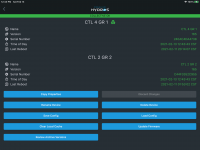
Go to the app and select the three dots in upper right corner. You should get a screen like below. The serial number is also the MAC address if you add the colons back in.

4196589E-FB9B-422B-9D55-AB257DB4703E.png
 
Go to the app and select the three dots in upper right corner. You should get a screen like below. The serial number is also the MAC address if you add the colons back in.

View attachment 624

Thanks Danny! I did find that info on another thread, and I was able to find the assigned IP after knowing what MAC to look for. I appreciate your input.
 
One thing I noticed is that updating the device name in the hydros app doesn't change the host name provided to the dhcp server as one might expect. It still just shows the serial number as the host name. #featurerequest
 
It could be that the naming is handled within the app and not the control device itself.
 
Back
Top