Feeding Mode Ques

  • Thread starter Thread starter kl3377
  • Start date Start date
  • Tagged users None

Users Who Are Viewing This Thread (Total: 0, Members: 0, Guests: 0)

kl3377

Member
Joined
Dec 31, 2020
Messages
31
Reaction score
6
Location
New Hampshire
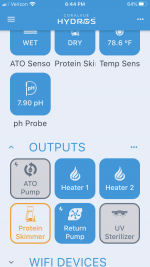
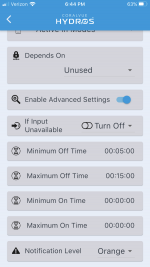
I need help with Advanced Settings for my skimmer in feed mode. My skimmer is the only Output that is programmed to turn off in Feeding Mode (15 minutes). However at the end of 15 minutes the Protein Skimmer does not turn back on. Below is a pic of Advanced Settings:

image0.png
image1.png
 
Yes, you have a minimum of time of five minutes on the skimmer. If you wait at the five minutes, the skimmer it will turn back on.
 
I set the Min time to zero. I figured the 5 mins was included in the 15 minutes of Off time for feeding mode. I have also noticed that the Countdown timer for Feeding Mode locks up (stops counting down). If you close the App and reopen the timer starts back up where it should but after a couple minutes freezes again. Is this in my setting?
 
I set the Min time to zero. I figured the 5 mins was included in the 15 minutes of Off time for feeding mode. I have also noticed that the Countdown timer for Feeding Mode locks up (stops counting down). If you close the App and reopen the timer starts back up where it should but after a couple minutes freezes again. Is this in my setting?
The app only refreshes for 2 minutes. After that, it stops refreshing unless you restart the app or hit the "refresh" button that appears on the lower-right-hand corner. The time is kept by the unit itself and not the app so even if you close the app, the timer will continue running.
 
What's the difference between "Mode Timeout" and "Exit Delay" in the Feed mode?
 
The Exit Delay is specifically related to Mode changes that are triggered from an external source (such as a 0-10V input). Mode Timeout refers to changes that are triggered by manual action from the UI.

Suppose you set your Exit Delay to 1 minute and your Mode Timeout to 15 minutes. Now you manually switch to that Mode using the app. At the end of 15 minutes that mode will "end" and you will go back to normal mode. Exit Delay will never apply in this case.

Now suppose you have a 0-10V input connected to a button. You push the button to trigger the mode. Now you release the button. The event has gone away but the mode will stay active for 1 minute till the exit delay ends.

The reason they are separate is because a user could connect the 0-10 v input to a toggle switch or to another controller. In that case you would generally want zero exit delay because you want the mode to stay active only as long as the input still stays at that level. But you would still want the mode to stay active for only 15 minutes if manually triggered.

 
How do I add a delay to my gyre pumps after exiting feed mode? Nothing I tried works…
 
The Exit Delay is specifically related to Mode changes that are triggered from an external source (such as a 0-10V input). Mode Timeout refers to changes that are triggered by manual action from the UI.

Suppose you set your Exit Delay to 1 minute and your Mode Timeout to 15 minutes. Now you manually switch to that Mode using the app. At the end of 15 minutes that mode will "end" and you will go back to normal mode. Exit Delay will never apply in this case.

Now suppose you have a 0-10V input connected to a button. You push the button to trigger the mode. Now you release the button. The event has gone away but the mode will stay active for 1 minute till the exit delay ends.

The reason they are separate is because a user could connect the 0-10 v input to a toggle switch or to another controller. In that case you would generally want zero exit delay because you want the mode to stay active only as long as the input still stays at that level. But you would still want the mode to stay active for only 15 minutes if manually triggered.
Thank you !!
 
Back
Top