Firmware advice

Users Who Are Viewing This Thread (Total: 0, Members: 0, Guests: 0)

Moparguy

Member
Joined
Jan 13, 2021
Messages
95
Reaction score
22
Location
New Jersey
Hi all just wondering if it’s worth it to upgrade to the new firmware? Since I only have the 4 unit and no collective? I’m seeing there’s bugs and u can’t switch back over to the old firmware I I’m hoping to get a Xs unit in the future or a wave engine or both . Also have 2 current wave pumps are they compatible with the wave engine? eFlux LOOP Accessory Wave Pump 2100 GPH (Pump Only) - Current USA
 
Yes. It’s worth the upgrade. The upgrade should go smoothly on a single device. Plus there are a lot of bug fixes that are in this release that will benefit you. Plus the web app, if you ever need it, will force you to update as well.

If you have concerns updating, best time to do it is during midday on a weekday since support is most available then invade something does happen. Then you can submit a ticket to support.coralvue.com if anything does happen and they can get you straight.

Hi all just wondering if it’s worth it to upgrade to the new firmware? Since I only have the 4 unit and no collective? I’m seeing there’s bugs and u can’t switch back over to the old firmware I I’m hoping to get a Xs unit in the future or a wave engine or both . Also have 2 current wave pumps are they compatible with the wave engine? eFlux LOOP Accessory Wave Pump 2100 GPH (Pump Only) - Current USA
 
Make sure you don't have a collective of one before you try and update. The new app does not allow collectives of one.
 
How would I know that I have a collective of one? Didn’t coralvue have cables for the current wave pumps at one point?
 
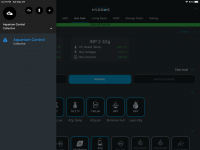
There is a banner across the top that says COLLECTIVE OK and also under the name in the menu on the left it will say Collective. I have 7 control units and only the Collective is displayed unless I am in bluetooth mode.

23416601-ED74-4839-8420-F0C2CABBCF23.png
 
This probably isn't the right place for this but I'm going to see if anyone has any ideas.
I'm not sure what to do, I typically use the Hydros phone app to check on my tank. But this morning I opened the web app to look. The web app is saying new firmware is available to download, currently running 186 with 189 available. However the phone app doesn't indicate this. Also Friday I tried the download and it failed. I'm tempted to just sit tight with my current configuration. What do you users think and am I the only one with this issue.
 
189 is the current release version but you will need the new app to download and install and use. The Android and IOS app should be available but installing the app will require you to download and install the new firmware also. I believe the release version of the app is 202.
 
189 is the current release version but you will need the new app to download and install and use. The Android and IOS app should be available but installing the app will require you to download and install the new firmware also. I believe the release version of the app is 202.
Thanks, I just re-downloaded the app a couple of weeks ago after having an issue, so there is a newer app?
 
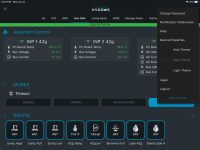
The new app is 202 is that what you have? To check click on the three horozontal dot in upper right of the app. You should get a popup menu like the one below. The version is at the bottom of the popup menu. They may have just released 190 for the control unit firmware. I think I seen a notice on facebook about it.

F4C3C9C7-DE5C-4ED7-8CF3-364742E18674.png
 
So I finally updated the app, installed the new firmware and now nothing is responding. This seems to happen everytime I install new firmware
 
Have you tried restarting your WiFi router? Seems to me the Control is not able to talk to your WiFi strips.
 
So I finally updated the app, installed the new firmware and now nothing is responding. This seems to happen everytime I install new firmware
I checked your controller and you had downloaded the firmware but not installed it. Either that or you restarted the controller right after the firmware installed so it reverted back to the previous firmware. Try restarting your WiFi router and access point and see if that clears it up.
 
OK thanks, question which firmware version is the most recent, 189 or 190?
 
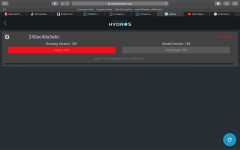
So I had a green bar that said install 190, I clicked on it and it goes to this. I don't understand.
 

Attachments

  • Screen Shot 2021-06-23 at 11.47.42 AM.png
    Screen Shot 2021-06-23 at 11.47.42 AM.png
    335.1 KB · Views: 6
Although when I check device properties it says running 190, so I guess it's OK
 
Back
Top