Getting Exception error when trying to connect WE

Users Who Are Viewing This Thread (Total: 0, Members: 0, Guests: 0)

wrz0170

Member
Joined
Jul 20, 2021
Messages
40
Reaction score
15
Location
Reno, Nevada
Hi everyone,

I am attempting to setup my WE and eventually my C4. I‘ve been following the setup instructions and doing ok until it gets to SSID and PW for your 2.4. When I input, I get the Exception Error as shown in the provided pic below “Submit” button.

I’m using an Eero Pro Mesh router which has 2.4 and to my knowledge, uses the same SSID for 2.4 and 5. I could be wrong.

I’m sure once I solve this, the fix will be the same for my C4.

Thanks!
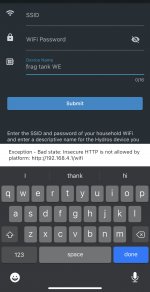
5B83AF86-20A1-4B9D-8FBF-7EBA9BCDD236.jpeg


t
 
Can you change the name of one so there is a difference. I have my 5ghz with the same name except it has 5ghz at the end of the name so that they are a different name.
 
Hi Danny,

I could give it a shot but I believe I have quite a few devices on the network that reside in 2.4. I’m spitballing here, would I run into the same issue with my C4 and then bring the WE on board in the Collective?
 
Looking through my list of all my attached devices, over 90% appear to reside in 2.4. Who knew? :)
 
In looking how to accomplish this for the Eero Pro, the result was not promising. A Google search of question of “Can Eero support separate SSIDs”

Best answer: No. Eero devices use a single SSID that broadcasts simultaneously on both 2.4 GHz and 5 GHz frequencies. This is a standard feature in most mesh networks, and even for those where it can be reconfigured, it's not easy to do.

Ugh.
 
If you can hookup a access point to a wired port you can give that a different name and move the control devices there. Others have done this to get around this issue.
 
So, I tried a different tactic (hasn’t worked yet). I brought up my C4 and thought I would bring up the WE in the Collective. The C4 connected to my WiFi in seconds. Updated firmware to 190 and created my Collective. It sees the WE but alas, I got the Collective Broken when I tried to upload changes. I have the Command Bus cable and one Terminator. The units are side by side In my cabinet if that helps.
 
This Pertains specifically to Eero mesh Routers.

We suggest you do this before you attempt to connect your Hydros Device or WiFi power strips.
TIP: It has come to our attention that this specific brand of Router can be difficult to deal with when trying to connect your Control devices. Below is a procedure that if followed will assist you with proper connection to your Control device and WiFi power strips.

You cannot technically separate the WiFi signal into a 2.4ghz and a 5.0ghz. However you can temporarily disable your 5ghz signal via the EERO App. This will give you a 10 minute window in which to Connect your Hydros Control Devices . If you run out of time you may have to go back into the EERO App and disable the 5.0ghz signal again.
Step 1. Go into the EERO App and select “ Troubleshooting “
Step 2. Select “ My Devices won’t connect”
Step 3. Select “ My Device is 2.4ghz only”
This will disable the 5.0ghz signal for a 10 minute window.
 
Thank you Michael. Should I try to connect my WE before trying to connect the WE to the collective? My Controller 4 connected right away To my Eero.
 
Thank you Michael. Should I try to connect my WE before trying to connect the WE to the collective? My Controller 4 connected right away To my Eero.
Absolutely. You want to make sure the WE is connected to your WIFI and you can get a status screen on the WE before starting the Collective process.
 
Ok, so still no go and I’m sure I’m doing something wrong. I removed the C4 entirely from it all. That works fine. I enabled 2.4 on Eros. I connected to WE SSID. Went to App, pressed +. Nothing shows up in the box. Only time it shows if I do Use Legacy WiFi Setup. No matter what I do there, I get the Exception error has pictured above in my first post.
 
Ok, so still no go and I’m sure I’m doing something wrong. I removed the C4 entirely from it all. That works fine. I enabled 2.4 on Eros. I connected to WE SSID. Went to App, pressed +. Nothing shows up in the box. Only time it shows if I do Use Legacy WiFi Setup. No matter what I do there, I get the Exception error has pictured above in my first post.
I would submit a support ticket at this point. They can ask you questions that can't be asked here. Keep in mind that their hours are standard business hours.

 
So I did a search of Wave Engine in the portal and came across a person who had similar issue with an Android. Carlos said the cause of the Exception error is outdated firmware. I assume this applies to IOS as well. Going to start a ticket.
 
Quick update in case someone else comes across this issue and reads this. This particular exception error apparently means the firmware is old enough where it can’t be updated. I pulled the short straw this time. CV will be sending me a new one and I will send this one back. Easy peasy.
 
Hi everyone,

I am attempting to setup my WE and eventually my C4. I‘ve been following the setup instructions and doing ok until it gets to SSID and PW for your 2.4. When I input, I get the Exception Error as shown in the provided pic below “Submit” button.

I’m using an Eero Pro Mesh router which has 2.4 and to my knowledge, uses the same SSID for 2.4 and 5. I could be wrong.

I’m sure once I solve this, the fix will be the same for my C4.

Thanks!

View attachment 1295


t
I am getting same error.. Does that mean I got a bad unit too?
 
I am getting same error.. Does that mean I got a bad unit too?
I would submit a ticket. Takes less than 5 minutes. You will have a response probably tomorrow. Just need proof of purchase and they most likely ship out a new one same day. You return your old one. Easy.

I get my new one tomorrow (Monday 08/2) and I look forward to add it to the Collective.
 
I am getting same error.. Does that mean I got a bad unit too?
It's not that it's a bad unit. It just means it's got really old Firware. You should submit a support ticket and CV will take care of you. :)
 
Update: Received new Wave Engine and it connected immediately to my home network. Was able to update from 160-190 and shows up on Status screen. Next stop, integrating it into the Collective. Thanks CV for the quick turn around.
 
Back
Top