Graphs

  • Thread starter Thread starter TangGuy
  • Start date Start date
  • Tagged users None

Users Who Are Viewing This Thread (Total: 0, Members: 0, Guests: 0)

TangGuy

New member
Joined
Apr 30, 2021
Messages
14
Reaction score
4
Location
London, ON, Canada
Hi Everyone,

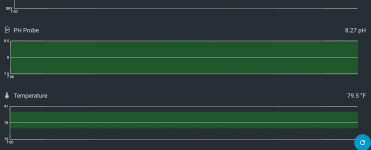
My Control 4 is no longer displaying the graphs for the last couple of days for PH & temperature. That said, the values are refreshing regularly. Any ideas why?

Thanks!
 
Try restarting the control and then wait an hour or so. That should clear it up.
 
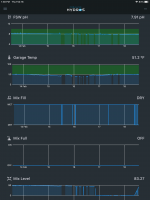
What does the graph look like? Below is one with gaps due to loss of internet. Are they completely blank?

FB94A619-2B99-433B-8067-1E7F930AB7F7.png
 
I have had that happen but usually I could get the data back by changing the display for inputs to tiles instead of graphs. Then wait a few seconds and then change it back to graphs. I have got to where I leave it in tile mode until I want to view the graphs. I think when you change it from tile to graphs it gets the info from the cloud for the graphs. If you change to tile and don't wait for a while it won't upload the change to the cloud. If you close the app and reopen it it will still be in graph mode. So waiting when you got to tile is important.
 
Hi , also having issue with input graphs only showing one graph when prior ver190 allowed me to see all (4) inputs in graph format. I get reading of all (4) inputs when switched to tile readings but when switched to graphs only get one (tank ph ) graph. Any ideas what to do appreciated.
 
Hi , also having issue with input graphs only showing one graph when prior ver190 allowed me to see all (4) inputs in graph format. I get reading of all (4) inputs when switched to tile readings but when switched to graphs only get one (tank ph ) graph. Any ideas what to do appreciated.
Did you try holding you finger on the one graph a few seconds to enter the choose mode. Once in that mode make sure the check box is checked on the graphs you want to show on that particular page. Then press and hold one of the graphs a few seconds and release to fo back to normal mode. You can also rearrange them in the choose mode. This mode works with tiles and text also. It also works with output and the other headings as well.
 
Multiple times. But as it goes, like taking the car to the mechanic soon as you replied I checked the app and it is graphing. I think the matrix has me! HAHAHAHA lol, thanks for the response always BEST customer service in the industry from the CoralVue Team.
 
Back
Top