Hydros Control 4 malfunction

Users Who Are Viewing This Thread (Total: 0, Members: 0, Guests: 0)

The "Running" version is the one that matters. That is the one that the unit is currently running, and as long as that is 165 (the latest at the time of this post), you are fine—no need to install anything else.
 
Sorry I lost power for a few hours. The weather is bad here in Texas right now. So did you get it to connect to the WiFi yet. If so choose a good save version before you had your problem to revert back to. You need to get it back on wifi though. The flashing red s no wifi if I remember correctly.
 
Thanks for checking in Carlos, sof as of now, I have no WiFi connection per se , but blue tooth is ok . Noted that Bluetooth “ icon” is now yellow and was red way back when all was not connected. Not sure what that means really. In past issues like this since starting hydros Bluetooth connection happens a bi before syncing to iCloud. Hope that gets me to blue pulse on hydros 4 . Really not relying on this for life support at all but would like it for trends of ph, temperature alerts etc..
 
Thanks Danny ,yes weather herein pa not great either lol. But yea, still red pulse and no WiFi on cloud yet. Fingers crossed that it’s gonna be ok soon. Was ok although a bit glitchy even before this issue started. Getting WiFi extenders to see if that helps. I am not really too techy as I am “ old school guy” I guess lol!!
 
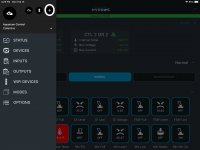
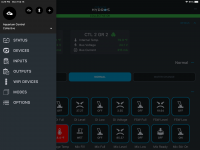
You may need to do a setup for the WiFi again. Select the three bars in upper left of the app. You should get the menu like below. Select the + in the menu to add.

F204AECB-DFC4-4FBD-B9A9-E313C6379FEE.png

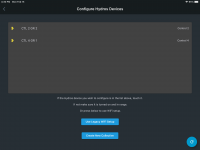
This should get you the screen below. Select you control unit. It should be displayed on this screen. This will get you to the setup of the Wifi for your control unit. Hope this helps.

9BCA7618-0B14-4843-B025-EEF6CA7C6E64.png
 
Thanks Danny, butI am only using iPhone to get the app. Do you think I should set app on actual computer to “see” what your saying as on iPhone I do not. See the same option for what you’re showing above. I could send (I think) pic of what I have available if you want. Thanks
 
Those screenshots are from a iPad. I don't have a iPhone so I am not sure what the difference is. I will check on my phone.
 
The three bars I was referring to are circled in the screenshot below With the white circle upper left.

69EC62AF-392D-4D8A-8EE5-B6660F62F267.jpeg

The + I was referring to is circled with a white circle in the screenshot below.

44FCFBEF-C651-4AEA-B232-2F9DB4CAFB57.jpeg
 
Thanks Danny, butI am only using iPhone to get the app. Do you think I should set app on actual computer to “see” what your saying as on iPhone I do not. See the same option for what you’re showing above. I could send (I think) pic of what I have available if you want. Thanks This is what I have been doing and then I’m still not getting WiFi; only connection is Bluetooth . Thanks Danny.
 
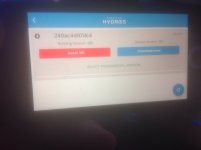
Update!! I finally was able to get this problem sorted. My connection to wifi was not working due to me trying to use my "phone " wifi password when I should of used the Houses wifi password!. Not being to computer savvy, this took me a really long time to figure out lol!!. Anyway, alls good now. Thanks you Danny, JRill(magnet info helped out big time).
 
Update!! I finally was able to get this problem sorted. My connection to wifi was not working due to me trying to use my "phone " wifi password when I should of used the Houses wifi password!. Not being to computer savvy, this took me a really long time to figure out lol!!. Anyway, alls good now. Thanks you Danny, JRill(magnet info helped out big time).
Great to hear this was resolved! Welcome to the world of Hydros!
 
Back
Top