Leak Detector Question

Users Who Are Viewing This Thread (Total: 0, Members: 0, Guests: 0)

DXHippie

New member
Joined
Jul 23, 2022
Messages
3
Reaction score
2
Location
Las Cruces
Hi Everyone,

I am very new to Hydros system, and have a question in regards to the leak rope. I am trying to find out if there is a way to have the leak rope shut off multiple items at the same time, if a leak is detected, i.e. return pump, ATO Pump, Skimmer.

I was looking at using combiners, but didn't see where they could be added to an input like the rope sensor.

Any suggestions would be helpful, as I am a bit lost at the moment.

Thanks,

Garett
 
You could create a virtual generic that will turn ON if there is a leak and then make your other outputs "Depend on" (off if on).

Also, most of the output presets you mentioned (skimmer and return pump) already have a way for you to specify a leak detector.
 
You could create a virtual generic that will turn ON if there is a leak and then make your other outputs "Depend on" (off if on).

Also, most of the output presets you mentioned (skimmer and return pump) already have a way for you to specify a leak detector.
I may have missed that part when setting up the skimmer and pump.

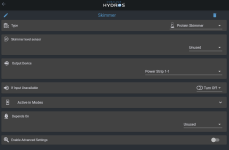
This is my skimmer page..
1659388675744.png
 
I may have missed that part when setting up the skimmer and pump.

This is my skimmer page..
View attachment 2565
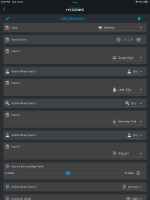
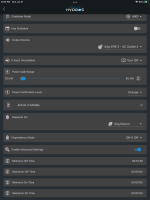
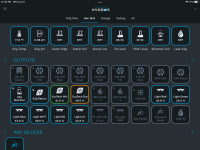
You would have to switch to generic to add a leak detector. With the new firmware you can change the icon on the tile to have the skimmer icon. I use a generic output type with my skimmer and have 4 inputs that control if the skimmer is on or off. Below in the first 2 screenshots is the skimmer output. The last one is a screenshot with the tile icon changed to the skimmer icon. It is middle row of outputs on the left.

B7879F4E-B45F-45A9-A309-94C863B9552B.png

F55D1962-8A7C-45B5-8FA8-CC5A888519C4.png

5D09B465-6E00-45B2-8D94-804B8E678EB3.png
 
You would have to switch to generic to add a leak detector. With the new firmware you can change the icon on the tile to have the skimmer icon. I use a generic output type with my skimmer and have 4 inputs that control if the skimmer is on or off. Below in the first 2 screenshots is the skimmer output. The last one is a screenshot with the tile icon changed to the skimmer icon. It is middle row of outputs on the left.

View attachment 2566

View attachment 2567

View attachment 2568
This is perfect. I appreciate the help. Still trying to work through the system, and am very excited about the wide range of controls that we have.
 
Back
Top