Lighting schedule with Radion G5s

  • Thread starter Thread starter Dbm338
  • Start date Start date
  • Tagged users None

Users Who Are Viewing This Thread (Total: 0, Members: 0, Guests: 0)

Dbm338

Member
Joined
Jul 13, 2021
Messages
96
Reaction score
10
Location
Worcester
I need some help setting up lighting schedules for Radion G5s. Do I select the variable led or just plain led when setting up outputs? When I try to create a schedule the only template I see is for flow schedules. Im having the same issue when trying to creat dosing schedules. Am I in the wrong area of the app? If you could share a screenshot of what it shoukd look like it would help (visual learner here)
TY
 
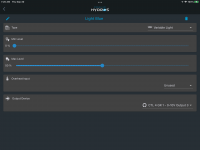
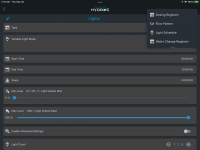
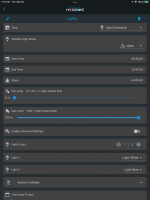
First do you have a light output setup for variable light? Example in first screenshot. Then create a schedule. You can set the type in the schedule. The second screenshot has the popup for selecting the type of schedule. For lights select light schedule. The third screenshot is an example of a completed schedule.

744CB0C9-01C5-4F80-AC32-83F4F430D7DA.png


FF86149A-3D79-46C5-8860-95C275D2C1EE.png

7A8BA3D1-416B-462E-BCCA-955416D32A46.png
 
EcoTech does not allow other controllers to take over the lights. They only want the Mobius controller to have full access. Unfortunately, for that reason, the only thing you can do is turn the lights ON/OFF by controlling the electrical outlet.
 
Carlos, is this still the case? What would be the best use of Hdros X4 and XP8 and using a Radion g6?
 
Aperture has not changed their stance, so the options are still the same as they were before. All HYDROS can do is power them on and off.
 
Back
Top