
Im setting up a new control 4, I'm using powerstrips from another control so i removed the outputs and strips from the XS controller and linked the one strip to the new control fine but when i do the second it links instantly but continues to flash like its in link mode, then when i save changes on my control the second strip keep turning on and off. Not sure why this all is happening?
Navigation
Install the app
How to install the app on iOS
Follow along with the video below to see how to install our site as a web app on your home screen.
Note: This feature may not be available in some browsers.
More options
You are using an out of date browser. It may not display this or other websites correctly.
You should upgrade or use an alternative browser.
You should upgrade or use an alternative browser.
Linking wifi powerstrip issue
- Thread starter d0gFartz
- Start date
- Tagged users None
Users Who Are Viewing This Thread (Total: 0, Members: 0, Guests: 0)

Danny
HYDROS Expert
Reboot the X4 abut three minutes after a pair or pair attempt before trying to pair another wifi device. Also wait agout 3 minutes after the reboot before trying to pair. See if that will work.
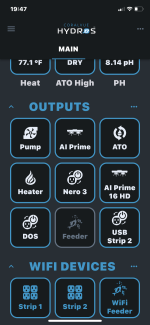
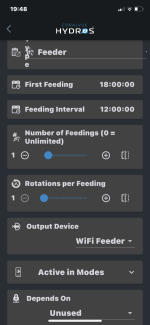
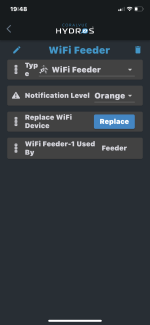
Got it going this afternoon. Carlos said reboot the my router then repair the second strip. It worked perfect then. Only issue I have now is getting my WiFi feeder back up. Has to be something dumb I’m missing like all my other issues lol. I have it paired up and turns my return pump off like before but isn’t feeding when tellling it to feed. I hit the feed button in the output and the return pump shuts off as expected but my feeder won’t rotate unless I press the button on the feeder it self. I also looked at my other tank and noticed the feeder light is always on this one isn’t but it has power from strip 2
Attachments
Danny
HYDROS Expert
I don't power my feeder with power strip I use the adapter and a always on outlet. It has to remain on all the time.
Danny
HYDROS Expert
Is the USB port that it is plugged into alway on.
Danny
HYDROS Expert
Does the tile on the app for that output turn red when you power the feeder down?
Danny
HYDROS Expert
The tile for the feeder in the wifi devices at the bottom of the page. If you power down the feeder by unplugging it from the wifi strip does that tile for it turn red?
Danny
HYDROS Expert
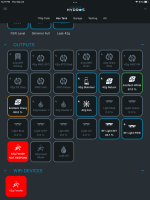
If I unplug my feeder The tiles turn red for the wifi device and the output. See screenshot below. Are you sure it paired with the right one?
Danny
HYDROS Expert
If they are unplugged from power they will turn red unless the display has timed out. If any wifi device that is paired looses power it will turn red and also any outputs that use a outlet on it their tile will also turn red.
- Admin
- #17

We are very sorry for the inconvenience. We are aware of the bug, and the fix will be included in the next firmware/app update!