Make the Icons independently selectable from the device type.

Users Who Are Viewing This Thread (Total: 0, Members: 0, Guests: 0)

cmrehder

New member
Joined
Oct 17, 2021
Messages
10
Reaction score
1
Location
Florida
This might seem to be a minor request but it should be easy to do and would make this awesome platform even better.

I think it would be a great feature if you could select the icon that shows for each device. Example: I originally had my Protein skimmer setup as an Output with type as Protein Skimmer, with cool Icon to match. Changing it to a Combiner type output so I can have it depend on 2 return pumps and a sump Hi level sensor which is a super cool feature, but now I lose the cool Skimmer Icon and have a combiner icon for the skimmer. It should be a fairly simple matter to make the icon be selectable independently from the device type.
 
This might seem to be a minor request but it should be easy to do and would make this awesome platform even better.

I think it would be a great feature if you could select the icon that shows for each device. Example: I originally had my Protein skimmer setup as an Output with type as Protein Skimmer, with cool Icon to match. Changing it to a Combiner type output so I can have it depend on 2 return pumps and a sump Hi level sensor which is a super cool feature, but now I lose the cool Skimmer Icon and have a combiner icon for the skimmer. It should be a fairly simple matter to make the icon be selectable independently from the device type.
You can still use the skimmer type if you use the combiner to combine the 2 return pumps with the combiner and then use the combiner in the depends on.
 
Ahah! Thanks for that tip. I will do that in this case for sure.

The skimmer is one example of this request. I would like the same feature for flow pumps etc
 
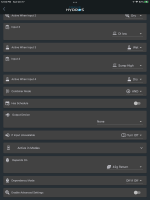
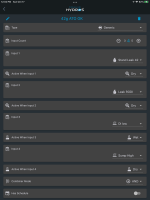
Don't you have to use the flow pump output to be able to use it in a schedule? So far I have been able to use the output and use another output or outputs to control it via the depends on. An example is the skimmer. I use a generic output so I can turn it off with more than the skimmer full sensor. In this case Stand Leak, Leak RODI, DI low and Sump High all have to be in their active state for this output for the output to be on. The RODI leak detector is next to the DI storage tank and ATO pump in the garage. The DI Low sensor is the low level sensor in the DI storage tank. The Sump High sensor is a sump overfull sensor. Since I used the skimmer depends on setting for this output I set the depends on setting on this output to the original output which was the return pump.


9EE98B77-095F-4065-B508-D521956291DB.png

47E8421D-19A9-4896-A45C-3D805867A38C.png
 
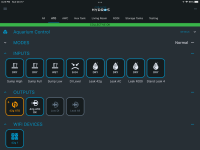
Generic output gives you the generic Icon.

It isn't that there is no way to accomplish the function. It's that I want to control the Icon associated with the output device.
 
My ATO has the ATO icon it is the other outputs associated with the ATO that use the generic output.

68F70FA9-8E20-45D5-9E3B-DD99548DBB8F.png
 
Back
Top