

I have a Control4 that I am trying to set up as the main control in a collective. It is connected by a data only cable to a Control XS in my water station room. When I created the collective only the control 4 was in the collective. Hkw do i add the XS and other control units as well? Is there a way to delete the collective and start over?
Navigation
Install the app
How to install the app on iOS
Follow along with the video below to see how to install our site as a web app on your home screen.
Note: This feature may not be available in some browsers.
More options
You are using an out of date browser. It may not display this or other websites correctly.
You should upgrade or use an alternative browser.
You should upgrade or use an alternative browser.
Need help with making collective
- Thread starter Dbm338
- Start date
- Tagged users None
Users Who Are Viewing This Thread (Total: 0, Members: 0, Guests: 0)

Danny
HYDROS Expert
When you are in the collective I believe you click in devices click on the horizontal bars in upper left of app and choose Devices in the menu. Then click on the + sign. When you add a control unit to the collective it will erase all setups you have on the control unit. Best to add new control units last. But since you have already started you may have to continue and setup the XS after adding it in. Just make screenshots of your setups of inputs and outputs.
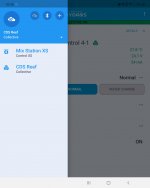
Danny
HYDROS Expert
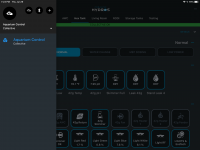
ok, I made some screenshots. This is the status page. In the upper left there are three horizontal bars. Click on them. You should get the menu in the second screenshot. In that menu there is a selection devices. Click on that and you should get the third screenshot. See the blue dot on the lower right corner with the + sign. Click on that. That sould take you to a screen where you can choose the device you want to add. As far as the wifi strips and plugs you add them to a collective the same way you would do if it was a single controller. Just remember it will erase the programming and setup on the device you are adding when you add a control unit.
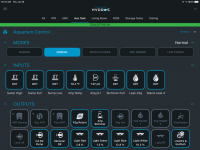
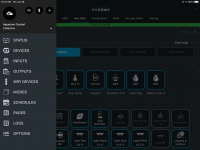
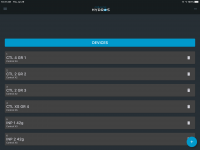
- Admin
- #6

Here are instructions on how to create a new collective:
Creating a New Collective
Here are instructions on how to add subsequent devices to an existing collective:
Adding a Second Device to an Existing Collective
Creating a New Collective
Here are instructions on how to add subsequent devices to an existing collective:
Adding a Second Device to an Existing Collective
I think I figured it out but im nit sure what I did. It coukd have been using terminators when i didnt realize the power supply had a built in terminator. Do my screen shots look right? Is there a way to see all my inputs, outputs, controls etc in one page? How do get inputs from one control to set a rule for other things? For instance if lvl sensor on a XS is wet turn off skimmer pump or something like that. It seems I can only select from the inputs on the control unit that is being shown in the app at that given time.
Attachments
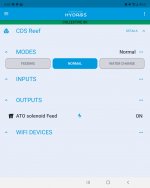
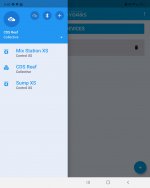
- Admin
- #8

To me it appears you have a collective of one setup " CDS Reef" if you want to add devices to that collective then you need to follow these directions next. HYDROS WaveEngine - Adding to CollectiveI think I figured it out but im nit sure what I did. It coukd have been using terminators when i didnt realize the power supply had a built in terminator. Do my screen shots look right? Is there a way to see all my inputs, outputs, controls etc in one page? How do get inputs from one control to set a rule for other things? For instance if lvl sensor on a XS is wet turn off skimmer pump or something like that. It seems I can only select from the inputs on the control unit that is being shown in the app at that given time.
- Admin
- #9
Here are instructions on how to add subsequent devices to an existing collective:
Adding a Second Device to an Existing Collective
Adding a Second Device to an Existing Collective
I think you are right. Lets try again, lolTo me it appears you have a collective of one setup " CDS Reef" if you want to add devices to that collective then you need to follow these directions next. HYDROS WaveEngine - Adding to Collective
Do you still need a terminator if the power supply has a built in terminator? How do i that with an XS that has power to one command bus and a data cable to the other?Here are instructions on how to add subsequent devices to an existing collective:
Adding a Second Device to an Existing Collective
- Admin
- #12
Adding a second terminator at the end of the connection chain is actually the correct way of doing it if you have many devices connected. Having the second terminator will only make the connection stronger.
We also cover that in the instructions under the "Terminator" section.
HYDROS Collective 101
We also cover that in the instructions under the "Terminator" section.
HYDROS Collective 101
Danny
HYDROS Expert
If you have a control device in a collective it will not show in the menu you have up. It will be like the one I posted here. To add them you have to be on the other menu. You also have to have the collective selected. The selected device or collective has a down arrow to the right of it if you click on it it will go to the other menu. If you have a buss cable longer than the normal 6ft you will probably need a terminator on each end. Do you have three devices or just two?
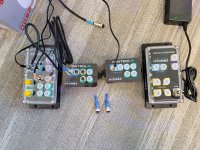
What else do I need to get this to work? Ive realized I need another control 4 or control 3 for my probes that i want. So I would need 2 more command bus cables it seems. Where do i plug in the data only cable that goes to another XS? Which devices need their own power? The wave engine and the X4?
Attachments
HYDROS Control - Adding to Collective
Here is an easy to follow how-to add your WaveEngine to your existing HYDROS Collective.
 www.coralvuehydros.com
Look at Figure B in redundant power supplies section. Wave Engine can power the control 4 & xs using (power & data) command bus cables. Terminator goes on one wave Engine bus. Then a data only cable from 1st XS to your remote XS with its own power supply.
So, the power for the wave engine can power everything on the tank side?HYDROS Control - Adding to Collective
Here is an easy to follow how-to add your WaveEngine to your existing HYDROS Collective.
Look at Figure B in redundant power supplies section. Wave Engine can power the control 4 & xs using (power & data) command bus cables. Terminator goes on one wave Engine bus. Then a data only cable from 1st XS to your remote XS with its own power supply.

Danny
HYDROS Expert
Also make sure that another power supply is not in the circuit with the power packs that come with the control units. There can only be one unless it is seperated with a data only cable From the other supply.So, the power for the wave engine can power everything on the tank side?