

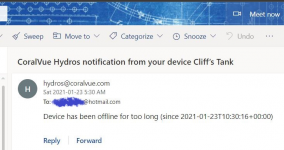
Maybe CV is already aware of and working on this but thought I'd see if anyone else has noticed this. The other day, I had a brief neighborhood power outage. I received the below email alert on my phone. Notice the timestamp of the email compared to the timestamp in the email itself.
I have this configured in Options:
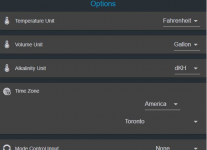
So I get that my local time was 05:30 EST (-5 GMT) and this email shows 10:30 (0 GMT). It would be nice if I didn't have to perform the mental gymnastics that early in the morning to understand that this was a real time event notice lol. It would be most helpful if the notification software could take my configured Time Zone into consideration and send me an email with my localized time. If so, it could have said, "Device has been offline for too long (since 2021-01-23 T 05:30:16 EST)"
I have this configured in Options:
So I get that my local time was 05:30 EST (-5 GMT) and this email shows 10:30 (0 GMT). It would be nice if I didn't have to perform the mental gymnastics that early in the morning to understand that this was a real time event notice lol. It would be most helpful if the notification software could take my configured Time Zone into consideration and send me an email with my localized time. If so, it could have said, "Device has been offline for too long (since 2021-01-23 T 05:30:16 EST)"

