
Navigation
Install the app
How to install the app on iOS
Follow along with the video below to see how to install our site as a web app on your home screen.
Note: This feature may not be available in some browsers.
More options
You are using an out of date browser. It may not display this or other websites correctly.
You should upgrade or use an alternative browser.
You should upgrade or use an alternative browser.
Nutrient export
- Thread starter Bugnator
- Start date
- Tagged users None
Users Who Are Viewing This Thread (Total: 0, Members: 0, Guests: 0)

JeffB418
HYDROS Expert
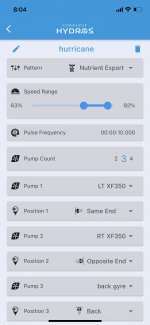
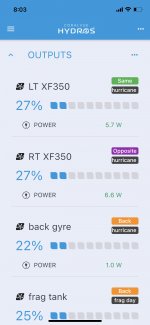
So I have it setup but the pumps run slower than they should obviously it’s configured wrong but IDK how.
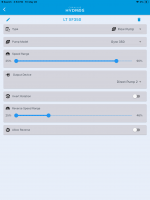
Open up each pump under Outputs and check what the min and max speed settings are there. Those settings “govern” the pumps. Ie if you have max 50% for the pump under its output setting and then the schedule has a max of 100%. The pump will max out at 50%.
Thanks, I should have posted a pic of that, they’re at 90% MaxOpen up each pump under Outputs and check what the min and max speed settings are there. Those settings “govern” the pumps. Ie if you have max 50% for the pump under its output setting and then the schedule has a max of 100%. The pump will max out at 50%.
I have the schedule set from 63 to 92 percent. That’s why I’m confused when they only go to the high 20s during that schedule.Are you using the schedules and maybe have that % set?
I like it, I wish I knew more about it. Hopefully I’ll figure it out. Maybe @Carlos has an idea?Hmmm not sure then my thoughts were that inside the hurricane mode you maybe had tuned them down. These things are amazing but so many options to find
- Admin
- #10

HYDROS WaveEngine - How to Create a Hurricane Preset - Help Page
The WaveEngine can repeatedly ramp up pumps to achieve a cleaner aquarium system, which will encourage healthy growing corals and help to remove nutrients.
 www.coralvuehydros.com
HYDROS WaveEngine - How to Create a Day Schedule - Help Page
Learn how to create a Day Schedule for the HYDROS WaveEngine. We even include an example of a Day Schedule used by our staff. Be up and flowing in no time!
www.coralvuehydros.com
HYDROS WaveEngine - How to Create a Night Schedule - Help Page
Create a Night Schedule to run pumps at night. We've included an example of a Night Schedule used by our own staff.
www.coralvuehydros.com
If you'd like more information on all the different patterns.... head over to www.coralvuehydros.com . There is a ton of information to be had!
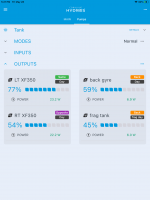
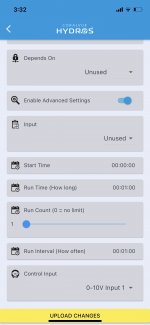
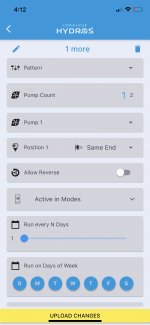
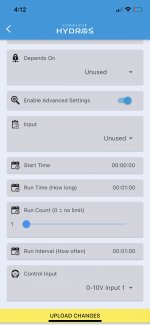
@Michael@Coralvue I may have found a bug. If the advance settings is enabled my pumps won’t run above 28%. I set a schedule to start at 2 and stop at 2:10 with the range set from 79% to 100% and it works, when I enable the advance settings it slows the pump down as soon as I upload the changes.HYDROS WaveEngine - How to Create a Hurricane Preset - Help Page
The WaveEngine can repeatedly ramp up pumps to achieve a cleaner aquarium system, which will encourage healthy growing corals and help to remove nutrients.
HYDROS WaveEngine - How to Create a Day Schedule - Help Page
Learn how to create a Day Schedule for the HYDROS WaveEngine. We even include an example of a Day Schedule used by our staff. Be up and flowing in no time!
HYDROS WaveEngine - How to Create a Night Schedule - Help Page
Create a Night Schedule to run pumps at night. We've included an example of a Night Schedule used by our own staff.
If you'd like more information on all the different patterns.... head over to www.coralvuehydros.com . There is a ton of information to be had!
- Admin
- #12

Do you have "Control Input" set to one of the 0-10V Channels? If so, unless you control the pattern with another controller, set that field to "None," and that should fix the problem.@Michael@Coralvue I may have found a bug. If the advance settings is enabled my pumps won’t run above 28%. I set a schedule to start at 2 and stop at 2:10 with the range set from 79% to 100% and it works, when I enable the advance settings it slows the pump down as soon as I upload the changes.
I deleted the it since I couldn't get it to work, I made a bunch of schedules (including some "hurricane") to cover the day. I'm not a SW engineer but I'm thinking that this setting should default to "none".Do you have "Control Input" set to one of the 0-10V Channels? If so, unless you control the pattern with another controller, set that field to "None," and that should fix the problem.
- Admin
- #14
They default to none. If you create a new schedule, you will see that they are default "None."
I'm not sure i want to take the time to undo all the scheds i did just see but i know i wasn't choosing an option here while i was messing with them.They default to none. If you create a new schedule, you will see that they are default "None."
- Admin
- #16
You can accomplish the same thing by creating a "test" flow schedule and then checking the field...I'm not sure i want to take the time to undo all the scheds i did just see but i know i wasn't choosing an option here while i was messing with them.
- Admin
- #18
I just tried it, and it was set to None.
Do the following:
Do the following:
- From the STATUS screen, tap on the upper-right-hand corner and select Device Properties
- Tap on "Clear Local Cache"
- Try to create a test schedule (use a name you have not used before) and then see if the Control Input is set to None.
No joy. I did as above And it defaulted to 1. I cleared again and rebooted my phone and cleared yet again and still defaulting to 1.I just tried it, and it was set to None.
Do the following:
Let me know,
- From the STATUS screen, tap on the upper-right-hand corner and select Device Properties
- Tap on "Clear Local Cache"
- Try to create a test schedule (use a name you have not used before) and then see if the Control Input is set to None.
Attachments
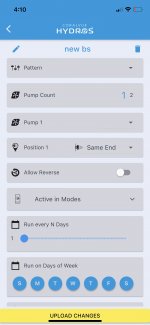
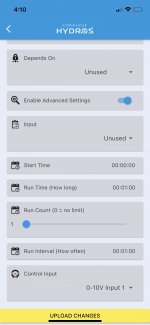
- Admin
- #20
Ok, we spotted the bug, and we have fixed it. Will will include it in the next release of the app. Thank you so much for spotting this and letting us know. We definitely recreated it, fixed it, and it is already incorporated into the new app. You will get the fix when we push the next version of the app!