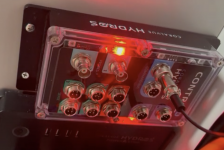
red blinking light, setup

Users Who Are Viewing This Thread (Total: 0, Members: 0, Guests: 0)

rballjunkie

Member
Joined
May 1, 2021
Messages
31
Reaction score
8
Location
Houston
already put in a ticket. trying to get the Hydros setup. I have a hydros account for my icecap gyres....plugged in the control 4 only, dedicated power. It cycles thru the light colors then stays flashing red/white. Is there a means to reset? Nothing is visible on either bluetooth or 2.4ghz wifi....dont seen an SSD either.
 

Attachments

  • Screen Shot 2021-05-14 at 12.42.24 PM.png
    Screen Shot 2021-05-14 at 12.42.24 PM.png
    2.5 MB · Views: 13
That particular flashing pattern (two red LEDs going back and forth with white strobes on the corner) indicates a hardware failure. Whenever a HYDROS device wakes up it runs a pretty complete hardware diagnostic. If anything fails that is what you will see. Since you are seeing it on a new unit it means that a component on the board experienced infant mortality after the initial test. That happens, but not really often. It will need to be replaced.
 
Big shout out to Coralvue for shipping a replacement unit out. Another shoutout for offering a controller thats are assembled here in the US....sure there's some hiccups with creating a product from scratch..this happens along the way, but for now, up and running. Got the Ph, temp and orp reading...onto the powerbars. Overall, like what i'm seeing. Some hiccups getting all three power-bars reading/responding, will regroup tomorrow and see if i can get the outlets to respond accordingly.
 
Make sure that your WiFi has independent channels. Make sure that your router is putting out different SSIDs for each 2.4 and 5GHz WiFi band. If your router is putting out a single SSID for both bands, the WiFi strips will have issues connecting and/or staying connected.
 
Well, I had a really long email typed up...erased it all. i had the wrong plug in the outlet. Chalk this one up to operator headspace. Doh!
 
Back
Top